
A couple years back, there were two instances where I warned Joomla users and WordPress users about their theme sources or where they downloaded their themes from. This was because some sites who redistribute free WordPress themes are hijacking and repackaging these themes and inserting malicious codes into the functions.php or footer.php files. If undetected, these codes can compromise your blog or make it link to unfriendly sites and can get your blog banned by Google.
Because of these incidents, the guys from builtBackwards saw a need for something to solve this issue and decided to create a plugin that can check and scan theme files for potentially malicious or unwanted code.








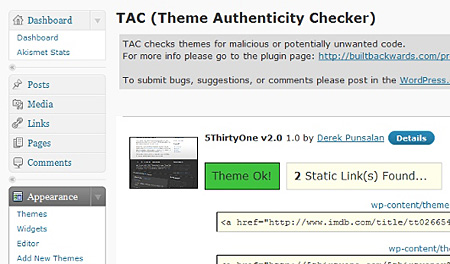
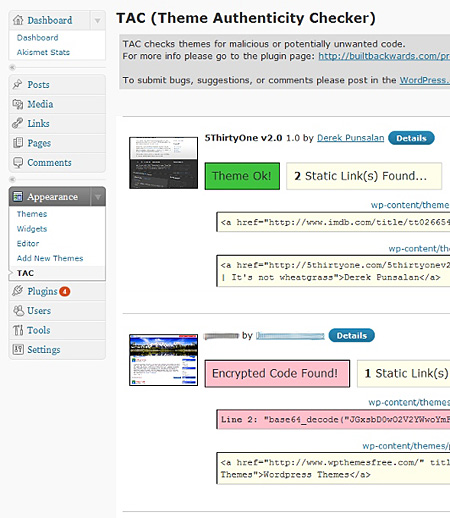
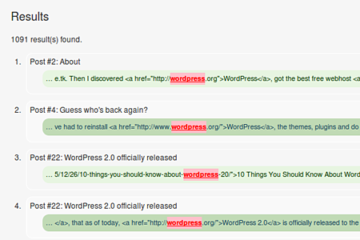
TAC stands for Theme Authenticity Checker. Currently, TAC searches the source files of every installed theme for signs of malicious code. If such code is found, TAC displays the path to the theme file, the line number, and a small snippet of the suspect code. As of v1.3 TAC also searches for and displays static links.
Installing the Theme Authenticity Checker plugin is easy as A-B-C. Just download the zip file, extract it, upload the tac folder into your wp-content/plugins folder on your web server and activate the plugin via the WP dashboard. Once its activated, you can access the Theme Authenticity Checker plugin via Appearance > TAC.
Screenshot:
How it works:
The Theme Authenticity Checker plugin is simple and straightforward. Once this plugin is installed, it automatically checks your theme files for potentially malicious or unwanted code. If it detects any types of those codes, it will display the path to the theme file, the line number and a short snippet of the suspicious code. Making it fast and easy for the user to trace and remove those pieces of code.
If you install the Theme Authenticity Checker plugin and it detects some suspicious or unwanted code on your theme files, first thing you need to do is contact the theme author about it and ask if that piece of code is supposed to be there. In most cases, that piece of code wasn’t put there by the author but in some cases like “sponsored” WordPress themes, the code is purposely placed by the theme authors themselves. Sometimes, removing the piece of “code” can cause your theme to crash or stop working so you’re better off changing your theme to a different one.
I’ve installed it here on my blog and it works great. Unfortunately, after I installed it I found out that one of the free WordPress themes that I’ve recently reviewed contains hidden code in its footer.php file. I’m talking about the Milano theme. I’ve disabled the download link from that review and posted an update, suggesting users who’ve downloaded and installed the theme to remove/uninstall it and replace their theme with a different one.
I love the Theme Authenticity Checker plugin and I wish I found out about it sooner. Its a very handy tool when I do my WordPress Theme reviews, because I can check the theme first before I do my review and make sure that the theme I’m sharing is safe for my readers and its users. This type of plugin is not only useful for blog authors who use WordPress but also for people who deal with a lot of WordPress themes and build WordPress blogs for their clients.
A word of warning, always make sure that you only download WordPress themes from reliable sources or only direct from the theme author’s site. If you really want to try out a new WordPress theme from a new or unreliable source, then you can use the Theme Authenticity Checker plugin to check the theme.
I strongly recommend the Theme Authenticity Checker plugin to anyone who runs a WordPress-powered blog. This is one of those must-have plugins for any WordPress blog.
Have you experienced downloading and installing a WordPress theme with suspicious code in it? Anyone else using or have tried the Theme Authenticity Checker plugin? What other features would like to see added to it? Please share your thoughts.



I downloaded TAC and checked several of my blogs. Super easy and quick to do – just like the instructions on by Jaypee above.
Most of the themes I am running turned out clean.
All the themes from a certain free provider were bad – Expi, Sofya etc. – so I deleled them.
Thank you for the tutorial about this very useful plugin. I will install TAC on all my blogs and test any new theme with it.
I think this was the reason why my blog was compromised. Malicious codes were detected in index.php and index.html files. Even though I’ve tried to delete the malicious codes, it kept coming back.
ooooops sorry I mean plugin. You know templatep2p.com right? do you think themes there is safe?
@Michael – Slight correction. It’s not a theme but a theme thats used to check themes for hidden codes and links. ;)
I’m not familiar with templatep2p.com. If you download themes from theme, you can use this plugin to check the themes.
what?! if it’s like that then I should download this theme. I download themes from templatep2p.com, what do you think of that site?
thanks
@Ade – Really? You should’ve have shared it with me. Hehe But yeah, after reading more about this plugin, I found out that its been existing for more than a year already. :)
I’ve been using TAC for the longest time now. I use it when I download themes from weird places.
@Kelvin – Thank you! Regarding your question, the installation process doesn’t matter. That depends on the plugin that you’re downloading, although all plugins in the WordPress Plugin repository are checked before they are posted so most likely you’re safe if you get it from there.
This post is very helpful, Kuya Jaypee. I’m just wondering if the WordPress 2.7+ feature, “Install Now” for plug-in (which will automatically download and install a specific plug-in) is safe? or the manual process is still the best?
@cah – Thank you! Correct, very useful plugin for any WordPress user. Glad to hear that I was able to share something useful to you and your blog. This plugin is basicallly used to detect hidden links and code but I guess it can also be used to detect errors caused by these malicious elements.
A good review. This is very useful plugin for wordpress users. I immediately using this plugin that I knew from your blog.
With this TAC plugin, we can prevent errors in a template. Good info and thank’s a lot
@Film Book – Yup, you have to be careful what themes you download and install on your blog. So have you changed the theme and used a different one?
Thanks for the compliments. Glad you liked this post. :D
Nice plugin. I have it installed and I see what you were talking about in your email about the hidden code.
Great post. Informative. Keep them coming.
@Jhay – Hehe how’d you know? :D
Yes, it is an awesome plugin. I wish I found out about it earlier. True, many users think that only plugins can cause security issues. Also, many users aren’t careful where they download themes from and don’t check the themes for hidden links and code.
I knew you’d blog about this. :D
It’s an awesome plugin that really takes blog security to another level. Most of us think that plugins are the source of security holes for blogs but we often overlook that themes are equally guilty in this area. Especially in the spread of spam.
Kudos to the plugin author!