
I got an email last week from one of my readers, Noel Perlas informing me that JaypeeOnline’s post images weren’t being displayed or were missing in Google Reader. I wasn’t aware of this problem because I don’t check my blog’s RSS feeds and I haven’t received any complaints from other readers prior to that.
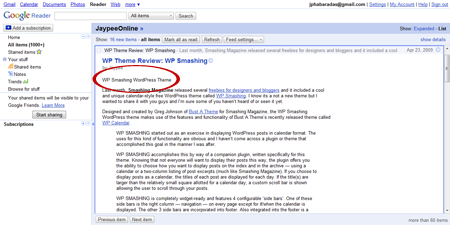
Anyways, I went ahead and checked it myself with Google Reader and indeed, the post images from JaypeeOnline’s RSS feed were missing and the only thing I could see is the image alt attribute.
Google Reader showing image alt attribute
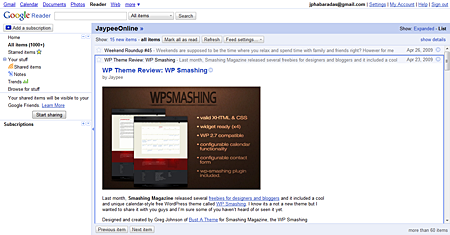
I did some research and I found out that Google Reader can’t access images from blogs that have enabled hotlink protection. For those who don’t know, I’ve disabled hotlinking to all my images using .htaccess rules which I discussed in an earlier post entitled – How To: Prevent Bandwidth Theft or Hotlinking. After editing my .htaccess file and adding a couple more rules to allow Google Reader access to my images, the post images now show up.








Google Reader showing blog post image
If you have the same problem with Google Reader not displaying your blog’s post images and have disabled hotlinking via .htaccess, just follow this short and simple tutorial.
IMPORTANT: Make sure you back up your existing .htaccess file before you do any modifications. In case something goes wrong, you can always revert to the original file.
The following is the basic code or .htaccess rule to disable hotlinking or protect images from hotlinking:
# Disable Hotlinking
RewriteEngine On
RewriteCond %{HTTP_REFERER} !^$
RewriteCond %{HTTP_REFERER} !^http://(www.)?domain.com/ [NC]
RewriteRule .*.(jpeg|jpg|gif|png)$ - [F]NOTE: Replace ?domain.com/ with your own blog URL.
The following code/htaccess rule is the one that will allow access to the hotlink-protected images from your server. If you noticed, there are two lines. The first line is for the regular Google Reader and the second one is for Google Reader Mobile just in case you have readers who use that.
RewriteCond %{HTTP_REFERER} !^http://www.google.com/reader/view/.*$ [NC]
RewriteCond %{HTTP_REFERER} !^http://www.google.com/reader/m/view/.*$ [NC]
Now, combine the previous code to basic disable hotlinking code and you should have this:
# Disable Hotlinking
RewriteEngine On
RewriteCond %{HTTP_REFERER} !^$
RewriteCond %{HTTP_REFERER} !^http://(www\.)?domain\.com/ [NC]
RewriteCond %{HTTP_REFERER} !^http://(www\.|images\.)?google\.com/.*$ [NC]
RewriteCond %{HTTP_REFERER} !^http://www.google.com/reader/view/.*$ [NC]
RewriteCond %{HTTP_REFERER} !^http://www.google.com/reader/m/view/.*$ [NC]
RewriteRule \.(jpeg|jpg|gif|png)$ - [F]
Copy and paste the code to your .htaccess file, save it and upload it back to your web server. That should fix the issue and solve your problem with Google Reader not displaying your blog post images.
To my readers who use Google Reader to get updates from JaypeeOnline, I apologize if you guys weren’t seeing the images included in each blog post these past few weeks/months. I wasn’t aware that there was this issue with Google Reader. I would appreciate it if you guys can let me know if you experience any issues or problems with JaypeeOnline’s RSS feed on Google Reader or other news aggregator sites or apps.
Btw, thank you Noel for letting me know about this! I wouldn’t have known there was a problem if you haven’t told me about it and the RSS feed images would’ve continued to be broken until now. I really appreciate it.
Has anyone else had the same problem/issue with Google Reader? What did you do to solve the problem? Was this tutorial helpful? Please share your thoughts by leaving a comment below. Thank you and have a nice day!



I have the same problem, i am using hotlink protection for my blog and i found that the feed which delivered by email, do not showing any photos, is there any think i can do to fix that?
Thank you. Let’s hope the hot linkers will stop the madness now :p
I know I’m a year too late, but you forgot to escape your dots.
!^http://(www.)?domain.com/ [NC]should be
!^http://(www.)?domain.com/ [NC]and the RewriteRule should be
RewriteRule .(jpeg|jpg|gif|png)$ - [F]you also might want to go for
!^http://(www.)?domain.com(/.*)*$ [NC]to allow for a redirection bug in IE6
for Google you might want something like:
!^http://(www.|images.)?google.com/.*$ [NC]This works fine if one`s readers are entirely American, or they have set their Google preferences to only use the google.com US site.
It will not work for sites with siginificant international readership whose readers will be using their localised version of Google (google.ca, google.co.in, google.co.uk, google.com.au, for example).
You would have to craft the .htaccess exclusions to include these other localisations or they too will be excluded from hotlinking images.
Okay I am also facing the same issue. My Google reader URL is like http://www.google.co.in/reader/view/?hl=en&tab= ( as i am from india)
But you have used http://www.google.com/ in the code. Will it work fine ?
@Michael – Yep, that’s how it works. You’re welcome! ;)
so that how it works, thanks.
@Jd – If you’re experiencing the same issue with Google Reader and follow the steps provided in this tutorial then most likely your problem would be solved. :)
I have had the same problem with Google Reader .. I hope this information will help solve the problem…
@ark – Yeah, good thing Noel told me about it. If not, I wouldn’t have known there was something wrong with my RSS feeds in Google Reader. Btw, if you follow the steps in this short tutorial, you’ll only be giving access to Google Reader but still disable hotlinking by other sources. :)
Ah, kaya pala di ko nakikita ang mga images sa gmail ko. If I disable hotlinking, how can I prevent other people from linking to my images without affecting my google reader?
@elmot – Now that you’re on WordPress, you need to know about these kind of stuff. Hehe :D
same here. since i am on blogger, i would not have to sweat it out learning all those codes which i will admit i have a phobia with, oh, not really, a total idiot with it maybe, ehehe
@jan – I don’t think you have to worry about it if you’re in Blogger because images uploaded on your account aren’t protected from hotlinking so they’ll show up on RSS feed aggregators. However, what you need to worry about is the potential of having other blogs hotlinking your images. :P
I thought of asking you if this applies as well in blogspot blogs, but I checked my reader this morning. I've subscribed to my own feed via email – well you know, to check how's my feed is doing – and it's showing pictures and graphics.
Well, that's potential headache for me out of the way. At least I don't have to go under the hood on that one. lol
@Michael – You’re welcome! Glad to know that via this post you found the code and Google Reader both useful. Thanks for stopping by!
Very informative Jaypee. I haven’t actually used Google Reader myself, but after reading your post it looks like I should be using it. Very time saving and efficient looking.
Thanks not only for the code, but for introducing me to Google Reader.
@jhay – Yeah, I know you upload your images on an image hosting service and you certainly don’t need to protect your images from hotlinking.
In my case, I prefer having my images on my server coz it gives me more control over it and anyways, I can protect it from bandwidth theft or hotlinking. I have more than 1,000 images but they don’t occupy too much space. Just make sure you resize and optimize before you upload your images. :)
I'm not using hotlink protection for my blog images because most of it are hosted offsite on some of the image hosting services I use.
It eliminates the threat of bandwidth theft due to hotlinking images altogether and saves disk space on my server. :D