

Facebook introduced three new components to the Facebook platform at the F8 conference held yesterday in San Francisco. These three components are – Social plugins, the Open Graph protocol, and the Graph API. The one that’s getting all the buzz and attention is the considered as the most important plugin, the Like Button. This is the same Like Button that you see and use to “like” posts, pictures, videos and other stuff posted by your friends on Facebook.
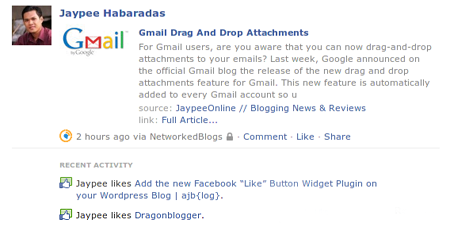
What Facebook plans to do is make the Like Button web-wide or all over the web so Facebook users can easily make connections to different pages on the web and share the content back to their friends on Facebook, all with one click. If you’re logged in to Facebook and you “like” a certain page using the Facebook Like Button, it will be displayed on your wall or recent activity on your profile. Kinda like this:









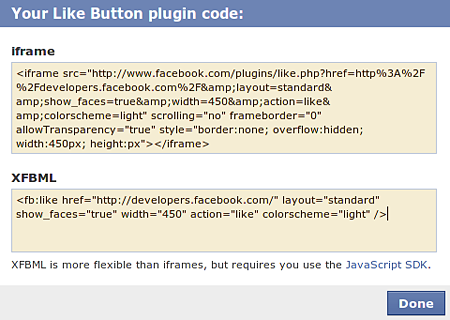
If you want to add the Like Button on your website or blog, you can visit the Like Button page and get the code.
But if you’re running a WordPress blog, you can do it via a Facebook Like Button WordPress plugin called Facebook Like Button Widget created by my friend AJ Batac.
Instructions:
1. Download the “Facebook-Like-Button-Widget.zip” file
2. Extract and upload `facebook-like-widget.php` to the `/wp-content/plugins/` directory
3. Activate the plugin through the ‘Plugins’ menu in WordPress
4. That’s it!
I haven’t installed it yet here on JaypeeOnline but this is how it should look like:
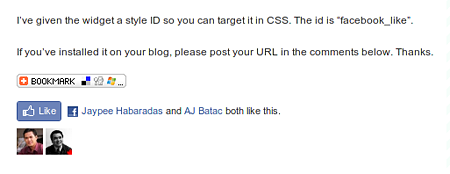
Now, your readers and visitors who have Facebook accounts can “like” your posts and easily share it with their friends on Facebook. The Like Button looks very promising function-wise and has a good chance of succeeding especially with the large number of registered Facebook users.
What do you think of the Like Button going web-wide? You think it would be successful? Has anyone here added the Facebook Like Button on their website or blog? Anyone using the Facebook Like Button Widget for WordPress or any other Facebook Like WordPress plugin? Please share your thoughts.



Successfully added facebook like button for my wordpress blog after read this :)
Works fine! Thank you!
how to prevent abuse using the like button ? what I want to ask how can you control the flow to check what person has written before getting posted on a persons wall. this will be good to control for recommendations i think. please suggest
I did it! the words next to the like box are not showing up. Thanks for the info!
Looks like a really good plugin. Can you help me find one that lets you do a “share”?
just added the like button yesterday, now I got 54 likes and counting! I like it!! thanks
How do I edit it so that it displays on the top of my posts, instead of at the bottom?
Thanks in advance for the help!
What is the difference between this button and FB Share?
I like this one…question: Is this FB “Like” different” from FB “Share” button/plugin?
It’s a great new plugin and it’s a good sign that Facebook is gradually opening up unlike the “walled garden” that is was years before.
I installed on mine manually, as I wanted it to display on a certain part of my post along with the Google Buzz button. Installing FBML thing instead of the iframe seems to make it load faster.
I was also looking for the Like button but I saw Gem was able to “like” it so I guess it means it works.
I was looking for an option to “Like” your post, hehe :) Thank you so much for telling us about this. I’m checking it out for my blog.
Word of advice, avoid using code in wordpress where you can, iFrame will break in the visual editor and you will be left with frustration if you put it manually inside a post. If you are going to use the iframe button, put it in the single.php or index.php for your posts instead of manually in the post editor.
Using it on my photoblog, works flawlessly. I didn’t know a plugin for this would emerge so quickly but I certainly am thankful that it did.
I’m using it with the A Simple Love (Mono) child theme for Thematic. Great work! Thanks!
Cool. Just installed the plugin and now ready for many, many “likes”:) Thanks for bringing this up. The plugin is much easier to use that the code FB provides.
likes this!
im leaning to adding it later :) thanks for featuring this plugin JP!