FireStats error : FireStats database needs to be upgraded
WordCamp Philippines

WordCamp Philippines

If you’re a Pinoy blogger or a WordPress user/fan then most likely you’ve heard or read of this already. But in case you haven’t, I have good news for you. There will be a WordCamp held in the Philippines this coming September 6, 2008. If you don’t know what I’m talking about here’s a little info.

What is WordCamp?

WordCamp is a conference type of event that focuses squarely on everything WordPress. Everyone from casual end users all the way up to core developers show up to these events. These events are usually highlighted by speeches or keynotes by various people. WordCamp is a spin off from the popular BarCamp which was a spin off of FooCamp. - Weblog Tools Collection

WordCamp Philippines will be the first ever WordCamp organized and held in Asia. WordCamp Philippines is being organized by a group of Filipino bloggers based in Mindanao who were also responsible for organizing the successful 1st Mindanao Bloggers Summit held last year.

What are the objectives of WordCamp Philippines?

…to encourage more developers to use and deploy WordPress, not only as a blogging engine but also as a full-featured content management system for Web sites. Another is to increase the number of WordPress users and developers in the country. By developers, we mean programmers of WordPress plugins and designers of themes & templates.


Myspace Profile Facelift
17 Comments 2711 Views

« Shortstat on Wordpress 2.0.1 10 Things That’ll Change The Way We Live »


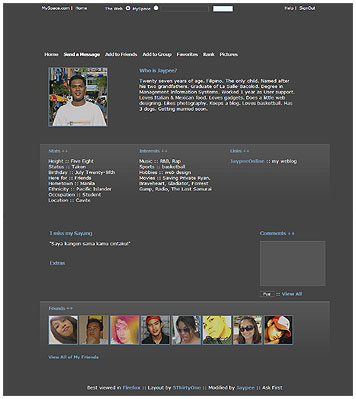
Thanks to Derek who shared his Div Overlay code, my profile had it’s long overdue facelift.

When I first opened my account over at Myspace, I was quite addicted to making my profile cool and snazzy. Adding photos, changing the background, font styles & colors, etc. After a while I got tired of it and almost forgot about my account.


Previously, I liked Myspace better than Friendster because only Myspace allowed users to insert code to customize their profiles. It’s only now that Friendster integrated it into their system.
Then just a few days ago, I found out that Derek released his Div Overlay code to the public. I was inspired to use it on my profile. So I got the code, made some modifications and uploaded the needed photos. The photo above shows how my profile looks like now. It’s not much and not as nice as the original layout but I tried to customize it and make it different from the rest.

As you can see, there’s not much content on it yet. I haven’t decided what I should write or put as content for visitors to read. I’ll think of something in a few days.

Here’s one guy who used the same code but made some major modifications.
http://myspace.com/the1nirvana

If you want to add me up in Myspace, just leave a comment. Btw, like what I do in Friendster, I only add people I know like friends and acquiantances. Total strangers would have to ask someone else to be their friend. Hehe :P


(No Ratings Yet)
If you enjoyed the article, why not subscribe?

Related Ads

Related Posts


17 Responses to “Myspace Profile Facelift”

  1. MyAvatars 0.2   andreana PHILIPPINES Windows XP Mozilla Firefox 1.5.0.1 on Feb 21, 2006 | 3:26 pm | Reply

    thanks looks so cool ;)

  2. MyAvatars 0.2   ::dHoY:: PHILIPPINES Windows XP Opera 8.51 on Feb 21, 2006 | 4:41 pm | Reply

    nice!

  3. MyAvatars 0.2   La Bella UNITED STATES Windows XP Internet Explorer 6.0 on Feb 21, 2006 | 5:43 pm | Reply

    Wow! That’s so cool!
    Yeah… I have a my space too but it’s kinda “BLAH”.
    I tried to add Derek’s code but I couldn’t figure out how. LOL I kept getting text links from my space over the code he gave us… I must be doing something wrong. WEIRD.
    Yours looks great.
    And I’m the same, I only add friends or family.
    I can’t believe I actually know 20 something people online. haha

  4. MyAvatars 0.2   La Bella UNITED STATES Windows XP Internet Explorer 6.0 on Feb 21, 2006 | 5:49 pm | Reply

    btw, I’ve added you to my blogroll too.
    ;-)

    Thanks for adding me to yours…
    One thing though. It’s really lame I know. but it’s like a tick… I see you added me on there. (Which is great) LOL
    But again… “only one thing”… can you take the extra “N” out of my name? LOL
    It’s Ana. Not “Anna”. hahaha
    Yeah, I know, I’m anal. I’m sorry… but it feels like that’s just not me. LOL
    Like someone has taken over my identity or something. LOL

    I know, I’m crazy. I’m going to go now.
    :-)

  5. MyAvatars 0.2   laurie UNITED STATES Windows XP Mozilla Firefox 1.5.0.1 on Feb 21, 2006 | 6:15 pm | Reply

    that looks really good!

  6. MyAvatars 0.2   Jaypee PHILIPPINES Windows XP Flock 0.4 on Feb 21, 2006 | 10:55 pm | Reply

    thanks for the compliments guys!

    @ana - adding the code is easy, but modifying it is a bit tricky. you should know a little bit about CSS and how to play with it. one question, are you using IE to view your profile? coz it gets messed up when viewed in IE. well, it’s nothing new. bout your name, sorry bout that. i corrected it already.

  7. MyAvatars 0.2   ade PHILIPPINES Windows XP Mozilla Firefox 1.5.0.1 on Feb 22, 2006 | 4:13 am | Reply

    wow! it doesn’t look like a MySpace account! wow!

  8. MyAvatars 0.2   trench GUAM Windows XP Mozilla Firefox 1.5.0.1 on Feb 22, 2006 | 6:21 am | Reply

    Hey JP, can you email me a copy of your coding? I tried Dereks code myself, but it doesnt seem to work out the way it suppose to. The whitespace is either too far to the left of too far to the right.

  9. MyAvatars 0.2   Jaypee PHILIPPINES Windows XP Flock 0.4 on Feb 22, 2006 | 7:43 am | Reply

    @ade - hehe..it still looks like a Myspace account but a little bit better. :)
    @trench - email sent! hope it works this time.

  10. MyAvatars 0.2   trench GUAM Windows XP Mozilla Firefox 1.5.0.1 on Feb 22, 2006 | 9:02 am | Reply

    Thanks man. Looks good. I have my color scheme already in my brain. I just need to find the time to work on it!

  11. MyAvatars 0.2   Jaypee PHILIPPINES Windows XP Flock 0.4 on Feb 22, 2006 | 10:56 am | Reply

    no problem. you’re welcome. ok, let me know when you have it up so i can check it out. good luck!

  12. MyAvatars 0.2   april.zara SINGAPORE Windows XP Mozilla Firefox 1.0.7 on Feb 23, 2006 | 4:54 am | Reply

    Nice! I would use that for my Myspace account but I gotta do the rest manually? Tinatamad eh. Heeheehee.

  13. MyAvatars 0.2   Jaypee PHILIPPINES Windows XP Flock 0.4 on Feb 23, 2006 | 7:21 am | Reply

    @april - thanks. first you have to edit the code and change the contents. then you have to modify menu navigation, friends, comments and other links. it does require some time to do it.

  14. MyAvatars 0.2   Karla PHILIPPINES Windows XP Mozilla Firefox 1.5.0.1 on Feb 23, 2006 | 7:54 am | Reply

    nice layout :D

  15. MyAvatars 0.2   Jaypee PHILIPPINES Windows XP Mozilla Firefox 1.0.7 on Feb 23, 2006 | 10:54 am | Reply

    @karla - salamat! :)

  16. MyAvatars 0.2   rose GUAM Windows XP Mozilla Firefox 1.5.0.1 on Feb 28, 2006 | 11:08 pm | Reply

    uy ang galing!! galing ng myspace mo.. di ako masyado sa myspace kasi ayung mga kamag anak ko nasa friendster lahat haha! take care

  17. MyAvatars 0.2   Jaypee PHILIPPINES Windows XP Flock 0.5.12 on Feb 28, 2006 | 11:13 pm | Reply

    rose! long time no hear. hehe. thanks, gumanda lang yan profile ko dahil may nagshare ng code. nauna din ako nagregister sa Friendster pero may naginvite sakin sa Myspace at sinubukan ko lang. ako din, most of my friends are in Friendster.

Sign up for PayPal and start accepting credit card payments instantly.

XHTML: You can use these tags: <a href="" title=""> <abbr title=""> <acronym title=""> <b> <blockquote cite=""> <cite> <code> <del datetime=""> <em> <i> <q cite=""> <strike> <strong>

« Shortstat on Wordpress 2.0.1 10 Things That’ll Change The Way We Live »


 Subscribe in a reader Or, subscribe via email:
Enter your email address: 
 
Feedburner
WooThemes - Premium WordPress Themes Club
Google