
Many individuals, small businesses including large companies use social media to promote and market their products, services and businesses. Creating a Facebook page, a Twitter account, a LinkedIn profile or uploading videos on YouTube to promote your company/business is easy to do and can bring in a lot of traffic to your website. However, not everyone who adapt and use social media for promoting their business is successful in converting the traffic they get from it.
Last week, I read an article written by Oli Gardner of Unbounce entitled The 7 Secrets of Social Media Conversion that aims to help individuals and businesses that use social media to improve their conversion rate and avoid making the fundamental mistakes during the conversion phase of the social media conversion funnel.
The article includes a nice infographic showing the detailed process of the social media conversion funnel.
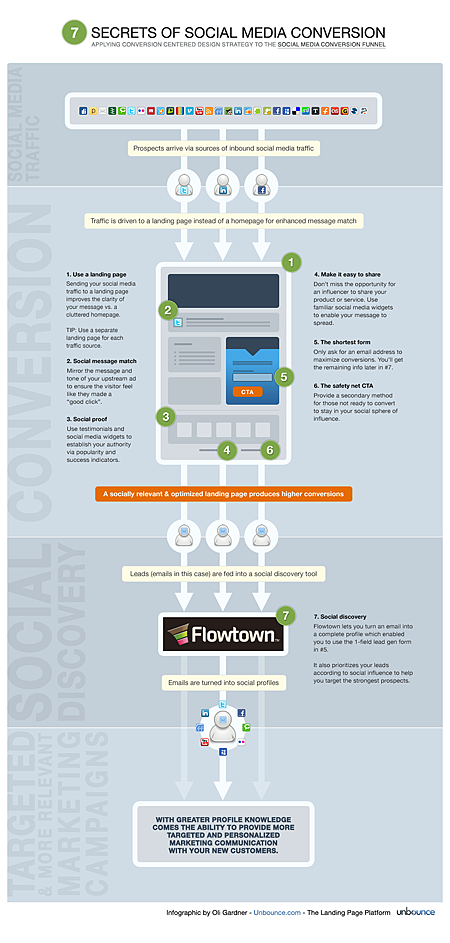
Click here to view a larger version of the image.










I really enjoyed reading the article and learned a lot from it, that’s why I decided to blog about it and share it with you guys. If you’re using social media – Facebook, Twitter, LinkedIn, YouTube, etc. to drive traffic to your business and you’re not satisfied with the results, then you should check out and read the full article to get tips and know more about the 7 Secrets of Social Media Conversion.
What do you think of the 7 Secrets of Social Media Conversion? Do you think that they’re effective or not? What other tips or strategies do you know that can help in improving social media conversion? Please share your thoughts.



With the popularity of social media, it would be great if we can increase the conversion rate. But using landing page is not good idea..
Although social media sends huge targeted traffic, the quality of traffic is extremely low when it comes to click through rates. That is the main reason why social media traffic can not be the sole factor to judge a website.
All that apart, a nice infographic. Simple and easy to understand.
that is great if social media connects to blog.
I guess the article was written for webmasters in general
and not bloggers because it emphasizes on a custom landing page for
each social networking site that is the source of traffic. For us
bloggers, the post that was shared is the landing page so I see no
major changes a blogger should make if his or her posts are already
optimized for this situation. Nice article though.
Social media has been always the most interactive way to find the best on the web, and by the way the info-graphics was cool.