
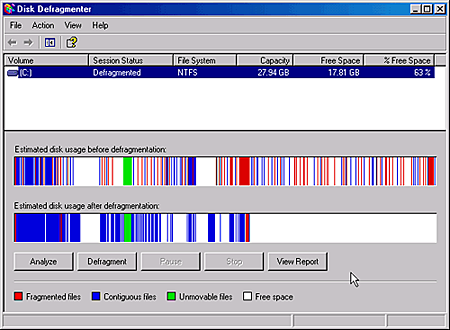
If you own a computer running on Windows, there comes a time when your computer would start to slow down, start to get wonky and the overall performance gets unstable. Windows as an operating system, doesn’t do a good job in organizing files. Whenever you add or delete files on your computer, these files get scattered all over and causes the computer to take longer in accessing and locating these files – thus slowing down your computer. Because of that, you need to defrag the file system every now and then to keep your computer running at an optimal level. Windows has a built-in tool called the Disk Defragmenter, but the problem with this tool is that its too slow and not very efficient.
Thankfully there are alternatives to the Windows Disk Defragmenter that are not only FREE but also do a better job. I’ve browsed the web and made a list of all the free defragmentation software I could find. Hope you find one that works for you!








DISCLAIMER: This list is intended to provide users with alternative free defragmentation software. I’m not endorsing these products and I haven’t tried all of them. INSTALL AT YOUR OWN RISK.
Auslogics Disk Defrag – a compact and fast defragmentation tool that supports both FAT 16/32, and NTFS file systems. It’s supplied with advanced disk optimization techniques, which will remedy your system sluggishness and crashes caused by disk fragmentation.
Platform: Windows
File System: FAT16, FAT32, NTFS
Homepage / Download
Contig – a single-file defragmenter that attempts to make files contiguous on disk. Its perfect for quickly optimizing files that are continuously becoming fragmented, or that you want to ensure are in as few fragments as possible.
Platform: Windows
File System: NTFS
Homepage / Download
Defraggler – a file defragmentation tool. It differs from other defrag tools on the market, by enabling you to quickly and simply defrag the files you want to, without having to process the whole drive. Simply run it, select the file and defragment in seconds.
Platform: Windows
File System: FAT32, NTFS
Homepage / Download
DiskTune – a freeware defragmentation program for Windows XP/2003 Server/Vista (32-bit and 64-bit). It supports FAT16, FAT32 and NTFS file systems.
Platform: Windows
File System: FAT16, FAT32, NTFS
Homepage / Download
MyDefrag – (previously JK Defrag) a disk defragmenter and optimizer (a maintenance utility to make your harddisk faster) for Windows 2000, 2003, XP, Vista, 2008, Win7, and for X64. It is freeware, no time limit, fully functional, no advertisements. Fast, low overhead, with many optimization strategies, can handle floppies, USB disks, memory sticks, and anything else that looks like a disk to Windows.
Platform: Windows
File System: FAT16, FAT32, NTFS
Homepage / Download
PageDefrag – is a program, developed by Sysinternals (now distributed by Microsoft), for Microsoft Windows that runs at start-up to defrag the virtual memory page file and the Registry files.
Platform: Windows
File System: Unknown
Homepage / Download
Quicksys Disk Defrag – is a free disk defragmenter and optimizer for Microsoft Windows® with high technology that aims to rearrange the fragments of files on disk, to be continuously and in order, so that the performance and search speed of the disc increases. Besides defragmenting the disk, Quicksys Disk Defrag has a system called QSICA (Quicksys Intelligent Clusters Allocation) for clusters optimization.
Platform: Windows
File System: NTFS, FAT16, FAT32
Homepage / Download
Smart Defrag – an automatic disk defragmenter that keeps your hard drive space from becoming overly defragemented, which can cause slower disk performance. It works continuously in the background while your computer is idle and does not require further user intervention for basic maintenance. The program also includes a manual defrag option as well as support for scheduled defragmentations and with optional file system optimization.
Platform: Windows
File System: Unknown
Homepage / Download
SpeeDefrag – is the exclusive freeware program, which optimizes Windows defrag. It restarts your computer, which refreshes the RAM and loads just the defrag.exe program. This imposes minimum load on the system and therefore defragmentation speed is increased. This small software will also shutdown or restart your computer automatically once defrag is over. It supports scheduling of defrag and now it also performs disk checking before defrag.
Platform: Windows
File System: Unknown
Homepage / Download
UltimateDefrag – is not just a defragger but also a hard drive file placement optimizer that enables you to defrag and place your files in the areas on your hard drive where you achieve maximum performance. 80% of the time you only use 20% of the files on your hard drive. UltimateDefrag places your rarely used files out of the way and onto the slower performing areas of your hard drive making your drive perform like a new, almost-empty drive.
Platform: Windows
File System: Unknown
Homepage / Download
UltraDefrag – is a powerful Open Source Defragmentation tool for Windows Platform. It is very fast, because the defragmenting is done via the kernel-mode driver.
Platform: Windows
File System: NTFS, FAT12, FAT16, FAT32
Homepage / Download
If you know of any other free defragmentation software or program that’s not on the list, please share it with us so it can be added it to the list.



Hello Jaypee,
I have tried most of the software you have listed and out of all the software I prefer SmartDefrag the most becasue it’s simply to use and best of all does a great job.
Thanks for telling us about these great software.
Regards,
John
@Dennis – The only one I’ve tried and used from this list is MyDefrag and UltimateDefrag. They both worked well.
OK read the disclaimer but still wanna know, what do you use? ;)
@Industry News – That’s the thing about Windows machines, you need to defrag them regularly, if not you end up having problems with the system’s performance or with some of the programs you use.
Yes please do share what defragmentation software you used on your computer how your experience was with it. Thanks in advance! :)
I’ve recently had some of my windows startup files go corrupt, and had to reinstall coreldraw yesterday because it was acting weirdly, which fixed that, so I really think that my 5 year old hard drive needs a defrag. This post really came up timeously, and I will investigate a couple of these free defrag softwares further before picking my final one. I’ll keep you guys posted as to how well it performed.
@Michael – Are those programs you mentioned freeware? If so, I’m gonna check ’em out and add them to the list. Thanks!
I also recommend using the Integrator or tuneup utilities. it’s a nice tool to defrag and customize your computer
@Jhay – Thanks for sharing! I’ve included UltimateDefrag on the list.
I also do the same thing. You don’t have to wait for it and when it’s done, you can proceed with your chores. :D
I use an old version of O&O defrag way back from high school. The most powerful I have is UltimateDefrag, it’s a freeware too.
When defragmenting my HD, I do it before going to bed and let it run throughout the night.
@Kenneth – Thanks! It would be great if you can provide more defragmentation software to this list. It has to be free though because this is a list of Free Defragmentation Software. ;)
Great list.
I’ll check on some places if I could add more defragmentation software on the list, whether it’s a freeware or not. ;-)