
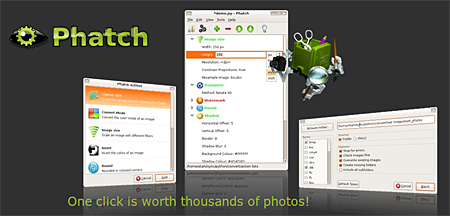
If you’re a professional photographer, amateur photographer, hobbyist or someone who works with a lot of photos and do a lot of basic image editing like resizing, rotating, etc. then you’re definitely gonna love this program that I’m gonna share with you today. Its called Phatch, an open source, cross-platform and user friendly photo batch processor and exif renamer.
Phatch is an user friendly, cross-platform Photo Batch Processor and Exif Renamer with a nice graphical user interface. Phatch handles all popular image formats and can duplicate (sub)folder hierarchies. Phatch can batch resize, rotate, apply shadows, perspective, rounded corners, … and do much more actions in minutes instead of hours or days if you do it manually.










Here are some samples of what you can do with Phatch:
Thumbnails with rounded corners and shadow
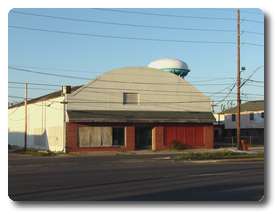
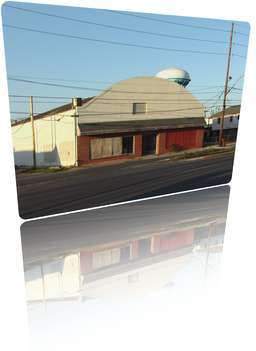
Thumbnails with 3d perspective, watermark, rounded corners and reflection
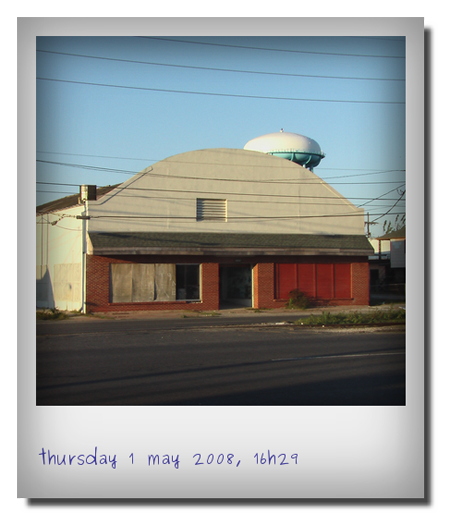
Polaroid
You can learn how to do these with Phatch by reading the tutorials.
I know you can also do this on Adobe Photoshop and I’ve done it myself with the help of custom actions, but you’ll have to purchase Photoshop which is quite expensive and not all versions of Photoshop can be installed on other platforms like Linux. Phatch on the other hand is open source so its FREE to download and because it’s cross platform, it works on Linux, Mac OS X and Windows.
Anyone else tried or are using Phatch? What program are you using for basic image editing? Do you know of any other freeware that has the same features as Phatch? Please share it with us.
For more information or to download Phatch, visit the official homepage.



This looks pretty hot. I have Adobe Photoshop and hardly EVER use it. I rather use ULEAD Photoimpact and Jasc Paint Shop Pro because it flows with the creativity.
Adobe Photoshop is basically the industry standard but still I rather use other apps like Jasc Paint Shop Pro and ULEAD Photoimpact. I like their user interface and how easy they make it for quick editing.
@Robin – Thanks for stopping by and sharing! :)
Hi
Phatch runs on a Mac. I run it on my Snow Leopard iMac (and it was running on Leopard before that). I’ve also got it to run on my elderly Tiger laptop. However you’ll need a little determination and tenacity to get it to work. There are dependancies on wxPython and PIL which you can download pre-built. However you’ll also need to build exiv2 and pyexiv2 from source (and their dependent libraries).
I’ve started a project to simplify this – however I don’t have much time at the moment due to work and other commitments. However perhaps we could cooperate to resolve this.
However before we start downloading and building everything, I suggest you install Phatch on Linux and that’ll enable you to use it immediately. I personally have VMware fusion to run virtual machines – however I use Virtual Box on my PC in the office. Ubuntu runs fine on the Mac with VMware fusion.
@K – Have you been able to install Phatch on your Mac yet? Please do share your experience installing/using it, okay? Thanks!
Thanks Stani, I am using a Mac, hit the link package and nothing happened but I will try to check on the site and read more about the software. ;)
@Stani – Thanks for taking the time to answer my reader’s questions and providing further information and installation instructions. :)
@K.noizki
I assume you are using Windows, as python is preinstalled on all Linux and Mac systems. Unfortunately a windows installer will only be made after Phatch 0.2 is out of beta.
You’ll find more info on the Windows installation instructions:
http://photobatch.wikidot.com/install#toc8
Basically you download all the dependencies with this zip file and follow the instructions inside to install everything:
http://sd-2469.dedibox.fr/photobatch/download/package/phatch-win-dependencies.zip
The Polaroid action list is only available in Phatch 0.2 You can get this version by installing bazaar:
http://edge.launchpad.net/bzr/1.17/1.17/+download/bzr-setup-1.17-1.exe\
Afterwards open a DOS terminal and type:
bzr get lp:phatch
If Windows does not find bzr, replace it with the full path to bzr.exe
Finally open the phatch directory it creates and double click on phatch.py, which should start Phatch.
If you have further questions probably, the Phatch forums (see link in my previous post) are probably a better place than this blog post.
As said earlier we need beta testers who are willing to do all these steps to setup phatch until we have an installer. If you don’t like to do beta testing, all you need is some patience ;-) We hope to provide an easy one-click installer before Christmas.
@K – Please refer to Stani’s comment for further installation instructions. :)
I like the polaroid.
Opps, I DL the tar.gz package then it extracted and nothing happened. Where do I get the python?
@Stani – Hi! Thanks for taking the time to stop by and sharing more information about Phatch. I’m sure a lot of people and current users of Phatch will be looking forward to those new features you mentioned. Do let me know when the new version that has these features have been released so I can update this post.
If get extra time, I might just apply to be a beta tester. For now, I’ll just help spread the word. :D
Hi,
I am the lead developer of Phatch. At the moment we are working very hard on a new release with many new (yet undocumented) features such as read support for camera RAW, pdf, svg, …, multifile metadata inspector (with read & write capacities), 3d blender integration, geotagging and much more…
We desperately need beta testers. In case you are interested please drop me an email: spe.stani.be # gmail # com
Feel free to visit our forum in case you have trouble installing or running Phatch or if you have some feedback to share:
http://photobatch.wikidot.com/forum:start
Best regards,
Stani
@aldrin – Are you installing it on Windows or Ubuntu? Python comes preinstalled on Mac and Linux distros but you have to install it separately on Windows. Ok, let me know how it goes. Hope you get it to work. :)
installation is not yet finished. i wonder if i need to install python? i really have no idea… or maybe i downloaded a wrong installer… i'll check out later.
@Michael – I agree, Photoshop is still the best but then someone just can’t afford it or their computers aren’t powerful enough to run it. And if you’re only gonna need something for basic image editing, a free app like Phatch is all you need. :D
downloading…worth giving a shot, but photoshop is still the best.
@aldrin – Cool! Hopefully this app would be useful to you like the PhotoRec app. Let me know how it works for you and if you’re gonna keep it on your computer. :)
@Jhay – It sure is. Like you, I also have lots of custom action scripts in Photoshop but like I said in the post, not all people have the luxury of owning, installing or running Photoshop on their computer and this app would definitely be useful for them. :D
Wow, this is nifty app. I’d be sure to give this a try though I’ve had recorded many action scripts in Photoshop for the things phatch does. ;)
definitely trying this… downloading now!