
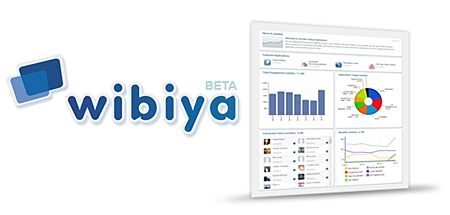
Wibiya has recently launched a new dashboard design and layout for all Wibiya Toolbar users. The new design and layout enables users to easily see the activity and user engagement on their toolbar – who’s using it and how they’re using it.
The new dashboard is divided into four sections – Overview, Analytics, Social analytics and Applications.










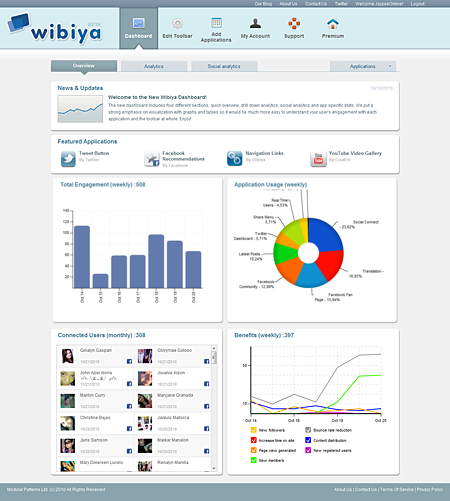
Overview – this section displays news and updates from Wibiya and an overview of user activity on the toolbar and a breakdown of different applications in the form of a pie chart, showing which apps are becoming more popular. There’s also a graph that shows a summary of the benefits of using the Wibiya toolbar.
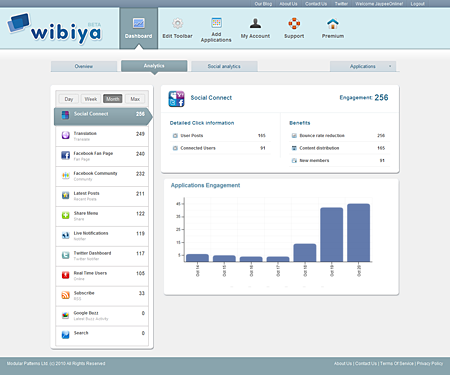
Analytics – this page gives users detailed information and statistics for each application they have on their toolbar and pie charts that show user engagement during the past day, week, month or since the app was installed.
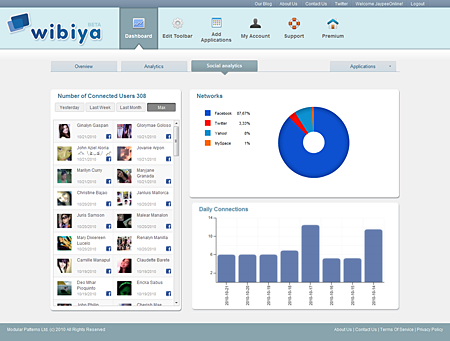
Social Analytics – this section details all the toolbar’s social data. It also enables the user to find out the number of people connecting to different social networks and who these people are.
Applications – this section contains a drop down list of all applications installed on the Wibiya Toolbar that have their own dashboard. This is also the place where users can add/edit new notifications and view blog/website visitors on real-time.
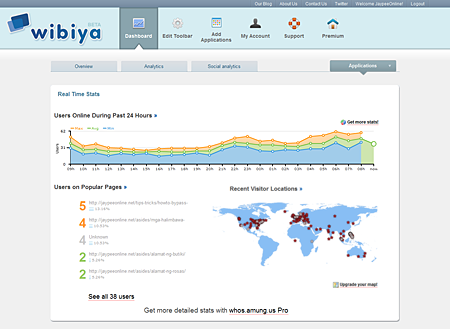
Although I seldomly log in to my Wibiya Dashboard, I do love the new dashboard design and layout. Not only does it look better than the previous one but it also provides more information and is more user-friendly.
Anyone else here using the Wibiya Toolbar on their website or blog? What do you think of the new dashboard design and layout? What are other features or options that you would like to see added to it? Please share your thoughts.


@Jhay – Why not? What made you decide to stop using the Wibiya toolbar? In my case, the advantages/benefits outweigh the disadvantages that’s why I’m still using it. Besides, the Wibiya team have upgraded the toolbar and it’s now faster and lighter than before. :)
I don’t use the Wibiya toolbar anymore. Though the new dashboard does look nice. It kinda reminds me of Google Analytics.