
Aside from the core developers, individual or corporate WordPress theme and plugin developers work with a lot of WordPress codes, template tags, hooks, etc. I don’t know how these developers work and how they can memorize all the pieces of code and tags. I guess some of them have some sort of list or cheat sheet or maybe a custom local database that they use to look up the different tags and stuff.
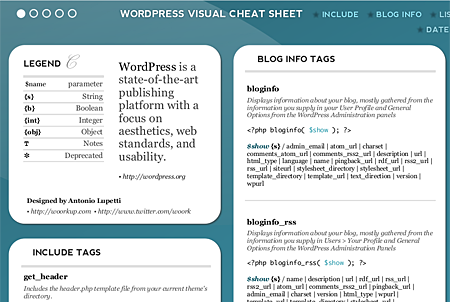
Antonio Lupetti of Woorkup.com has created a WordPress visual cheat sheet that would come in very handy for any WordPress theme/plugin developer.







Here’s a short description of the visual cheat sheet from the author himself:
WordPress Visual Cheat Sheet is the new document, of the Visual Cheat Sheet family, that contains a practical reference guide to WordPress 2.8. This cheat sheet (5 pages) contains the full reference guide to WP Template Tags with detailed descriptions and sample code. The simple visual style I used to design this sheet allows you to find at a glance everything you are looking for.
The WordPress visual cheat sheet is divided into the following tag categories: include, blog info, list & dropdown, login/logout, post, comment, category, tag, author, date & time, edit link, trackback, permalink, links manager, query and title.
The WP visual cheat sheet is in PDF form and contains 5 pages of the full reference guide to WordPress Template Tags. Aside from WordPress theme and plugin developers, this visual cheat sheet would be useful for users who want to tweak their blog theme or some plugin they’re using on their blog and also for those who want to dig deeper and learn more about how WordPress works “under the hood”. I’ve downloaded it and kept it for future reference. I also plan to print it and keep it in my file or maybe stick it on the wall near my workstation. Btw, this cheat sheet is based on WordPress 2.8 so some tags might become obsolete when WordPress 2.9 or other future versions gets released.
Kudos to Antonio for creating this beautiful visual cheat sheet and sharing it to other WordPress users! You can download the WordPress visual cheat sheet here.
If this doesn’t work for you, you might want to try out the WordPress Function/Tag Lookup Tool.



It was too complicated for me but I am not a developer. I use the latest issue of WP and have limited knowledge of tags. I can do “more” “adsense” “headline”, “italics”, “bold” etc tags in HTML. As for plug ins I dont really utilize what isnt already in the editor so what would be of more value to me would be suggestions on the type of plug ins any WP blogger should be using.
This would come handy to WP tweakers like us. :D
it made me say that it is really tough in there being a developer, hence reference sheets like this one is really a must-have to save the day. thanks for sharing Jaypee. i will be downloading it.
Thanks! I’ve been wanting to tweak my blog, but am a little apprehensive. I will definitely print this out. Between this and my CSS chart I should be good to go.