
Early this year, Gravatar added full profiles which enables Gravatar users to add contact information (email, instant message & phone numbers), links to social network profiles (Facebook, Twitter, Del.icio.us, LinkedIn, etc.) and blog/website links to their Gravatar profile. If you liked the full profiles and thought they were cool, wait til you’ve seen and tried Gravatar’s latest new feature.
Last week, Gravatar added a new feature called Gravatar Hovercards that extends the usability and functionality of full profiles.
Sample Gravatar Hovercard:
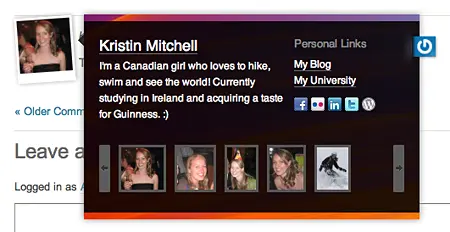







You can view other user’s Hovercards by hovering your mouse over their Gravatars (hence the name Hovercard) which will display all the information – name, bio, pictures, contact info, social networking profiles and blog/website URLs, listed on their Gravatar profiles.
Leaving comments on other blogs is a good way of increasing your online presence and promoting your blogs. Using Gravatar Hovercards extends that to another level because unlike the traditional blog comment which only displays the blog/website URL, Hovercards display additional information that are found on the user’s Gravatar profile. It enables users get to know the people commenting on their blogs better and to easily connect with them.
To set up your Gravatar profile, log in to http://gravatar.com and fill up the section under Edit My Profile. If you don’t have a Gravatar account, sign up here.
Right now, the Gravatar Hovercards are only available on WordPress.com blogs. The Gravatar team will release an official plugin soon but for those who can’t wait and would want to implement the Gravatar Hovercards on self-hosted WordPress blogs, you can check out the codes written by Weblog Tools Collection and Otto.
So what do you think of the Gravatar Hovercards? Would you install it on your self-hosted WordPress blog?




@Joie – Me too. I’ve been using Gravatar since it was first released. Happy that they’re continuing to add more cool stuff to it. Now, it’s not only just an ordinary avatar but something like a virtual business card. :D
I always like gravatar and by adding a full gravatar profile makes it more useful.