
Earlier this week, Facebook rolled out several updates including the Mobile Initiative with updates on its Facebook iPhone/Android apps. However, the most noticeable update and the one that got a lot of reaction/complaints is the font size. A lot of users are complaining about the smaller font size because it’s causing them to squint and strain their eyes just to be able to read stuff. Plus, there’s no option to adjust Facebook font size on the app or on the website.
I didn’t notice the new font size because I use the Facebook for iPhone app most of the time. I found out about it because of several status updates posted by my friends. It’s not certain whether the font size will be reverted to the original size but according to Facebook, the smaller font size is just an experiment on making the site more efficient for users.










Because of the number of complaints and frustration I’ve seen from many Facebook users, I’ve decided to write this short and simple tutorial to help them with the Facebook font size issue. This tutorial will enable users to adjust Facebook’s font size to make it bigger and more readable (this is applicable to any website). This procedure doesn’t require any changes done to your Facebook profile settings but utilizes a built-in “universal” shortcut command for all web browsers.
It doesn’t matter what web browser you’re using – Internet Explorer, Mozilla Firefox, Google Chrome, Safari, Opera, etc. because the procedure is the same. All you need to do is log in to Facebook and once you get to your profile, just press and hold CTRL then press the + (plus) key and that would automatically resize the font on your browser, making it bigger and easier to read.
BEFORE & AFTER ADJUST FACEBOOK FONT SIZE
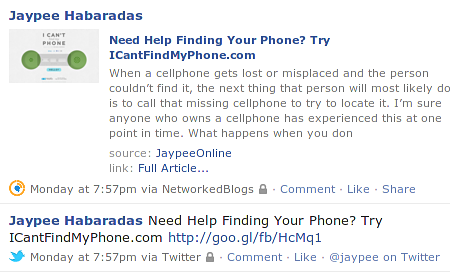
Here is a couple of screenshots that I took while viewing my Facebook profile as an example:
BEFORE
AFTER
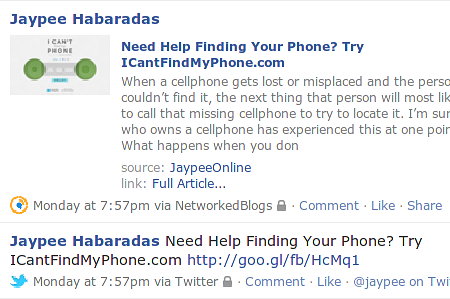
If you compare the BEFORE and AFTER screenshots, you can see that the font is a little bit bigger (bottom photo) after performing the procedure and is now easier to read.
HOW TO ADJUST FACEBOOK FONT SIZE
Here are the steps you need to do in order to adjust Facebook font size and make it bigger and easier to read.
Usually, doing the procedure once is enough to make the font size readable for most people, but in case it’s still too small for you to read, you can make the font size larger but repeating the process. In case you want to revert and/or make the font size smaller, instead of the + (plus key), press the – (minus) key. So press and hold CTRL and then press – (minus).
Btw, some users may not experience any issues with Facebook’s new font size due to web browser settings. Also, if you’ve logged in to Facebook on the iPhone or Android app then you also won’t be affected by this update. It’s still uncertain whether Facebook will revert back to the original font size or provide font size options, so for now this tutorial can be used as a temporary solution while the new smaller font size is still in effect.
I hope this short and simple tutorial will be useful for those having problems with the Facebook font size. Please don’t forget to share this with your friends on Facebook. If you know of any other fixes or solutions, please feel free to share it with us by leaving a comment below or by sending us a message via the Contact page.
Anyone having problems reading stuff with the new Facebook font size? Do you prefer or hate the smaller font size? Please share your thoughts.




Only the font when I make a post is enlarged… these tips are to enlarge or make smaller the whole web page…
How do I change the font ONLY for my posts
Yes, if you find the answer to your question, I would also like to know. I just want to change the font size on my posts, which currently defaults to 24pt.
I went into inspect element and manually change the font size from 24 to 14.
I changed the font size on my iPhone FB app by going to settings-General-Accesibility-Larger text. Turned it on and adjusted the continuum to larger (to the right). Worked perfectly!
This did not work for me!! I am on a mac computer. Any other suggestions?
Hi Gale, thanks for sharing. On Mac OS X, instead of the Control key use the Command key together with the + or – keys to zoom in/out of the page to make the text bigger or smaller.
to hit command and the + sign in the Facebook works but it pushes your messenger list on the left off the page …..thanks jp habaradas
You’re welcome! Yes, it does push the messenger off the page because what basically is happening is that the whole page is being enlarged. But it’s a small trade-off considering you can now read Facebook posts better with a bigger font size. :)
Thanks JP Habaradas …now i know and won’t keep trying to figure it out …..✔️
This method using control and plus or minus simply changes the total page and not just the text size. How can I change the text size without changing the whole page size ???
Hi Denis, unfortunately this is the only available option right now. Maybe one day Facebook will provide users an option to increase/decrease the default font size on their website.
I updated my FB App for my IPhone 6 and now the font size is huge! Nothing else is this way, only FB App.. Any ideas on that?
Hi Kellie, can you please give me the version of the FB app that you have installed? You can check it by going to the App Store and go to Updates and look for the FB app, you’ll see the version # there.
Also, can you send me a screenshot of the FB app with the huge font size? You can send it to jphabaradas [at] gmail.com Thanks!
Thanks for your reply it was very helpful and I am now using Facebook on a browser instead of the Facebook app and am able to get a more readable size of font.
You’re welcome! Glad I could help. If an update comes up that allows the Facebook mobile app font size to be resized, I’ll update this article.
Fix does not work on a tablet, do you have a fix for that please?
Hi Alison! like I mentioned in previous comments, this tutorial only works for the web version of Facebook and not on mobile apps.
There’s no way to change the font size on the mobile apps unless the Facebook dev team adds the option in a future update.
That’s how you increase the font from a PC or laptop. Even using the accessibility to enlarge the text doesn’t increase the font on your facebook application.
Hi Debby, yes that’s true. Unfortunately, this method only works for the web version of Facebook. They haven’t made this option available on their mobile apps.
Thank you, thank you, thank you!!!
You’re most welcome Sally!
Can’t believe how easy that was, and that I never knew that before, Thanks!
You’re welcome Dale! Now that you know how to do it, you can help out your family and friends. :)
Thank you! My fonts on every website became too smal to comfortably read. I am so glad that you made it clear that this process would work on all web sites.
Problem solved :)
You’re welcome Susie! Glad I was able to help you with this simple tutorial. :D
I was looking for a font increase for the Facebook Android app
Hi Kyle, you’re not the only one. Unfortunately, there’s no way to adjust the font size of the Facebook app for Android or iOS right now.
All we can do is wait and hope that the Facebook team would add an option to adjust font settings for mobile apps.
thank you!!!
You’re welcome Lisa!
Ty very much!!! :)
You’re most welcome Karrie! :)
Hey, what a God send….if just kept getting smaller & smaller..Holy Cow !!!!
THANKS
TRACEY WILLIS BROOKS
You’re welcome Tracey! :)
Thank you so much!! I was going crazy when the font all of a sudden turned tiny. I have spent days trying to figure out how to get it back to a readable size.
You’re welcome Bridget! Good to know that this tutorial was able to help you.
Thank you so much, I really thought I was accidentally hitting something that made this happen or my eye glass prescription changed suddenly!!!
You’re welcome! Good thing you didn’t go have your eyeglass presciption changed before finding this tutorial. :D
Thank you so much! I was googling about the font size on FB and stumbled across your post. I have re-posted on FB and Twitter. Good grief, FB is not user friendly for baby boomers. I thought it was me but it was FB messing around again.
You’re most welcome Julie! It’s good that you were able to find this tutorial to help you. Thank you also for sharing this post on your FB and Twitter accounts. :)
thnkuh..it ws a lot of help…
You’re welcome! Glad to know this was helpful for you Gurman.
Thanks. My font was too big on facebook and it was driving me crazy.
Sandy
You’re welcome Sandy! Really? Most folks here needed help because their font was too small. Anyway, it’s good to know this also helped you.
thanks! it worked
You’re welcome mario! Good to know it worked for you.
Thanks! :D
You’re welcome Alonica!
thanx a lot i was confused wat 2 do but opening ur page helped me a ton, i thought it was smthing wrong with my browser but other sites were going well, thanx a lot
You’re welcome akshita! Glad that this tutorial was able to help you.
Thank you, that helped!
You’re welcome! Good to know this tutorial was helpful for you.
THANK U!!!!! U r a life saver!!!!XOXO!!!!
You’re welcome Angie! Glad I could help. :)
Thank you so much! It never occurred to me that the keyboard shortcuts I use in FireFox would work in IE. Duh. Now I won’t have to strain my eyes when working on a system where IE is the only browser.
You’re welcome LuAnn! Most of the keyboard shortcuts especially for common tasks are the same between different browsers. Yes, the default font size really causes the eyes some strain.
Thank you for this site to help change the font size on my facebook page. I can finally see it again. Very helpful and easy to use!!!!
Happy Holidays!!!
You’re welcome Darlene! Glad this tutorial was able to help you. Happy holidays to you as well. :)
Thank you very much. The new font size was very annoying. I also thought it was a problem with Google Chrome until I logged in with Internet Explorer and it was the same again.
Why can’t Facebook stop messing about? :-)
You’re welcome Keith! I know, right? I also thought the problem was with my browser until I checked and found out it was the default setting on Facebook.
I think they’re just trying to make things better but sometimes it doesn’t turn out the way it’s supposed to be. :D
@Jhay – Haha..that’s true. Many users thought the problem was with their computer or something was wrong with their eyesight.
Yep, this is a simple trick that many users aren’t aware of.
When Facebook rolled out the new tweaks, I thought there was something wrong with my browser or my connection. The smaller font faces are really annoying but yeah, a little Crtl plus +/- does provide a quick fix.
Facebook is simply getting dumber and dumber, me thinks.