
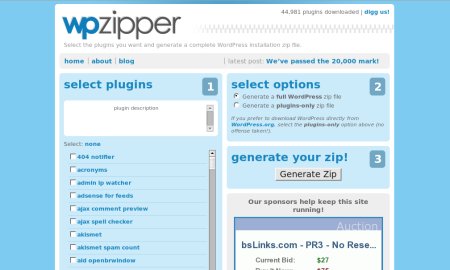
From WPStar comes the WPZipper, a cool new site that lets you generate a fresh WordPress installation with all the WordPress plugins that you want or create a “plugins only” installation zip file. WPZipper makes life more easier for WordPress users.
Why WPStar created WPZipper:







I created wpzipper because I find myself installing WordPress quite often. Every time, I have to go digging for the right plugins, download them all, unzip them, then upload them to my server. If you use a lot of plugins, this can be quite time consuming.
WPZipper makes it a lot easier to install WordPress and WordPress plugins because it saves you time looking for every single plugin. With this, you get all the plugins that you need from one place. I’m sure many WordPress users will be happy to know about this and will find this site very useful.
Personally, I’m not sure if I’m gonna use this. I think there’s a concern for security as I would want to make sure that the WordPress installation file that I use comes directly from WordPress.org and not from any other site especially after the incident with WordPress 2.1.1. If there’s a way to validate the source of the installation file, then I might change my mind. But inspite of that, I still think that this is a great service and kudos to WPStar for coming up with this idea.
Check out WPZipper.
Anyone else tried WPZipper? How do you like it so far? Would you consider using this for all your fresh WordPress installations? Please share your thoughts by leaving a comment below.



Jaypee – don't mention it, not at all/you are welcome
@Gabor – Thanks for dropping by and for the compliment! :D
Hello,
I like your blogsite and one of the part clipped in my blog for all the visitors who interested in…
@bluepanjeet – WordPress.org has a whole page dedicated to upgrading WordPress. Try to go through that and see if you understand it enough to do it yourself. If not, let me know and I'll see what I can do to help you with the upgrade. Btw, I just upgraded my installation earlier today. :)
noted mga tol. very nice tip :) i don't really know how to upgrade. i mean i don't know kung ililipat ko ba yung lahat ng contents ng wp folders ko sa upgrade version then install it again on my server o ano. noon ko pa dapat gagawin kaya lang i really don't know how to upgrade. i was afraid of losing important data kaya i just settled with my current version. remember jaypee when i told you that I had this #54 showing in my admin area instead of the actual admin? patatlo ko nato kaya sobra talaga ingat ako sa plugins at upgrades. but if you can teach me how, please do. i dont want to wake up one morning na hacked na yung wp ko. and instead of code 777 ano dapat? di kaya magka problem sa pagpopost ng mga readers? please help!
God Bless!
@bluepanjeet – That's quite an experience but you're still fortunate that the person who broke in didn't delete anything. Changing passwords was a good move. Noah's advice are very good ones and you should check your WordPress folder for extra files and check the file permissions and upgrade it to the latest version ASAP.
@Noah – Very good tips and advice. I'm sure me and my readers would find them very useful. Thanks! :)
bluepanjeet–
— I'd make sure you had the latest version of WordPress installed (upgrade if you don't).
— double check all your folders on your server and make sure they have appropriate permissions (hackers can get in if your root folder is set to 777)
— double check the files in your WordPress install folder. Make sure there aren't any extra ones. Sometimes, hackers like to upload a special file that, once on your server, gives them all kinds of access. The last time I saw this happen, the file was named faq.php so it would blend in.
— Changing your passwords was a good idea, too.
I just woke up one morning that my akismet, and some plugins (I think 6 of them) were deactivated. I do not remember turning them off coz it's akismet for crying out loud. deactivating it is like a blog suicide.
when i logged on to my server (my control panel in freehostia) there is a log record there. my ip address is not dynamic so obviously i only have one kind of ip address logged on. but to my surprise, dalawa kami. the other ip starts with 195.
i googled the exact ip address and you know what I found out? the same ip address was banned in wikipedia and the webmasters/admin gave the owner of the ip ad an ultimatum. allegedly, this guy vandalized a number of entries in wikipedia. the wiki said that the pc was a "zombie" computer". when i tried to look for the meaning of it, i found out that it has a spyware and hackware intalled on its hard drive, without the owner knowing it. ang timano, yung pc nya ay kinokontrol ng outside hackers so that these hackers cannot be detected. the owner is completely clueles that his pc is being used for hacking.
kaya after that rude awakening. I immediately changed all of the passwords in all my existing accounts and downloaded an anti-spyware tool from mcaffee.
I really don't know how those b*****ds entered my wp admin area. buti na lang hindi nila nabago agad password ko kungdi, back to the old drawing board na naman. ngayon ang password ko ay daig pa ang registration key ng adobe sa sobrang haba. hahaha.
whew.. what a comment!
@Noah – You're welcome! This is really a great idea and I hope that you'd find a way to validated the WordPress installation file in that way, more people would benefit from this great service and it will save WordPress users a lot of time. Keep up the good work! Thanks for the comment and for dropping by. :)
Thanks for the post and comments. I completely understand your concern for downloading WordPress from a non-official source. I'm still trying to figure out a way to improve the trust that wpZipper could have with it's service.
One suggestion was to provide an md5 checksum of the zip file that could be compared to an official download of WordPress. Unfortunately, this won't work because as soon as you add a plugin to your zip using wpZipper, the checksum would change.
I'm definitely open to suggestions and the best I've been able to come up with is providing the option to download just the plugins, without WordPress included.
@Ymir – Yeah, it is really convenient and saves you a lot of time. It's up to the user to choose which plugins to include into the installation file. That's why I mentioned that an experienced user is better off using this than a newbie.
@bluepanjeet – Really? How did you find out that the spammer was trying to hack your blog? Make sure you have a strong password and that you have an offline backup of all your data, just in case something happens.
i'll go with the same vein. I'm too hesitant to use this because of the security reasons you just laid above, especially now that some spammer is trying to hack my wp because he got pissed off when most of "his" spams where nullified by akismet.
sounds convenient enough.. I just hope that all those zipped plugins will work in one's theme.
@jhay – Good point. I think this service is better used by someone who has experience using WordPress and the different plugins. I won't recommend this to a newbie. :)
You're not only concerned with the validity of the files but with the compatibility of the plugins you mix and match.
It's a neat idea, maybe I'll play with it using my sandbox. ;)