
If you liked the WP Tiger Administration admin theme that I featured in Pimp My WP Dashboard Part I, I’m sure you’re gonna love this one!
Sunghwa Park or known on the web as Ceprix, felt the need to create a WordPress admin panel theme. So he drew inspiration from Mac OS X Tiger’s desktop search tool Spotlight and the Milk theme by Max Rudberg and created SpotMilk.
Since it’s first release, SpotMilk has been downloaded more than 6,500 times. Which could only mean one thing, it’s good.







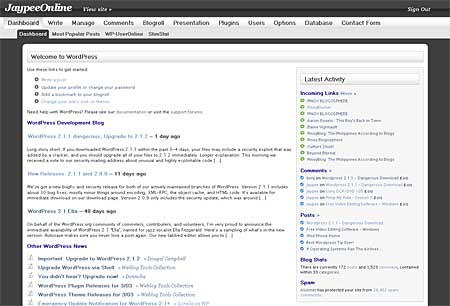
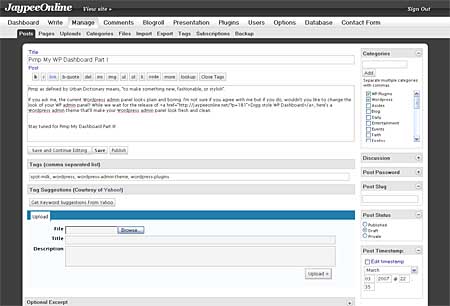
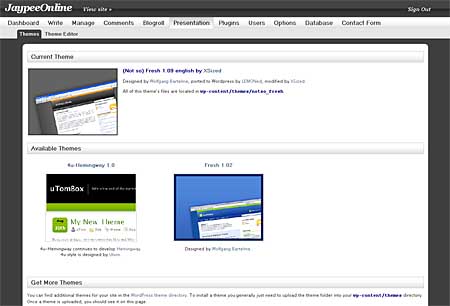
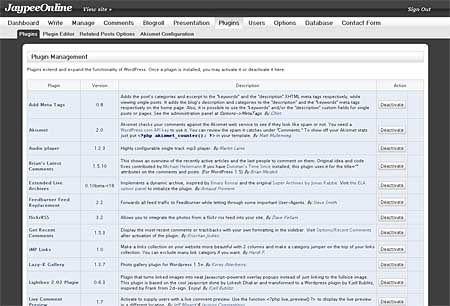
Screenshots:
Dashboard
Write Post
Presentation
Plugins
SpotMilk features:
- New WP logo designc
- New Login/Register page
- Spotlight-styled header image
- New main and sub menus
- Font and color changes in menus, titles and texts
- Removing box styles in the WP News
- New forms and fancy buttons
- CSS support for other popular plugins
SpotMilk is compatible with the following browsers:
- Firefox 2
- Safari 2
- Opera 9
- Internet Explorer 6 & 7
- Camino 1
SpotMilk was coded to fully support the following WP plugins:
- Ultimate Tag Warrior
- PodPress
- Popularity Contest
- WP-SlimStat
- WP-ShortStat
- Akismet
- aLinks
- PopStats
- Jerome’s Keywords
- K2
- Flickr Photo Gallery
- WordPress Database Backup
- Sociable
- Link Harvest
My Take:
I downloaded, installed and tried SpotMilk. What can I say? I LOVE IT! I love it so much, it made me switch from my previous admin theme. It only changes the design and colors but doesn’t mess up the original WordPress admin panel layout.
Btw, I’m using the BlackMilk edition of SpotMilk. If you want to activate BlackMilk, just open the spotmilk.php file and uncomment line 16, save it and upload.
What are you waiting for? Download SpotMilk Admin Theme for WordPress now!
There are two versions of SpotMilk so make sure that you download the right version. The latest version 2.0.3 is compatible with WP 2.1.x only! If you’re still using WP 2.0.x, you should download v1.7.5.



@Tim – I didn’t know that Ceprix.net is no longer online. If you still need the SpotMilk admin theme, let me know and I’ll send it to your email address. Btw, what version of WordPress are you currently using? I was thinking that maybe SpotMilk won’t work well with newer version of WordPress because it was created for WordPress 2.1+.
Hmm, scrap that, I realise it’s just not available to anyone. :cry:
Cleverly http://www.ceprix.net has blocked my IP, which happens to belong to a rather large private network. Can I help working for the UK’s largest employer (1.3 million workers at last count)?
Any other way to obtain the plugin?
@F – Glad to know that its working. You’re welcome! ;)
yeay! i got it. & ive got it working now. thanks so much. :grin: im loving it. hehe..
@F – Yes I do and I just sent them to your email so please check your inbox. Let me know if you get them, ok? Enjoy! :)
im just wondering do you still have the files for this? cause i tried downloading it from the site you’ve linked but their site’s expired. :sad:
Oh! It is very great and really useful post for me, thanks!
;)
@ade – How long have you been using it? I wouldn’t have switched if Tiger Admin Style wasn’t messed up in some parts of the panel. :D
Still loyal to my WP-Tiger theme. Hehehehehe!
Awesome. I think I’ll miss some meetings today to upgrade my admin page. hehehe.
@benj – Cool! Yeah, FireStats doesn’t look nice in it. Hehe..Talking about FireStats, I uninstalled it coz it was causing an error with my archived posts. I still have to figure out what causes the problem. :)
@iskoo – Buti na lang! Hehe :D
@Jam – It is nice. Once you try it, most likely you’re gonna keep it. :D
@ash – Who cares about those meetings? Go ahead and upgrade your admin theme! Hehe..just kidding :D
I think this one is nice. I may give it a try.
wait, i’m using wp 2.1, will it work for me?
Finally, a new look for my WP dashboard. I’m off to to download it. Thanks for the tip.
oks na oks talaga WP buti nalang natutunan ko WP
I'm loving it. :) The only downside is that Firestats looks like crap in it. haha
@Joni – Great! I like the Blackmilk version too, it's what I'm using right now. You’re welcome! :)
@bluepanjeet – You should definitely try it! It’s gonna make your dashboard look snazzy! I think you missed reading the note. Anyways, if you’re running WP 2.1, download version 2.0.3. :
@trench – Give it a try. There are like 4 styles to choose from. You’re welcome! :D
@jhay – You don’t need to use your sandbox on this one. Install it immediately to your main blog. I’m sure you’re gonna like it. Hehe :D
Nice, it looks cool. I'll give it a try in my sandbox. :D
Installation complete! I luuuv it! Especially the black one. This is definitely better than the other one. Thanks Jaypee! :)
@christian – You’re welcome! Hope you like it. :D
@Joni – I didn’t know you were online! I was surprised to see your comment so fast. Hehe. You’re welcome! Enjoy! :D
Wow! You're right. I like this one better! Try ko na. :) Thanks Jaypee!
wow, looks good. Might just use this. thanks JP.
cool! i think I'll try it. it will lessen my eye sore on my current dashboard.
@pinoyblogosphere – Thanks! :D
Let’s vote for this post at PinoyBlogosphere.Net :)