
One of the first things I did after I got my Lenovo IdeaPad Y560 was to make it dual boot to Windows 7 and Ubuntu. After I have installed Ubuntu, I immediately run the Update Manager to update the system. Btw, I always update the system (either Windows or Ubuntu) before I install any programs or do any customizations. This makes sure that all components are up-to-date and helps make the system run smoother and lessens the chances of errors or conflicts with other components.
Anyways, when I tried to download and install the available updates for Ubuntu, I got this error message:

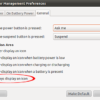
Requires installation of untrusted packages – “The action would require the installation of packages from not authenticated sources.”
I’ve installed Ubuntu lots of times before and this was the first time that I encountered this issue/error. I Googled the error message and found the very short and very simple solution from the Ubuntu forums. I’m sharing this in case someone might encounter the same problem and get the “requires installation of untrusted packages” error while updating Ubuntu.
How To Fix “Requires Installation of Untrusted Packages” Update Error
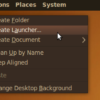
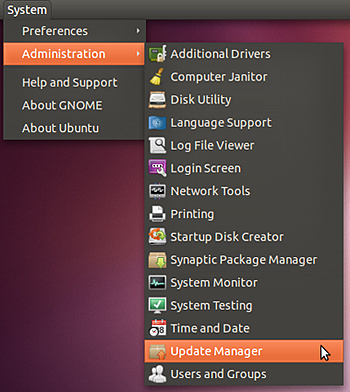
1. On your Ubuntu panel, click on System > Administration > Update Manager.
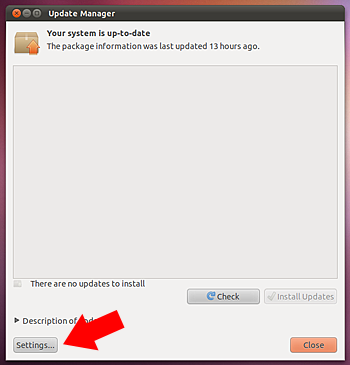
2. Look for Settings at the bottom left corner of the Update Manager window, click on it.
3. On the Software Sources window, click on the Ubuntu Software tab.
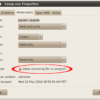
4. Under Downloadable from the Internet, put a check on Source Code.
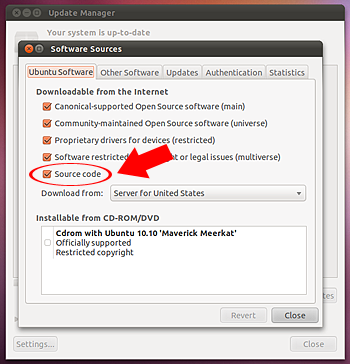
5. Close the window and the changes will be applied.
6. On Update Manager, click on Install Updates.
UPDATE:
As mentioned in one of the comments by Sky WalkeR, this issue can also be fixed by typing in the following command lines in the terminal:
sudo apt-get update

sudo apt-get upgrade
That should do it and you should now be able to download and install the available updates for your system. In my case, the Source Code option was not ticked/checked. After I put a check on it and clicked on Install Updates, the “requires installation of untrusted packages” error went away.
Hope this short and simple tutorial will help you if you encounter the same problem while updating Ubuntu. If you know of a different way to solve this problem when updating Ubuntu, please feel free to share it with us via the comment section. Thank you!


Thanks.
You’re welcome!
It’s better to click ctrl+alt+t and type the command
Yes, that is an easier way. However, not everyone is comfortable with typing commands.
Ohh i see
You replied after several months. Now i changed to pop os from ubuntu
Yeah, I replied late on your previous comment. How do you like Pop OS?
very very good.
thanks
You’re welcome!
@jaypee Thank you it really worked.
You’re welcome! Glad to know that it worked for you.
Thank you so much. It works…
You’re welcome!
I’ve tried the following instead.
from command-line:
sudo apt-get update

sudo apt-get upgrade
also have worked for me.
@Sky WalkeR Worked, thanks.
thanks for the solution everyone – this was really bugging me as it is somewhat intermittent.
sudo apt-get update
sudo apt-get upgrade
takes care of all of it of course
The resolution is as simple as typing this line in the terminal
sudo apt-get update
Works as intended ! Thanks !
I did the same thing Peiter did; I changed from U.S. to main server-worked! Wouldn’t have known to do it if not for this page-thanks!
still not working
actually after i shifted it to the main server it is showing no more updates
i’ve checked the sourcecode box tried main server and every server on the list i also tried checking for best server and i still get this error:
“Requires installation of untrusted packages
The action would require the installation of packages from not authenticated sources.”
details:
libavcodec52 libavutil50 libfaac0 libmjpegtools-1.9 libmp3lame0
libquicktime1 libswscale0 libvpx0 libx264-112 libx264-118
please help thanks UBUNTU FOREVER !
KARMAKID
thanks alot dude
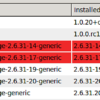
also look in details tab to see if any other programs are conflicting with the update. I had to uninstall wine in order to stop recieving the error
I had to do like Pieter said and change ‘Download From:’ Mine was set to ‘United States’ I changed it to ‘Main Server’ and all is good thanks
Pieter Says:
July 18th, 2011 at 5:23 AM
neo, I had the same problem. I changed ‘Download from’ from a local / national server to ‘Main server’. After that, I could check the ‘Source code’ checkbox.
I was facing the same problem, updating the system alongside Windows 7..It really helped..Thanks a lot buddy… :)
thank you so so sooo much! it does work. still have problems with activating wireless driver though, ugh..
Can’t find the update manager in 11.10 unfortunately, so still stuck.
Found it now, but it won’t let me check the ‘source code’ box
You have to switch “download from:” to either “main server” or “united states” (which is probably the same :)
After switching, I was able to select it and it worked out for me.
I hope it helps
Switching the source did it. Thank you!
Me too. I can not check the box.
choose the “main server”, not the ‘country’ server. then, the source code will authenticate and all available options will be seen/available
It helps me, thank you very much!
dear,dearer, dearest friend,
no words enough 2 thank u 4 the precious help . It works pretty well
just change in software sources where it say download from to
main server
just change in software sources where it say download from main server
Excellent! You’re D man.
thanks so much … u have saved me a lot.
Thanks a lot! It has bothered me to no ends. Your technique worked beautifully.
is there a way to do this via command line? I run a server and generally ssh into it….
I can make the checkbox orange, but it won’t let me ‘check’ the check box. Now what?
Thanks
thanks a lot dude, it was really helpfull
dave, i had the same problem, but it started updating properly anyways. So i guess jus making d box orange is enough. Try updating once.
Thanks a lot dude. This solved my problem :)
thank you dude…
thnx bro……god bless u. peace
dude..u made my day
neo, I had the same problem. I changed ‘Download from’ from a local / national server to ‘Main server’. After that, I could check the ‘Source code’ checkbox.
Thank you much boss..
Many thanks sir. you solved my big problem
it really worked successful. thanx a looootttttttt
Thanks :)
yes, it has really work for me. you are genius. thank you
Thanks it working
It works for me… :)
problem fixed. i used “ubuntu tweak” for this. i also got new repositories added, the real google chrome is now added, not the chromium one. plus skype :)
It worked for me .. Thanks
im using ubuntu 10.10 now. it didnt work though :( i only get a minus [-] tickbox. cant set it to check. any help? the one bugging my update was the “nautilus”.