
Have you lost important files or precious photos because of a damaged, re-formatted or corrupted memory card or hard disk? I recently have, when I lost all the files on my cellphone’s memory card. It sure wasn’t a pleasant experience. Good thing I had backups on my computer so I was able to re-install all the programs and re-upload all the files. But what if I didn’t have any backups? I would’ve lost everything. When this happens, you can use commercial data recovery software to try and recover those files for you but they can be quite expensive and some of them don’t even do the job well. I recently came across a free data recovery software or free data recovery utility called PhotoRec.
PhotoRec is file data recovery software designed to recover lost files including video, documents and archives from Hard Disks and CDRom and lost pictures (thus, its ‘Photo Recovery’ name) from digital camera memory. PhotoRec ignores the filesystem and goes after the underlying data, so it will still work even if your media’s filesystem has been severely damaged or re-formatted.










Screenshot:
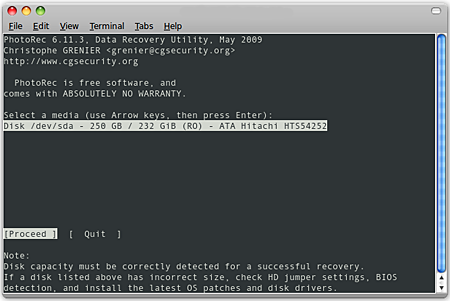
PhotoRec running on Ubuntu
PhotoRec is free and is an open source multi-platform application distributed under a GNU Public License. It is the daughter program of TestDisk, an app used for recovering lost partitions on different filesystems and makes non-bootable disks bootable again. Both apps come together in the same download package.
PhotoRec has a very fast and powerful recovery engine and signature search algorithm that lets the program locate deleted photos or files and because it ignores the filesystem, PhotoRec can be used even if the filesystem is severely damaged. Aside from digital photos, it can also recover different file types like office documents, compressed archives, mp3s, videos and even executable files.
PhotoRec is very versatile that it runs on different operating systems – DOS/Win9x, Windows NT 4/2000/XP/2003/Vista, Linux, FreeBSD, NetBSD, OpenBSD, Sun Solaris and even Mac OS X. It also runs on different filesystems – FAT, NTFS, EXT2/EXT3 and HFS+ and works with harddisks, cdroms, dvdroms, memory cards (Compact Flash, Memory Stick, SecureDigital/SD, SmartMedia, Microdrive, MMC, etc.), USB memory drives, DD raw image, Encase E01 image and many more.
There are a few things that I don’t like about PhotoRec. The first one is that there is no graphic user interface, the console uses a command-line operation. Another one is that it requires some level of technical knowledge so beginners or users who don’t have much experience with computers will have a hard time using it. The last one is that it doesn’t let you recover a single directory, it only lets you scan a volume or partition.
Overall, I still love and highly recommend PhotoRec especially to those who have some technical knowledge and experience using computers. It is a very useful and powerful data recovery software which can even outdo some commercial products. Best of all, its FREE!
IMPORTANT: As soon as a file or photo is deleted or you find out some files are missing from your memory card or hard disk, do NOT save any files to that disk or memory device. If you do, it may overwrite the lost data. When using PhotoRec, do not choose to write the recovered files to the same partition the files were stored in.
For more information, check out PhotoRec – Free Data Recovery Software. For installation instructions go to PhotoRec Step by Step.
I do hope that by me sharing about PhotoRec, you’ll find it useful one of these days and help you recover deleted photos or important files. What do you think of PhotoRec? Anyone else tried or are currently using this app? Do you know of any other free data recovery software that has the same features as PhotoRec but uses a graphic user interface?




Getdataback is commercial one, for freeware there are Recuva is good to, not only to recover image but also other files :)
Nice info Jay :)
@Michael – Haven’t heard of that. Is it commercial or freeware? If you try PhotoRec, do share with us your experience using it, ok?
i use getdataback, but i’ll give this a shot.
@aldrin – Really? Awesome! Glad to know that this freeware I blogged about really works and was able to help you. Maybe you should blog about it too. Hehe :D
it actually worked. i have my pictures back. plus the other old files. ;)
@aldrin – Hehe..what a coincidence huh? Anyways, I hope that PhotoRec will be able to help you recover those pictures and do let me know what happens, ok? You’re welcome! ;)
hey… how did you know that I just messed up with my 2GB SDHC with all the fresh pictures in it? This is right timing and I want to try this. Thanks…
@Jhay – I’ve tried some commercial and free data recovery software before but none really did the job. I still have to try PhotoRec and hopefully it won’t be anytime soon.
I know, remember I’m also OC but accidents happen and you’ll never know when. :D
Heard of this tool before but I’ve never actually used it – or any photo/file recovery tool for that matter.
I’m too much of an OC to accidentally delete a file and I’ve been lucky thus far to have not suffered from a faulty memory card. :D