HowTo: Restore Ubuntu Battery/Power Panel Applet

HowTo: Restore Ubuntu Battery/Power Panel Applet

9 Mar 2011 ·

Tips and Tricks, Ubuntu


Is your battery/power management icon missing from your Ubuntu panel? That happened to me the other day when I logged in to Ubuntu. I noticed that the battery/power management and network icons where missing from the Notification Area. This isn’t the first time this happened to me so I already know how to fix it. However, there might be some of you out there who are quite new to Ubuntu, having this issue with a missing battery/power icon and don’t know how to fix it.

Today, I’m gonna show you how simple and easy it is to restore the battery/power management icon on your Ubuntu panel.
Ubuntu Battery Power Management

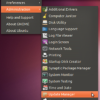
  1. Go to Preferences > Power Management
  2. Ubuntu Battery Power Management

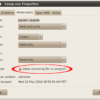
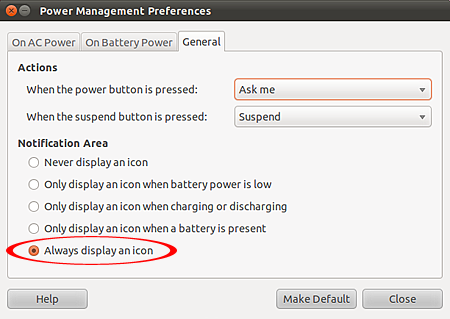
  3. On the Power Management Preferences window, click on General tab
  4. Make sure that the “Always display icon” option is checked.
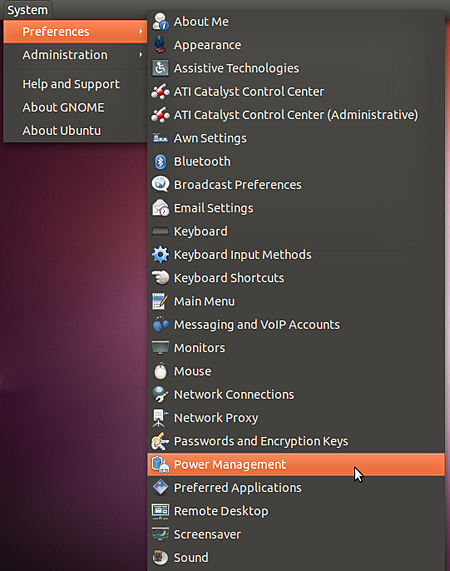
  5. Ubuntu Battery Power Management

For those of you who might not want the icon to show up when you have your computer plugged in or maybe want the icon to show up only during certain instances, just repeat the steps listed above and select your preferred option on the General tab. Btw, if you tried the steps I provided above and the battery/power icon is still not showing up it means that the Notification Area applet is missing from your panel. To enable it, just follow these steps:

  1. Right click on the panel, click on “Add to Panel
  2. Ubuntu Battery Power Management

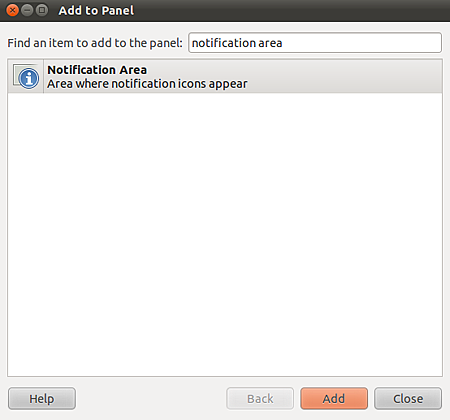
  3. On “Find an item to add to the panel:” type in “Notification Area
  4. Select the Notification Area applet and click Add
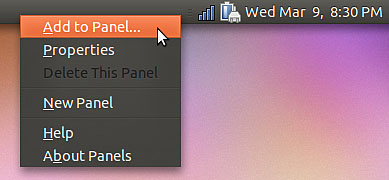
  5. Ubuntu Battery Power Management

That’s it. Wasn’t that easy? Hope this short and simple tutorial helped you with the missing battery/power icon issue on Ubuntu.


Subscribe to JaypeeOnline's RSS feed  Share this on del.icio.us  Stumble It!  Digg this!  Share this on Facebook  Tweet this!  Share on FriendFeed  Bookmark It!  Submit to Reddit!  Email this story to a friend!
Written by Jaypee Habaradas
Owner and editor of JaypeeOnline. Self-proclaimed geek. New media writer and consultant. WordPress advocate. Loves blogging, gadgets, video games and sports. You can follow him on Twitter @jaypee or Facebook.
Don't miss a single post and receive FREE updates on your email inbox. Subscribe NOW!

Enter your email address:

*Don't forget to verify your subscription by clicking the link on the email that Feedburner will send you.*

Didn't find what you're looking for? Try looking for it again.

Related Posts

Related Ads


, , , , , ,

**Comments posted on JaypeeOnline are moderated. I reserve the right to edit/delete comments that contain words or phrases that are defamatory, abusive, incite hatred and advertise an email address, commercial services or spammy.


One Response to “HowTo: Restore Ubuntu Battery/Power Panel Applet”

  1. Nithya INDIA Mozilla Firefox Ubuntu Linux Says:

    Wow Thanks For Sharing This one It works well.

    Reply

Don't Be Shy. Share your thoughts!

XHTML: You can use these tags: <a href="" title=""> <abbr title=""> <acronym title=""> <b> <blockquote cite=""> <cite> <code> <del datetime=""> <em> <i> <q cite=""> <strike> <strong>

You May Also Like -

HowTo: Disable Ubuntu Unity InterfaceHowTo: Disable Ubuntu Unity InterfaceI just recently upgraded my Ubuntu partition to the latest version - Ubuntu 11.04 ...