Gmail Drag And Drop Attachments


Gmail Drag And Drop Attachments

22 Apr 2010 ·

Internet, Tips and Tricks


Gmail

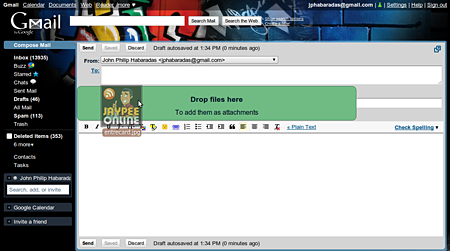
For Gmail users, are you aware that you can now drag-and-drop attachments to your emails? Last week, Google announced on the official Gmail blog the release of the new drag and drop attachments feature for Gmail. This new feature is automatically added to every Gmail account so users don’t have to install it via Gmail Labs. All you need to do is create a new email (Compose) and select any file you want to attach and drag it anywhere inside the Gmail interface and drop it. You can add as many attachments as you can as long as you don’t exceed the attachment size limit.

Here’s a screenshot I took while trying out this new feature.
Gmail Drag And Drop

Right now, the Gmail drag and drop attachments feature only work on Google Chrome and Mozilla Firefox 3.6 browsers. This drag-and-drop attachments feature will definitely give users an easier and faster way to add attachments in Gmail. In my case, I won’t be using this feature because I use an email client – Mozilla Thunderbird to manage my Gmail account.

Btw, Google released another new Gmail feature that lets you insert calendar invitations. Pretty useful if you use Gmail alot and want to share your schedules and activities with your co-workers, family and friends.

Anyone tried the drag-and-drop attachments or the insert calendar invitations features on Gmail? What are the things you like or dislike about it? If there are any features or options that you’d like to add to them, what would it be? Please share your thoughts.



Subscribe to JaypeeOnline's RSS feed  Share this on del.icio.us  Stumble It!  Digg this!  Share this on Facebook  Tweet this!  Share on FriendFeed  Bookmark It!  Submit to Reddit!  Share on Mixx  Buzz It!  Email this story to a friend!
Written by Jaypee Habaradas
Owner and editor of JaypeeOnline. Self-proclaimed geek. New media writer and consultant. WordPress advocate. Loves blogging, gadgets, video games and sports. You can follow him on Twitter @jaypee or Facebook.
Don't miss a single post and receive FREE updates on your email inbox. Subscribe NOW!

Enter your email address:

*Don't forget to verify your subscription by clicking the link on the email that Feedburner will send you.*

Didn't find what you're looking for? Try looking for it again.

Related Posts

Related Ads


, , , , , , , ,

**Comments posted on JaypeeOnline are moderated. I reserve the right to edit/delete comments that contain words or phrases that are defamatory, abusive, incite hatred and advertise an email address, commercial services or spammy.


5 Responses to “Gmail Drag And Drop Attachments”

  1. Buy and Sell Philippines Says:

    Wow. Thanks for the share man! Gmail is the best! With this drag drop tool. Mailing attachments becomes easy:) Thumbs up!

    Reply

  2. Joie Says:

    I didn’t know that until today. The calendar is a good addition to it. I’m always a fan of gmail. Thanks for sharing bai.

    Reply

  3. Kimwell Says:

    Its about time that this feature became available, Its really saves time compared to the conventional email attachment process. Gmail is getting smarter and smarter nowadays..hehehe..

    Reply

Don't Be Shy. Share your thoughts!

XHTML: You can use these tags: <a href="" title=""> <abbr title=""> <acronym title=""> <b> <blockquote cite=""> <cite> <code> <del datetime=""> <em> <i> <q cite=""> <strike> <strong>

Trackbacks/Pingbacks

  1. [...] This post was mentioned on Twitter by Aileen Apolo and JP Habaradas, Ruben Canlas. Ruben Canlas said: RT @aileenapolo: Gmail Drag And Drop Attachments http://goo.gl/fb/lVG1W [...]

  2. [...] This post was mentioned on Twitter by Aileen Apolo , JP Habaradas. JP Habaradas said: Gmail Drag And Drop Attachments http://goo.gl/fb/lVG1W [...]