

UPDATE: If you haven’t updated to WordPress for iPhone/iPad version 2.6, then don’t! Tried opening it after I updated and it crashed. Tried several times to no avail. Tried the delete and reinstall trick but still doesn’t work. Now I can’t open the app as it keeps on crashing. I suggest that you hold up on updating until the WordPress dev team releases a fix for this. Oh yeah, next time make sure to read the reviews first before updating. I learned it the hard way.
Was browsing the App store on my iPhone and updating my apps when I saw that the WordPress for iPhone app had an update. When I opened my WordPress Dashboard to check on my blog, I found the announcement from the official WordPress blog that WordPress for iPhone/iPad version 2.6 has just been released.







Screenshot:
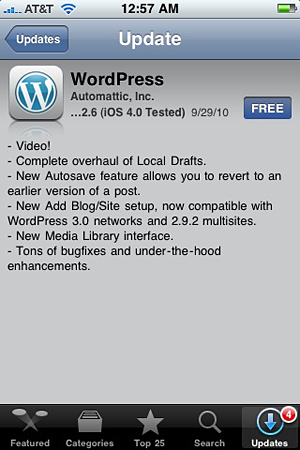
Here are the improvements and new features on the latest version of the WordPress for iPhone/iPad app:
- Video. Record, upload, attach, and play videos within the app. Yay for being able to catch your friends’ and co-workers’ most embarrassing shenanigans creative moments with iPhone video and publish them immediately for all the world to see on your WordPress site.
- A total rewrite of the way local drafts are handled, to prevent the unintentional loss of your pending posts.
- Autosave/post revisions. Bam! One of the “oh, thank goodness” features of the web app makes it into the iOS version.
- Easier setup. Faster and easier process for adding your sites to the app.
- Media Library. We’re gradually getting closer to the media management you’re used to in the web app.
I never use the WordPress for iPhone app to write articles but rather for moderating comments here on JaypeeOnline. Nevertheless, the latest version does have pretty good new features and improvements. I think users who regularly use the app to blog/publish stuff will love the addition of the Video and Media Library features.
One of the things/options I’d like to see added to next update of the WordPress for iPhone/iPad app is the ability to access the Spam folder. Why? Because when moderating comments, I sometimes mistakenly flag a comment as spam instead of approving it. And since I can’t access the spam folder, I have no way of retrieving the comment and I’m forced to log on to the main WordPress Dashboard just to do it. And when I’m on the road or I don’t have my laptop with me then I’m stuck and I’ll have to wait til I get home or get access to laptop.
You can download WordPress for iPhone/iPad version 2.6 from iTunes or via the App store on your iPhone or iPad.


@Abhik – Oh okay. The WordPress for Nokia/Symbian can be found here – http://dev.nokia.wordpress.org/
@Jaypee, I noticed that Android App right after commenting..
http://android.wordpress.org/
But, didn’t find any news on Symbian Application.
@Abhik – There’s already a WordPress app for Android devices and they’re developing one for Symbian devices.
I have seen this working in one of my friend’s iPhone 4. Looks great, but I am waiting for similar app for Symbian and Android platform.
@Harsh – You’re even fortunate because you were able to access the app after the upgrade. In my case, after I upgraded everytime I tried to access/open the app, it crashed.
Btw, they’ve released WordPress for iOS 2.6.1 which fixes the bugs. I’ve tried it and it works fine now.
I updated my wordpress app to latest 2.6 version and first thing which I did was to try new video post thing..
As soon as I ended up recording video and tried adding into my post (from iPhone), it crashed…
I thought latest version solved lots of bugs..but I believe it’s still there…
Anyways I welcome new feature and they are really useful…
@Sourish – Yes, it has fewer options compared to the regular WordPress dashboard. This app is good for basic blog posts or blogging on the go. ;)
im using this on my ipod touch , but dont find it much useful … only got fewer options
Sourish
@icechen1 – Yeah, I use that plugin here on JaypeeOnline. :D
The iPhone WordPress theme plugin(WPtouch) makes your site looks like a mobile app when visited on mobile phones. Pretty cool!