
In part I of this series, I showed you how to restore or recover your WordPress password using the MySQL command line. This time, I’ll show you how to do it with phpMyAdmin.
Before you start with phpMyAdmin, you need to create a md5 hash of your new password. You can use this md5 encrypt tool. After you created the new md5 hash, save it and kept it for later.
Note: use phpMyAdmin at your own risk. If you are not sure on how to use it, seek further advice. I’m not responsible for any loss of data.







1. Open phpMyAdmin.
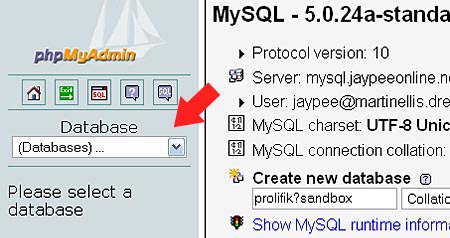
2. Click on the drop down menu and select your WordPress database.
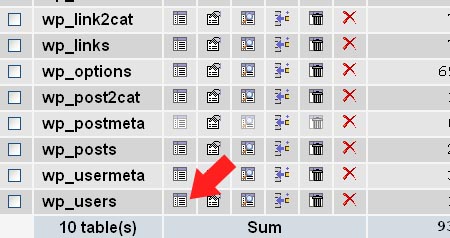
3. From the list of tables, look for the wp_users table and click on the Browse icon. (the prefix may defer with different databases)
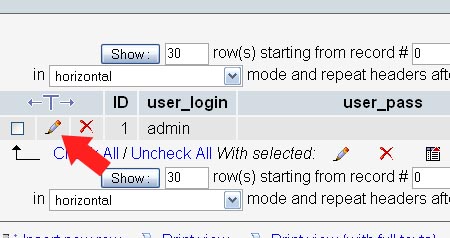
4. Click on the Edit icon (pen icon).
5. Look for the md5 hash of user_pass under the Value column.
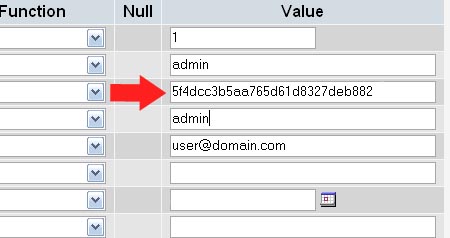
6. Change the md5 hash with the one you created earlier. If you want to use a different username, you may also change the present value with a new one.
7. Close phpMyAdmin
8. Login to your WordPress blog with your new password (and username if you changed it).
I hope this series would provide you with the needed information on how to restore or recover your WordPress password. Some of you might know a totally different way of recovering WordPress user passwords, so any suggestions and corrections would be greatly appreciated.


Thanks for the great info! PHPmYAdmin trick worked perfectly!
I want to know if i use phpMyAdmin to get my password. Will it effect to another blog? Cause i have more one site in one hosting? How i can select the blog which is lost password in phpMyAdmin.
@Justin – Yes it still is because the forgotten password via email option is not 100% reliable. A lot of WordPress users have experienced this problem, including myself. That’s why I wrote this tutorial to help other WordPress users who might encounter this problem in the future.
Ironically I found this under your featured article link on your homepage, with WordPress later versions offering forgotten password via email without having to do it manually is this information relevant in WordPress 3.x anymore? Probably it still could be used if the email setup wasn’t working for you to use the forgotten password feature.
Thanks for the tips and taking time to post. Very useful stuff (even 3+ years after the fact).
@fruity – Wow, what a pleasant surprise! Long time no see my friend. I sent you a message on Twitter asking how you’ve been but you didn’t reply. :P
Anyways, I’m glad that this post was able to help you with your problem. Yes, you should update your blog even once a week or twice a month at least. You also need to do keep your WordPress install up-to-date so your blog will be safe as there’s been a lot of attacks on WordPress blogs lately.
You’re welcome! ;)
OMG, I have to say “THANKS” x 100 for this information. I lost my password recently (I swear to God)… and I remembered you wrote something about password recovery. So I tried the phpMyAdmin recovery method half an hour ago… and damn, it worked! Now I suppose I have no excuse to not update my blog. LOL.
Thank you, thank you, thank you sir! Whoo, what a relief. I was freaking out today.
@Carleenp – You’re most welcome! Good thing you found this post, which I believe got from Google Search? Glad I could help. Thanks for stopping by! :)
Thank you! Great info when I was having a hard time finding a solution for my lost PW and turned off remailer!
@Henry – You’re welcome and good to know that it helped you! :)
@kates – Thanks for info. I've seen and read about that but I've never tried that before. Hehe I'll edit this post later when I have the time. :)
Hi Jay,
You can always use the MD5 function in the dropdown menu in the function column. This way you can just provide the plain text password and mysql will generate the hash for you.
@jhay – Thanks man! Just trying my best to provide useful information to WordPress users out there. Yeah, phpMyAdmin is not that difficult to use but if you don't know what you're doing, you can do a lot of damage to your database. Hehe :)
Nice tutorial dude. Using phpMyAdmin is not that tough. You just have to read and read twice before you click on anything. ;)