
Are you annoyed and frustrated with Megavideo’s time limit? Don’t worry, I’ll show you how you can bypass that limit and let you enjoy watching your video or movie without any interruptions. Megavideo is one of the best and one of the most popular video sharing sites in the Internet. The problem about watching movies on Megavideo is that there is a 72-minute time limit and once you hit the limit, the video stops and you get this message:
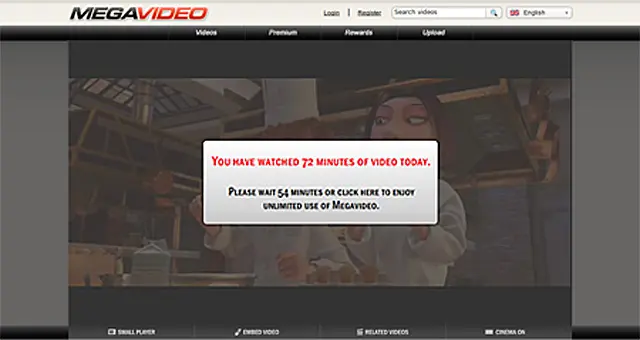
Some movies are more than 72 minutes long, some are even 2-3 hours long so once you hit the time limit, you can’t continue watching the movie anymore. Sucks doesn’t it? Today, I’m gonna share with you a few methods on how to bypass the Megavideo time limit.










DISCLAIMER: These are workarounds suggested by other users. I do not endorse them and I haven’t tried all of the methods listed below. PERFORM THE METHODS AT YOUR OWN RISK.
Method 1 – Work Offline
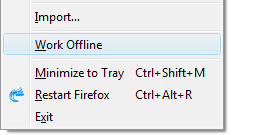
1. Open the video that you want to watch on Megavideo. Click the Play button and when it starts playing, click on the Pause button to let it buffer.
2. Wait until the video is done loading/buffering to 100%.
3. Click on Work Offline and watch the video.
Mozilla Firefox
– Click on File > Work Offline.
Internet Explorer 7 & 8
– Click on Tools > Work Offline.
[Remember to unclick the Work Offline button once you’re done watching]
Method 2 – Block Cookies
1. Clear your web browser’s cache and delete cookies.
2. Block cookies.
Mozilla Firefox
– Click on Tools > Page Info.
– Click on the Permissions tab. Under Set Cookies, if Use Default is checked, uncheck it then select Block.
Internet Explorer 7 & 8
– Click on Tools > Internet Options.
– Click on the Privacy tab.
– Click on Sites.
– Under “Address of Website“, type “megavideo.com” (without the quotes), click Block.
– Repeat the previous step and this time type “www.megavideo.com“, click Block.
3. Disconnect your modem and wait for about 10 seconds before reconnecting it.
4. Continue watching the video.
Method 3 – Download
(You’ll need Mozilla Firefox for this one.)
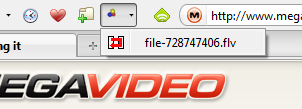
1. Install the DownloadHelper addon and restart Firefox.
2. Go to Megavideo and open the video that you want to watch and click Play.
3. Once the video starts buffering, the DownloadHelper icon would start revolving. Click on the small arrow beside it then click on the .flv file and it will prompt you to save the file to your computer. You can rename the file if you want and choose where you want it to be saved.
4. Watch the video with VLC Media Player or Applian FLV player.
Method 4 – Illimitux addon
(You’ll need Mozilla Firefox for this one.)
1. Install the Illimitux addon and restart Firefox.
2. Go to Megavideo and open the video that you want to watch.
3. Click on the Illimitux icon (lower right corner of Firefox) and you will be directed to another page where you can watch the video without any time limits.
Caution: This add-on has not been reviewed by Mozilla. Be careful when installing third-party software that might harm your computer.
Method 5 – Megastreaming.org
1. Go to Megavideo and copy the URL of the video that you want to watch. (example: http://www.megavideo.com/?v=Q7UK1BVI)
2. Open http://megastreaming.org/.
3. Paste the URL of the video you want to watch on the space provided and click Play.
Method 6 – Lyke.co.cc
1. Go to Megavideo and copy the URL of the video that you want to watch. (example: http://www.megavideo.com/?v=Q7UK1BVI)
2. Open http://lyke.co.cc/.
3. Paste the URL of the video you want to watch on the space below “Remove Time Limit” and click Watch.
Method 7 – No More 72 Mins
1. Go to Megavideo and copy the URL of the video that you want to watch. (example: http://www.megavideo.com/?v=Q7UK1BVI)
2. Open http://megavideonotimelimit.com/.
3. Paste the URL of the video you want to watch on the space provided and click Watch The Video.
Just choose any of the methods listed above which you think suits you best, follow the instructions and you’ll be able to enjoy watching videos and movies on Megavideo without any time limits or restrictions. If you’d rather do something else like play video games, you can try doing that using your Fierce PC.
In case you know of any other way or alternatives on how to bypass the Megavideo time limit, please share it with us so we can include it on this list.




Great! Now I can watch movies without issues :)
Kinda weird…I just refreshed the page and started watching it where i left off!
I am upset with Megavideo because it shows that message when I have NOT even watched 72 minutes of a show yet. I was trying to watch a series that is about 54 minutes long, and the video did not even pause once to buffer and it’s already telling me I have reached my time limit and I am no where close to it.
I can’t see the megavideo url anymore. Help?
Hi,
How does one bypass everything on a mac , where I can watch movies uninterrupted ?
hey guys so basically the router thing works according to my sis. I figured that by turning the router off and on all it’s doing is renewing your IP address. So follow these instructions: http://whatismyipaddress.com/change-ip
I used the Windows one and it seemed to work
Open up the command propt
Press (windows key) + r
type in cmd hit enter
type: “ipconfig /release”
then type “ipconfig /renew”
all without quotes. Keep in mind there’s a space there.
Hope this helps someone!
for the 2nd method.. shall i wait for the video to buffer first?
Interesting, but the time limit has never really bothered me. I just go on another site while I wait.
just restart your modem when movie stops after 72 mntx, new i address will b given so u can watch the whole movie
people, the easiest way is to delete and block cookies from both the url and megavideo.com. A lot of tutorials on how to bypass the video limit says this, but they don’t explain it enough. You will still run into the “72 min” notice, but what blocking cookies does is it lets you open the video up again (either in another tab or browser, or you could just reload the page probably) without knowing that you already watched 72 minutes. So just go to the video url, on firefox go to tools/pageinfo, under the permissions tab, there’s a row titled “set cookies”. all you have to do is click the “block”, then it blocks the cookies. This only blocks cookies for that specific url of that video, so you probably want to go to megavideo and do the same to block all cookies from that site. Just to be safe though, everytime you watch a video, just block the cookies from that page. Anyways, after you block the cookies, enjoy your video. When 72 minutes is up, copy the url of that page, exit that browser, open a new tab/browser window, paste the url in the address box, then hit enter. It takes you back to that page, but you can still load the video like you never watched 72 minutes of it. Then, you can move the search bar up to the point when the limit stopped you, then keep watching.
Most of the methods posted here didn’t work for me, except for lyke.cc.co, but that website isn’t up anymore. A lot of sites suggest the delete/block cookies method, but they make you think that the 72 minutes notice doesn’t appear. It still does, but you can just reload the video again in another page, like the 72 minutes never happened. Anyways, hope this method works for you, enjoy your videos.
guys the easiest way to stop the megavideo thing is to unplug your router and plug it back in it works for me. I dunno if anyone else posted that or it was said but I didn’t read the whole article so sorry lol
Or you could just replace the “video” in the URL with “upload” and download it like that.
Nice, I’ll try it out, hopefully it still works. Worked the same way on pandora before…
@sourish- it worked a month ago when I tried so I guess it still does.
nice share , does it still works . i see the post is dated back to jan 2010
Jaypee Habaradas, this is a nice way to Bypass Megavideo Time Limit. Thanks for sharing this.
Thnx a ton……. mate!!!!!!!!!!
method 5 is not working for me. trying other methods atm.
Method number five didnt work for me. Still got the timelimit message. Wanted to try cacoweb but have read up on it and appearently its full of trojans n other viruses. Can anyone confirm or deny, please..?
Option 7 looked promissing, but it wouldn’t load. Might have been down for maintenance or something though. But by the time I got fed up with trying it I looked at the time and realized I only had two more minutes to wait, so I just sucked up it and waited the other 2 mins.
Next time I’ll try things faster :P
I have found another way of being able to watch unlimited megavideo.Simply go to tools,internet options and then go to the privacy tab.You then need to adjust the settings to block all cookies.My advice would be only to block cookies when watching megavideo,because blocking cookies can interfere with other things online.
thanks, perfect tut.buti na kita ko.
when you use the cookie method delete your cookies then go to http://www.megavideo.com, look at your cookies again, block everything there or else it does not work, or at least it did not for me until i did this
update. method 2 still doesn’t 100% work. I can surpass the 72 mintue limit, but I will still eventually get stopped, and have to wait for the cool down period. sometimes it seems to work, sometimes not.
mykezero’s addon to method 2 works. block the cookies and then give 0 space for it save anything onto your machine.
I was timed out at 72 mins, and tried it, and it worked.
I had to refresh the page, and let the video reload, but no big deal.
since then, I have not had the 72 limit bother me.
block cookies, set local storage to 0.
thanks jaypee and mykezero.
yay! all 7 methods in one post. Gagawa sana me ng ganitong post, pero meron ka na, and top 1 pa sa lahat ng datacenters. Great job! :) Gawa nalang ako then e link ko to para di na mawala sa top 1. hehehe… ^_^
Method 2 works, Blocking the cookies.
I also right clicked on where the video was playing,
went to settings,
local storage(3rd tab on the bottom),
and lowered the sliding bar all the way to the left of the panel,
then clicked the never ask again check box below it.
If method 2 did not work by just blocking the cookies, try this. this may have made my attempt at doing so successful.
I just found this article by clicking my StumbleUpon button, really great write up. It is all too easy to thwart sites that track and set cookies to determine how long a person has been on them, but the tip about blocking megavideo cookies altogether is excellent tip.
just do what they advise at project free tv–unplug your modem/router/gateway long enough to reset it. i have a 2wire at&t gateway and i unplug the power a couple of minutes. it seems to work if i first close all my browser windows too.
works every time.
None of these methods worked for me. All of the sites tell me there is no valid link, when I paste in the link to video I want to watch (the Top Chef Masters finale). I don’t understand what I’m doing wrong….does the URL have to change at all or something?
Hello
I tried the method 1,3,5,6 and 7.
1: Did not work for me.
3: The files it downloaded didn’t start playing in the VLC or FLV player.
5: Didn’t work for me, got the same time limit message.
6: Didn’t work for me.
7: Worked, but the sound fell out of sync.
Will try method 4 next, when I get home. Don’t have access to the modem here.
@Jack – You can just provide a link of this post in your forum. If you want to post the full article, you’ll have to provide the source/link on that post.
Hello, author.
I would like to request your permission to post your article on how to bypass megavideo’s time limit on one of my forums.
Thanks for your prompt response.
Wow, ang galing naman nito. I thought hanggang 72 minutes lang talaga ako. Pwede pala maextend, hehe.. Thanks for sharing.
Youtube also limits me when I upload videos but I wonder why other videos reach more than 10 mins…
@Dennis – What I meant was Megavideo was one of the best and one of the most popular video sharing sites. I’ve edited the post now to make it clear. ;)
Most popular? Where was that study done?
@sylv3rblade – Yep, not all have that privilege. Btw, care to share with me how that’s done? Hehe :D
I prefer getting a month prem (that’s $10).
Yes, I understand that payment is not an option to most of us but seeing as I’m getting $200 a month from MU/MV, it’s not so bad. You also get a year of membership PER $100 earned :D.
@Paulo – You’re welcome! Please do share what methods you tried and what methods worked for you.
Cool! I’ll try these methods mamaya. Tnx!