
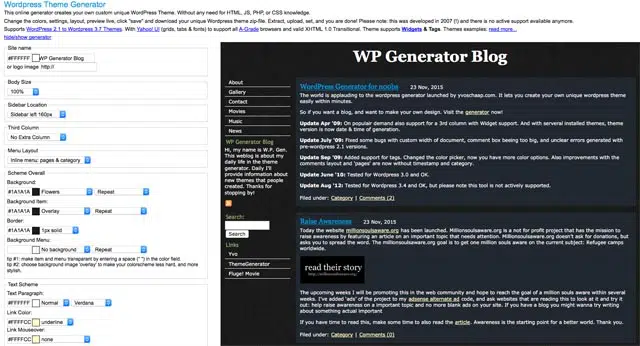
For those of you who use or have used the WordPress Theme Generator, you might want to know that it has been updated and now supports WordPress 2.3, Tags, Tag clouds as well as article tags. Aside from that, WP Theme Generator has more color options to choose from and it’s codes are now XHTML standards compliant.
For those who don’t know what it is, WordPress Theme Generator is an online site that generates custom WordPress themes. It doesn’t require any HTML, PHP or CSS knowledge. All you have to do is visit the site, choose from the different layout options available to customize the theme design and layout. The theme you create is automatically displayed on the right side so you can preview the theme while you’re creating it. When you’ve come up with a design that you like, just click on “Save” and you’ll be able to download all the necessary files as one zip file.







Personally, I haven’t tried it but I believe it’s a good alternative for those who don’t have any background knowledge in HTML, PHP or CSS and would like to have a unique, customized WordPress theme of their own.



I rolled out wppal.com for all those people who need a theme but dont really care about the fancy pants images and what not. Its real simple to use and it has 6 different layouts with more to come. I wanted to know what everyone thought http://www.wppal.com
@Bull3t – Yup, its really helpful especially to those who don’t have any background in CSS & PHP and for those who want generate a unique, customized WordPress theme in just a few minutes. :D
WordPress Theme Generator is a very helpful and sexy theme generator! Thanks for this.
@Joni – You don’t have to coz you can make your own WordPress themes! :P
Me too, can’t wait for WordPress 2.3. Btw, make sure your plugins are all compatible before you upgrade. Have a good weekend! :)
I haven't tried that one too. But I'm excited for WordPress 2.3! I want the built-in tagging feature. :D