
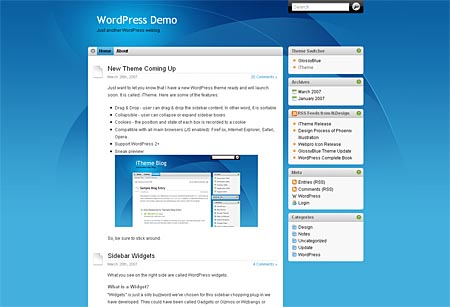
iTheme is Mac inspired 2-column, widget-ready WordPress theme created by Nick La of N. Design Studio. He’s the same guy that gave us the cool Glossy Blue theme. I’m pretty sure all the Mac fans would be very happy to see and use this theme on their blogs.
iTheme is a WordPress theme that is designed for the Mac lovers with a truly customizable sidebar. As an administrator, you can customize your sidebar’s contents without modifying the source code using WordPress widgets (no programming required). As an audience, you can rearrange the sidebar by drag & drop or you can collapse the box to save space.
Screenshot:










Basic features:
- Supports WordPress Widgets.
- Drag & drop sidebar
- Tested on WordPress 2.0 and 2.1
- Tested on the following browsers: IE, Firefox, Safari, Opera
- Icons from iMini set
- Drag & drop Javascript by Brothercake.com.
My Take:
I love everything about the iTheme WordPress theme, from the background to the icons to the drag-n-drop sidebar. It just seems that there’s nothing you can’t like about this theme and I’m sure it won’t be long before someone comes up with a modified version of this theme.
I’d love to see the iTheme have different color schemes or maybe themes based on the different Mac OS versions. I’d also wanna see a footer or bottom bar added to this theme to accommodate other content that you can’t have on the sidebar. Overall, I give the iTheme a 5 out of 5. Excellent job Nick! Can’t wait to see your upcoming free WordPress themes.
Preview or Download the iTheme WordPress theme.



Grate wp theme
@K – I'm sure it will be added to WP.com soon especially if a lot of people are requesting for it. You should get your own hosting! That's the fun part coz you get to choose what theme you want to add or use.
Bout my comments, I think it's because I left several comments in a short time period that's why Akismet thought it was spam. I'm just guessing here. :D
@paurong – Yeah, it's a very nice theme.
@jhay – I still wish I had a MacBook even w/o seeing this theme. That's a great idea! It's gonna be awesome if someone would be able to do that. :D
@fruityoaty – Yeah, I think so too. 3 columned themes are becoming more and more popular these days. I myself am looking for a nice 3 columned WordPress theme that I can use for this blog.
I want a Mac! Hehe :D
I like it! I'd like to see a hacked 3-column version of it with widget support for 2 columns (sidebars). That version would probably get a lot downloads from the 3-column fans.
But I already look at my Mac's interface for hours and hours on a daily basis… not sure if I want my blog to look like that too, LOL. Still nice though.
I've played with it once, cool and slick. Makes me drool even more about getting a Mac.
If someone where to put a footer on this theme, it will be super if it will look and function like the Dock. :D
ang nice naman pala e.
This theme was submitted several times in wp.com forums. I, too love this theme, the template looks very Safari browser to me and I would be delighted if sooner or later, this will be added in wp.com presentation.
Only if I have my own hosting account.
ps. suprisingly your earlier comments on my blog was caught by the akismet spam, glad I recovered it. Do you have a dual ISP or something?
@ash – Hehe..sure, let me know once you've installed it already. :D
@Gean – I know. I'm sure a lot of people will be downloading and isntalling this theme just like ash. Hehe :D
wow. :) this one is really cool.
this is definitely very cool and nice theme. I'll use this. that's a promise… Wow.