Anyone who’s using the Vistered Little Theme other than the latest version 1.7.3, are strongly advised to immediately upgrade due to a vulnerability that has been recently discovered.
From the author’s blog:
WordPress Blogs using Vistered Little are being targeted by hackers. Over the last two days the number of 404s on my site increased significantly. Further investigation revealed that attempts were being made to access the following URLs to gain access to files they wouldn’t normally have access to.
It appears the skins/common.css.php is vulnerable. This file existing in that location in 1.6a and within the theme’s root directory in 1.7.0 through to 1.7.2. This file does not exist in the current version 1.7.3.









For those who can’t do the upgrade, another option would be to switch to another theme and immediately delete the Vistered Little theme folder from your wp-content/themes folder.
A little background:
Screenshot:
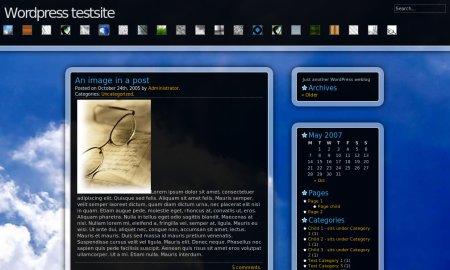
Vistered Little is a 2 column, fixed width, widget-ready theme from Windy Road and is one of the most popular and most downloaded WordPress themes. Vistered Little has a highly customisable glass-like interface with wallpaper and skin support. This theme makes use of the Skinner and Presentation Toolkit plugins.
Upgrade to Vistered Little 1.7.3 now!