
Have you experienced manually editing your blog posts to remove pieces of code from an old plugin? I have. Or having to manually go through all your posts to change image directory names/URL paths? I have. Good thing this happened to me earlier when my blog posts numbered only about a couple hundred. What if you have hundreds or thousands of posts? Aside from the time spent on doing it, think about the pain and hassle you have to go through to manually edit each post.
If you’re looking for an easier and quicker way to do this, you’re in luck! There’s now a WordPress plugin called Search Regex that can help you do these tasks quickly and easily.
Here’s a little background info on the Search Regex WordPress plugin:









Search Regex adds a powerful set of search and replace functions to WordPress. These go beyond the standard searching capabilities, and allow you to search and replace almost any data stored on your site. In addition to simple searches you have the full power of PHP’s regular expressions at your disposal.
Features:
- Simple search and replace
- Advanced regular expression search and replaces, back references and capture groups
- Search previews with inline replacing
- Perform searches in post & page content, excerpt, titles, URL, and meta-data, as well as comment content and author data
- Full support for WordPress roles. You can only search and replace in posts you have access to
- Fully localized
Screenshots:
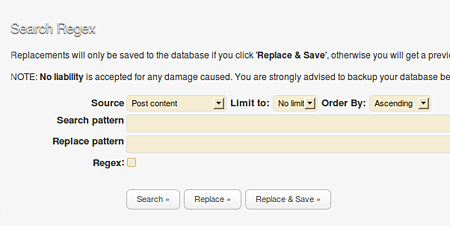
Search Options
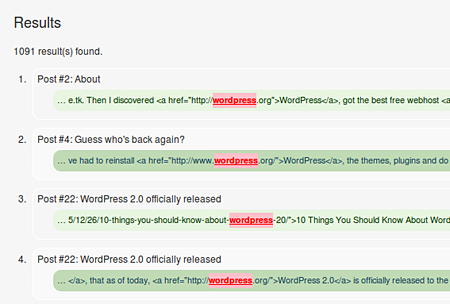
Search Results
The plugin author – John Godley, created the Search Regex plugin primarily for helping WordPress users with blog migration and upgrading. This WordPress plugin comes in very handy when you’re changing the image directory for your post images or URL paths to your posts, like if your changing your domain name or moving from a free blogging service like Blogger to a self-hosted WordPress. This plugin can also be used to edit/remove WordPress plugin tags or correct misspelt words. With Search Regex’s search and replace pattern, you can perform these tasks easily and quickly. Saving you lots of time and the hassle of manually editing each post.
For more information regarding the installation, usage, search options and examples regarding the Search Regex plugin, make sure you visit the official Search Regex plugin homepage.
The Search Regex plugin is a very powerful, useful and helpful WordPress plugin. I wish this plugin or something like it was developed earlier. But anyways, I’m just glad that someone came up with the idea of creating a plugin like this so that WordPress users won’t have a hard time and won’t waste too much time editing URL paths or image directory paths. Thanks John and more power to you!
IMPORTANT: To those who plan to use the Search Regex plugin, first thing you should do is create a backup of your WordPress database before making any changes. Also, make sure that you always use the “Search & Replace” preview before saving it to the database.
Check out the Search Regex WordPress plugin.



It’s brilliant! I’d be sure to keep this plugin around it will definitely come in handy someday.