
Dash-Note is a useful plugin for WordPress users who need something to organize and remind them of their blogging tasks and ideas. Basically, it works like a Post-It note for your WP Dashboard.
This plugin is simple, straight-forward and easy to install. Just unzip the file and upload it to your wp-content/plugins folder. Once you install and activate Dash-Note, you’ll find a small piece of crumpled yellow paper in your WP Dashboard. If you have Akismet installed, you’ll find it under the Spam statistics and if not, it would be beneath the Blog Stats section.
Screenshot:
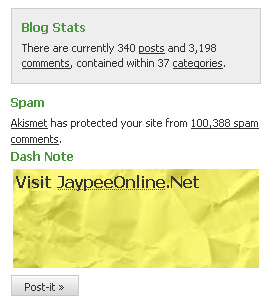









My Take:
The Dash-Note plugin is a good alternative to a notebook or piece of paper because you don’t have to worry about losing it or leaving it somewhere. Although there is one drawback. This plugin only works with one posted note. When a note is modified, it will overwrite the previous or existing note.
Check out the Dash-Note WordPress plugin.
Anyone here tried or installed the Dash-Note plugin for WordPress? What feature/s would you like to see added to future updates or versions of this plugin? Do you know of any other WordPress plugins that provide the same functionality/options? Please share your thoughts by leaving a comment below.




@Brown Baron – Yeah, it’s really useful but limited. Hopefully, the author could make improvements and allow multiple reminders or notes. Let us know if it works for you.
Btw, I’ve used the Reminderfox plugin before but uninstalled it. I think I’ll try to use it again. :)
This seems like a good plugin to remind you of your most important blogging todo for the day. For multiple reminders, I use the reminderfox plugin for Firefox. I think I’ll go try this out.
@Melo – So now you’re relying too much on this plugin. Hehe :D
@ Jaypee: It works.. the thing now is Im putting a lot of pending works and its kinda annoying.. hehehe
@Euri – That’s a very good reason not to use it. Hehe :D
Basically, because I don’t need it. :) I am not the type of person who takes note of what to blog today, tomorrow and the other day. It’s mostly in a random basis.
@jhay – I know the reason why. It’s the one you told me about that involves modifying the WP Dashboard right? ;)
It’s a nice plugin, but I won’t be using it. I already have a similar yet more comprehensive system in place to help me beat blogger’s block and get my workflow moving. :lol:
@Melo – There’s one who likes and actually uses it! Hehe So no more writer’s block from now on, eh? :D
great plugin… i have tried it after reading your post… it will help us to avoid blogging block..
@Euri – Hehe yeah it’s useful but I don’t think everyone would use and install it. Anyways, what’s your reason for not wanting to use it? :D
I think this one is a useful tool. But I don’t think I want it. :P