
I’ve received some inquiries regarding the tiny icons (flag, web browser and OS) displayed beside the commentators name for each comment left here on JaypeeOnline. I promised that I’d blog about the plugin that I use for that so today I’m gonna share it with you guys. Previously, I used the Firestats plugin – a web analytics/statistics plugin that included a feature of displaying the comment info. However I had to uninstall it early this year because it eats up a lot of the disk space and increases the size of the WordPress database.
I really like the comment info feature of Firestats and find it very useful that I searched for a plugin that specifically did that job. I wasn’t sure if such a WordPress plugin existed but I kept looking and finally found one. The Comment Info Detector plugin is created to help bloggers know where their readers or commentators come from (country of origin based on IP address), what web browser they’re using – Firefox, Safari, Google Chrome, Internet Explorer and what OS (Operating System) they have installed on their computer.
This is a plugin for WordPress 2.6+ that can help you know where your commenters come from, which type of web browser and OS they used when they left a comment on your blog. It provides two functions that take IP and User Agent as parameters and then return HTML string contains country flag, web browser and OS icons. You can put these icons anywhere you like in each comment.
In fact, this plugin is a combination of two plugins: WordPress Browser Detection Plugin and Easy IP2Country that I have intergrated as a built-in plugin for my premium theme before, see this page for example, but now I decide to separate it as a new plugin with some enhancements and share it for everyone.









Screenshot:
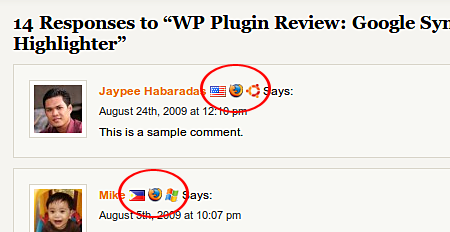
Comment Info Detector displays commentator’s country flag, web browser and OS.
Features:
- Detects and shows commenter’s country flag, web browser and operating system
- Supports many web browsers and operating systems: major desktop browsers, antiquated browsers, blogging software (for trackbacks and pingbacks), text based browsers, various PDAs and cell phones.
- Uses a binary file for IP to country resolution and supports database sources from Webhosting.info – Software77.net
- The returned string can be configured as a template to suite your theme
Comment Info Detector isn’t one of those must-have WordPress plugins but very useful if you want to know more about your readers/commentators and can be handy at times. It
can also help you come up with what to blog about especially if your blog is about technology and other tech related stuff. Like for example, if you see that most of your readers/commentators use Firefox as their web browser, you can blog about a new Firefox addon/extension or a list of useful Firefox addons/extensions, get what I mean? I’m sure there are also other ways that the Comment Info Detector plugin can be useful for you and your blog.
It’s not that hard to install, it just requires you to insert a line of code into your theme’s comment.php file. To make sure that you do it right, don’t forget to read the installation and usage instructions found at the plugin homepage.
Anyone heard, tried or are using the Comment Info Detector WordPress plugin? What do you think of this plugin? If you haven’t tried it yet, would you consider using it on your blog? Please share your thoughts.
For more information, installation and usage instructions, visit the official Comment Info Detector WordPress plugin page. You can also download it from the WordPress Plugin Directory.



Wow! good plugin for comments! ;-)
@Michael – You did? Cool! :D
yeah I noticed this the first time I came here in your blog. This is cool.
@elmot – How about a geek at heart? Hehe..yeah, I’ve had this plugin running here for several months now and was finally able to blog about it.
I doubt that there’s a plugin like that. Maybe you can create one? LOL
Hey, I am not really a self-proclaimed geek, but I love to have this one. I saw this stuff on so many blogs, and at last, Jaypee bared it.
I agree with Jan, is there such kind plugin that could give an idea if the commenter is a cutie? Wahahaha!
@K – Oh really? So how did you like it? Are you still using it on your blog or not? Yeah it is, and that shows that not only geeks are interested in this plugin. :D
I’m not sure I understood your question clearly. Can you be more specific or maybe an example?
I tried this before when I saw it over your blog and it’s one of the nifty musthaves in any comment section, I must say.
Do you also know a plugin that gives you the correct visitors link directly to your dashboard?
@hieudt – My pleasure! Actually, this review is long overdue coz I’ve already been using this plugin for several months now. Btw, I’m gonna check out your new plugin, the WP System Health.
@Loy – I tried UserAgent Spy before, but I’m not sure why I dropped it and used Comment Info Detector. I think it had some issues/conflicts with my blog or other WordPress plugins.
@Jan – Its not because it only detects the comment/referrer info and displays the icons according to the info it detects.
Regarding your question, I’m not aware of any plugin that can do such thing and if there was such a plugin, I’m sure it would be popular. But then, if you have it on your blog it might turn your readers away. LOL
Good morning to you too buddy! :)
This WP plug in is not a resource hog? Maybe it’s not – you’ve it installed after all.
Quick question: is there a plug in that will tell me what the commenter is wearing as he/she makes that comment? A quick peek? Or a heads up function to warn me as in, “This guy is high on mosquito coil, or over caffeinated. Proceed with caution!”
Never mind. Just wanna say good morning from these islands, buddy. :)
Thanks for reviewing my plugin.
@Jhay – Haha..you think so? I think other bloggers who keep track of stats would also be interested in such info. :D
I use a similar plugin named UserAgent Spy. Don’t know if it’s a good thing or not. :-)
Such info only geeks like us would love to have. ;)