
In my post entitled How Secure Is Your Password, I promised you guys that I would show you how to make use of the hidden password generator in Windows XP.
This is a built-in feature of Windows XP that only a few people are aware of. With this tool, you won’t have to download a separate password generating program or go online to visit a password generating website. It only takes a few minutes and it’s very easy to do.
Steps on how to use the Windows XP hidden password generator after the jump.








Here’s what you need to do:
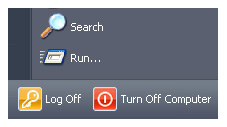
- Click on Start
- Then go to Run
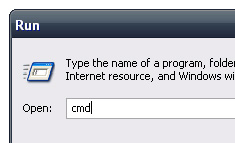
- Type cmd
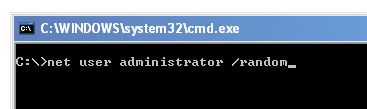
- In the command prompt, type
net user administrator /randomand hit Enter - Viola! You now have a secure 8-character password.
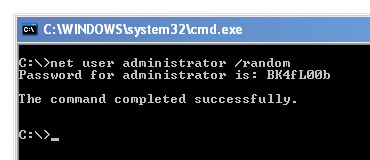
If you don’t like the created password and would like to create a new one, just hit F3 (assuming that you didn’t close the window) to bring back the ‘net user administrator /random‘ line so you won’t have to type it again, then hit Enter. Repeat steps until you get desired password.
I hope you liked this simple tip on how to use the Windows XP Password Generator and find it useful. Who knows, it might come in handy in the near future.



Thank you for describing this tricks with command prompt screen shot. Now it is clear to me.
Thank You! I have been looking at some of the freeware password generators and it is nice not to have to load additional software when I don’t have to. Easy, fast and secure.
@Shutter Box – Good points you brought up. Yeah, passwords should be changed every now and then. I think it’s easier for users to use randomly generated passwords for email accounts, social networking sites and other personal sites because you decide when to change the passwords.
Btw, thanks for sharing your thoughts!
I’d just like to share my thoughts on this one…
Having the computer generate a password for you is probably fine if you are using just a few computers as you could easily remember the randomly generated password. You’d also need to change your passwords at least every month if you want to have more security. Having randomly generated passwords, unless of course you are using token based authentication, with security policies that require you to change passwords every month might just give you more headaches.
@Ade – That’s a legit question. I’m glad you brought that up coz I never thought of it that way. Regarding your question, this method doesn’t change your current administrator password but creates a new password. Now you don’t have to worry about NOT being able to log in to your PC later. Hehe :D
Okay, I sound like a n00b, but it says “password for administrator”. Did I just change something in my computer or is that password just some random sequence my computer created? I hate to NOT be able to log in my PC later. :razz: