
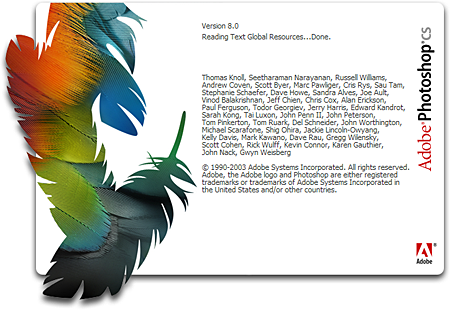
Are having a problem getting the ALT key to work after installing Adobe Photoshop on Ubuntu? Don’t worry, I’m gonna show you how you can fix it with a few simple steps.
I’ve been running a Windows Vista/Ubuntu dual boot system on my Toshiba Satellite A305-S6872 for almost a year now. The Windows partition is the one I use for regular web surfing, video chat (Skype) with my parents and in-laws, watching movies, or playing pc games while the Ubuntu partition is my main desktop – the one I use for work/blogging.
I have everything I need (blogging tools) on Ubuntu, including one of the most important tool – Adobe Photoshop. I installed Adobe Photoshop CS using Wine and it worked flawlessly until I found out that the ALT key wasn’t working. I use a lot of keyboard shortcuts in Photoshop and the ALT key together with the CTRL & SHIFT keys are very important when using keyboard shortcuts. I first noticed the problem when I tried using the Clone Stamp Tool (the ALT key is used to select the area to clone from).







I never had this issue with Windows so it had to be with the settings on Ubuntu. I checked all the areas under Preferences and found the culprit.
Here’s how you can make the ALT key work with Adobe Photoshop on Ubuntu:
NOTE: I’m running Adobe Photoshop CS on Ubuntu 8.10
1. Click on System > Preferences > Windows.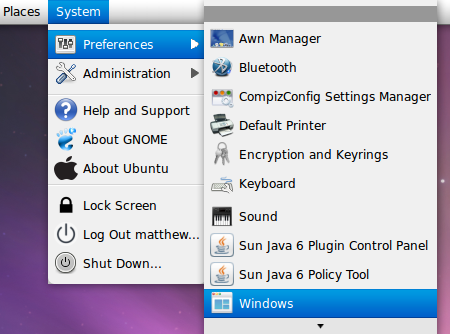
2. Look for the Movement Key section.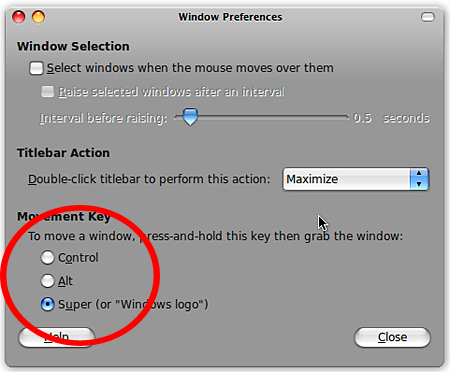
3. Make sure that the ALT key option is not selected. If the ALT key is selected, choose a different option – CTRL or Super (or “Windows logo”) and click Close.
4. To be sure that the changes you made are recognized, reboot/restart your computer. That’s it, next time you use Photoshop on Ubuntu, the ALT key should be working. I’ve only tried this with Adobe Photoshop CS but it should also work for other versions of Photoshop.
Wasn’t that easy? Btw, if you’re running Photoshop on KDE the settings are different but the procedure is similar. Here’s how:
Open KDE Control Center > Look&Feel > Windows Behavior > Second Rollout and then change the settings, making sure that the ALT key is not used for moving or resizing windows. For those running KDE version 3.4, this setting is under Desktop > Actions Tab > Modifier Key.
Hope this short and simple tutorial helped you with your ALT key problems with Adobe Photoshop on Ubuntu.



hey man, thank’s for your tips!! you save me… thank’s alot
Glad to know that this article is still helpful and useful after all these years. You’re welcome!
Thanks! You saved me! :)
You’re most welcome! :)
Ubuntu Rocks sangat handal dan bisa dipercaya.dan saya yakin akan bisa menjadi saingan windows. Viva Open Source
@Jhay – Hehe..I think its become a habit due to using Windows for a long time. Thanks! You don’t use Ubuntu anymore? You could partition your laptop and make it dual boot to Windows and Ubuntu. Its very easy to do and works flawlessly. ;)
You had to restart the PC for the changes to take effect on Ubuntu? I though that thing was with Windows PC only? :P
Anyways, it’s a nice tip. How much I miss Ubuntu!
@Industry News – You got that right! I’ve partitioned my laptop into two and made it dual boot Windows-Ubuntu and I use Ubuntu as my main desktop. I barely use Windows these days.
The more Ubuntu/Linux becomes more popular, more software/hardware vendors would provide support and compatibility to it and I can’t wait for that day.
Ubuntu Rocks! It is already a viable alternative for the enthusiast, and once the mainstream can have it as easy to install and as compatible with everything as Microsoft’s products, we will see a wider acceptance. Viva Open Source, Viva!