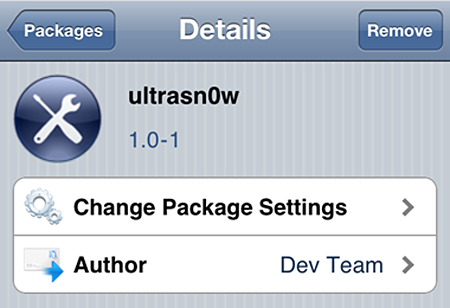
The iPhone Dev-Team recently released a new version of their carrier unlocking tool called Ultrasn0w for US based iPhone users who have the problem of being stuck with one network – AT&T. The latest version, Ultrasn0w 1.0-1 can perform a carrier unlock on iPhone 4 units running iOS 4.0.1 with a 01.59.00 baseband. It also works on iPhone 3G/3GS units running iOS 4.0.1 with the following basebands – 04.26.08, 05.11.07, 05.12.01 and 05.13.04. With this tool, US users can unlock their iPhone and use it on a different network like T-Mobile.
NOTE: Make sure that you backup your iPhone before doing a jailbreak or unlock. You can do this by syncing your iPhone to iTunes. iTunes automatically creates a backup of your iPhone when you sync, which you can use later on to restore your iPhone in case something goes wrong or if you simply want to return to a previously backed-up state.








This procedure requires the iPhone to be jailbroken and requires the latest version of Ultrasn0w which is Ultrasn0w 1.0-1. If you’re iPhone is not yet jailbroken, you can do it by opening Safari and visiting JailbreakMe 2.0 Star which is a browser-based jailbreak. JailbreakMe 2.0 requires firmware 3.1.2+ and less than firmware 4.1. Check out this post for a more detailed instruction on how to jailbreak an iPhone using JailbreakMe 2.0 Star.
Once your iPhone is jailbroken, you can now proceed to unlocking it. Below is a video by TechManTV which shows a step-by-step process on how to unlock an iPhone 4 with iOS 4.0.1 using Ultrasn0w 1.0-1.
If you’re having a hard time following the instructions in the video, you can visit Redmond Pie’s post which provides a more detailed step-by-step process on how to unlock your iPhone 4 iOS 4.0.1 with Ultrasn0w 1.0-1.
Before performing a jailbreak and/or unlock on their iPhone, there are several things users should take note or consider. First, jailbreaking and unlocking methods can void your iPhone’s warranty and violate Apple’s Apple iPhone Software License Agreement. Second, jailbreaking an iPhone means the user can’t update to the latest iOS firmware update (without losing the jailbreak) until a new jailbreak has been released.
Although I’ve been thinking about doing it, I personally haven’t tried jailbreaking or unlocking my iPhone 3GS so I can’t recommend it to everyone. But if you’re not worried about voiding your warranty, if your warranty is over or you’re the type of person who’s brave enough to try these kinds of things, then go ahead and try it. Jailbreaking and unlocking an iPhone enables the user to do more things and opens up more features on the device. Just make sure that you read and follow instructions carefully and always backup your iPhone before performing a jailbreak or unlock procedure.
Anyone here tried unlocking their iPhone 4 using Ultrasn0w 1.0-1? How about trying jailbreaking or unlocking an iPhone in general? What have been your experience with jailbreaking and unlocking the iPhone? Please share your thoughts.
[image source: Redmond Pie / video source: TechManTV]