
This is a guest post by Keith McDonald. If you want to guest post on this blog, check out the guidelines here.
In the olden days, you nearly always got a separate copy of the operating system which was installed on a newly purchased computer. For example, if you purchased a computer with Windows XP installed on it, you would also get a Windows XP CD included in the package. Unfortunately, this is not always the case nowadays. Frequently, when you buy a computer from a company like Dell or HP no operating system CD’s are included. Rather, they sometimes create a restore partition on your computer or give you the ability to burn your own recovery disk.









Now most people will ask the obvious question: why would I ever need a Windows Installation or Recovery Disk? After all, I’m never going to be changing my operating system!
The Role of the Windows Recovery Disk
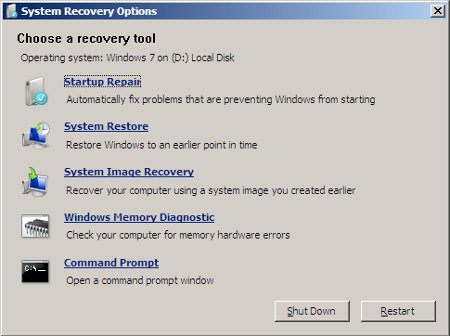
A Windows Recovery Disk is important because of its ability to help fix a computer which has run into problems. Without it, you will have a much more difficult time, for instance, with a PC which refuses to boot up Windows. Here is a little summary of what a recovery disk can and can not do.
What does a Windows Recovery Disk let you do?
- Repair a computer which won’t start up
- Allow you to restore your computer to a given restore point
- Allow you to restore an image of your machine
- Perform a memory (RAM — random access memory) analysis
What does a Windows Recovery Disk not do?
- Allow you to install a fresh copy of Windows.
Create your own Windows Recovery Disk
Assuming your computer has run into problems and you don’t have an installation CD or a recovery CD, how would you create one?
1) Log onto a working computer. If your computer is not working, use your friends or, perhaps, a library machine.
2) Grab a blank rewritable CD or DVD.
3) Head over here, scroll down a bit, and click on the recovery disk link. Most of you will want to choose the top option: Windows 7 Recovery Disc 32-Bit (x86) Edition. If you are unable to download the file it means that you don’t have a torrent program on your computer. If so, go and download BitTorrent and try again.
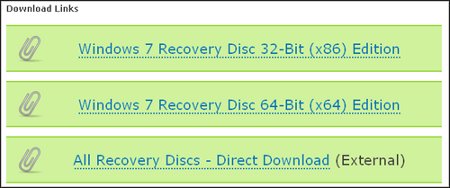
4) The file you have downloaded is an ISO file and must be burnt to a CD or DVD. If you are using Windows 7, this can be done within the operating system. If not, check out this list of FREE CD/DVD Software for Windows and select a program of your choice.
5) You now have a working recovery disk. If you need to make use of it simply place it in your CD tray, restart your computer, and boot from your CD (as opposed to your hard drive).
Conclusion
If you are ever having problems with your computer (in particular, if it won’t start up) then I highly recommend that you download and burn the Windows Recovery Disk. It is quite easy to use and can solve many basic Windows problems.



I tried using a recovery disk after my computer crashed, but when I go to “start up repair” it gives me an error moments later saying “if you have recently attached a device to this computer, such as a camera or portable music player, remove it and restart your computer”. The problem is, I haven’t had anything hooked up to the laptop in weeks and it still gives me this error after various reboots. This is extremely irritating and any help would be appreciated.
I used the recovery disk to fix my windows 7 startup problem, but now I can’t connect to my network anymore, which is a problem because my only printer is a network printer.
does anyone know what’s wrong?
@Abhi – Yes you get a recovery disk when you buy a Windows OS but nowadays, it’s very rare for a PC or laptop manufacturer to provide a recovery disk. Users have to burn the restore disks themselves.
since Windows Vista your Windows pack comes with a recovery disc when you buy it… or your PC or laptop manufacturer will provide it you so you don’t need to create a recovery disc separately..
@zammax – You’re welcome! :)
Thanks for the information I sometimes experienced this problem before and I usually re-install Windows.