
As the in-house desktop support among my family and friends, I get a lot of questions regarding computer and technical stuff. Most of these questions fall under basic computer configuration, setup and/or tweaks. One of the questions I often get is “how to disable or turn off the startup sound on Windows XP”. I’m sure anyone who’ve used or tried Windows XP know how annoying the startup sound is, especially if the speakers are on full volume. It could also be both distracting and embarrassing in a classroom or meeting.
Today, I’m gonna show you how the Windows XP startup sound can be turned off or disabled. This procedure/short tutorial could also be used to disable/enable other Windows XP system sounds like the logon or logoff sounds.
1. Click on START > Control Panel.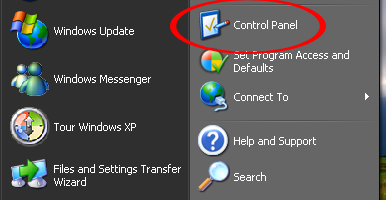







2. Click on Sounds, Speech, and Audio Devices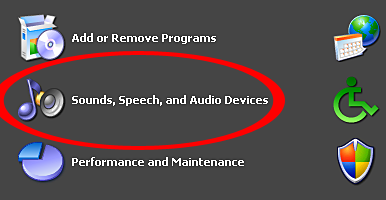
3. Click on Sounds and Audio Devices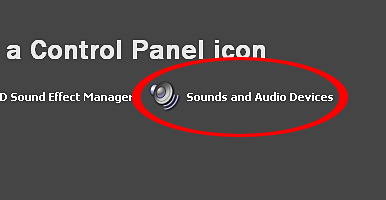
4. Click on the Sounds tab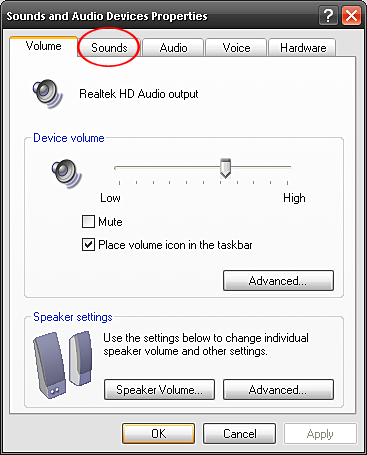
5. Look below for Program Events. Scroll down and look for Start Windows.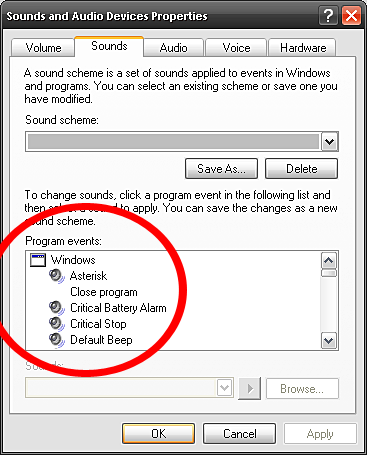
6. First, highlight Start Windows. Second, go below to Sounds and select (None).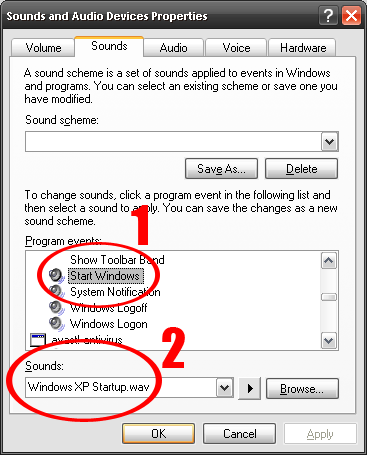
7. Click Apply and then OK.
Now, you can go ahead and restart your computer for the changes to take effect. This time, when the computer boots up you won’t hear the annoying startup sound.
I hope that this short and simple tutorial on how to disable the Windows XP startup sound can be useful or come in handy one of these days. If you have any questions regarding this post, feel free to contact me or leave a comment below. You might also want to check out my other Tips & Tricks posts for other useful and related tutorials.

very helpful. thanks so much.
I sometimes make fun of changing my logon sound to a bomb to scare someone who turns on my rig haha
Nice post Jaypee. Although I already know this one, you are very industrious at capturing those snapshots one by one :)
Just a thought, why would they want to turn of the startup sound? he he..