
I just recently upgraded my Ubuntu partition to the latest version – Ubuntu 11.04 Natty Narwhal. The upgrade process went smooth although it did take quite a while to finish because my Internet connection was wonky. The first thing you’ll notice when you install or upgrade to Natty Narwhal is the new default interface – Unity interface which is already the default for Ubuntu 10.10 netbook edition. Some users like me, prefer the old classic interface and fortunately, Ubuntu 11.04 allows users to disable the Unity interface and revert back to the “classic” or traditional GNOME desktop interface.
If you’re one of those users who recently installed or upgraded to Natty Narwhal and would like to use the “classic” or traditional GNOME desktop interface but don’t know how, don’t worry because today I’ll show you in just a few short steps on how to disable Unity Interface and restore original (classic) interface in Ubuntu Natty Narwhal.
Here’s how to do it:
1. Go to Ubuntu login screen. If you’re already logged in, logout and type/select your username.
2. On the bottom panel, select “Ubuntu Classic” or “Ubuntu Classic Desktop“.
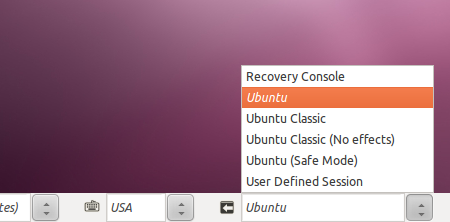
3. Type in your password and login.
4. Ubuntu will now use the classic Ubuntu Desktop interface.
For those who haven’t upgraded yet and don’t know the difference between the GNOME desktop interface and the Unity interface, here are a couple screenshots I took from my Ubuntu partition or you can also refer to my previous post on Ubuntu 11.04 Natty Narwhal.
Unity interface
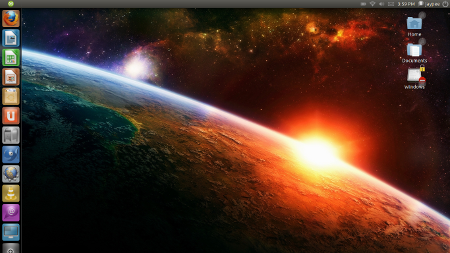
GNOME desktop interface (using AWN)
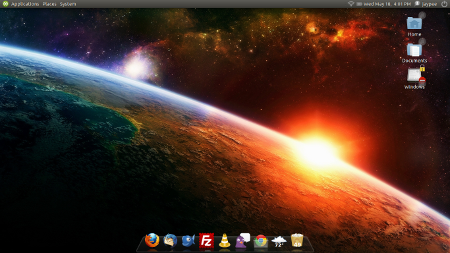
If you want to re-enable or revert to the Unity interface, just follow the same steps above and instead of choosing “Ubuntu Classic Desktop”, select “Ubuntu” or “Ubuntu Desktop Edition“.
Hope this short and simple tutorial helped you disable the Unity interface and switch back to the classic or traditional GNOME desktop interface or vice versa.

Unity is installed but you log in to ubuntu-classic and there is no option to choose in the greeting window. I can only choose what desktop to use when I am logged in using the program “Login Screen” in System menu.
These people are doing things so badly that everything is a mess and they are ruining Linux’s prestige.
I wish this told me how to “Disable” unity, and not change my login session. This is impossible for me to do over VNC :(
my laptop cant run ubuntu 11.04, it just falls back to the terminal. i can run startx at the prompt, but its very slow and the gnome was unresponsive. maybe due to graphics card? my laptop was neo sis672 video card. :(