
Recently, I tried installing Adobe Photoshop CS3 on my laptop but when I started the installation process I got this error message:
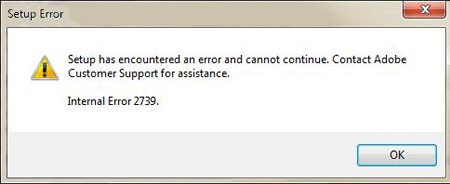
I rebooted my machine and tried to install again but I still got the error. The next thing I did was to copy the files locally on my machine and tried installing it again but I still wasn’t successful and got the same error message. Finally, I decided to look for a solution or fix to this problem. I found the solution over at the Adobe support forums and today I’ll it share with you.








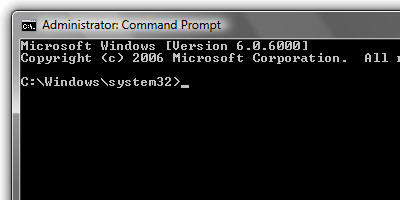
For those running Windows Vista 32-bit, here’s what you need to do:
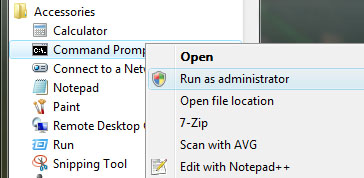
- Click Start > All Programs > Accessories.
- Right-click on Command Prompt and choose Run As Administrator
- Go to C:WindowsSystem32.
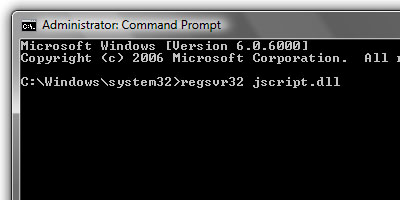
- At the prompt, type regsvr32 jscript.dll and press Enter.
- When a dialog box with the message “DllRegisterServer in jscript.dll succeeded” appears, click OK.
On Windows Vista 64-bit:
- Choose Start > All Programs > Accessories.
- Right-click the Command icon, choose Run As Administrator, and authenticate.
- Navigate to WindowsSysWow64.
- At the prompt, type regsvr32 jscript.dll and press Enter.
- When a dialog box with the message “DllRegisterServer in jscript.dll succeeded” appears, click OK.
UPDATE: I’ve published another step-by-step tutorial for those who are experiencing the same problem on Windows 7 64-bit. Adobe CS3 Internal Error 2739 Fix (Windows 7 64-Bit)
I didn’t provide the screenshots for the 64-bit version because it’s practically the same procedure and the only difference is the location where you need to run “regsvr32 jscript.dll”.
After performing and following these steps, I was able to successfully install Adobe Photoshop CS3 on my machine. Btw, this error isn’t exclusive only to Photoshop CS3 but could happen if you try to install any Adobe CS3 product.
Anyone experienced getting this same error message while installing an Adobe CS3 product? What did you do to fix it? If you know of an alternative or better way of fixing this problem, please do share it with us.



Thank you !!!
Bro… Awesome. It worked perfectly for me. Thanks a ton.
Thank you soooooooooooooooooooooooooooooooooo much :D
Thanx dude……..really helpful
Thankssssssss A Lot………. buddy
thank u very much sir for solve my problem.
thanks a bunch, worked for me. am using win7
This same technique worked great for Flash Pro CS3 Extension Manager 1.8 installation on Windows 7 64-bit. The only difference is you must cd to c:\Windows\SysWOW64 before typing the regsvr32 jscript.dll command. After that, the Extension Manager installs properly.
I am running Windows7 on my laptop. Will the above solution apply to it as well. If not please provide it for Windows 7 32 bit. Thanks
thanks :X:X:X It’s very cool!
TNX! you’re cool
I’m having this error with Windows 7–are the instructions to repair the same as those for Vista?
Thanks!
thanks bro.. its really work..
Great, it worked well. Thanks a ton :)
@kathleen – You’re welcome! Glad I could help and keep you from throwing your computer. :D
Thanks… about ready to throw the computer out the window before I found you….
@Jamesy – You’re welcome! Good to know this tutorial helped keep you from going crazy. Hehe :D
Hey thanks, at last in your blog I found a fix for the problem that’s been driving me crazy. I would never have come up with the solution.
Fantastic – thanks again!
hi I am using Window 7 same error i had follow same proc as you described in blog… but then after i m getting same error
setup Encountered an error
Internal Error 2739. Contact adobe Customer Support.
i am using Xp and i am getting error message while opening CS3 can you please assist.
Jaypee,
Thanks for the Error 2739 Fix.. I googled the error and got your blog post and rememdy. Easy to follow your directions and saved my day.
Regards,
Rick
I tried all the below; but still when the programs appears like installing but then immediately it desappears; anyone to help???
To do so:
Run an elevated command prompt as Administrator.
For Windows Vista 32-bit user, ensure that the command prompt is at C:\Windows\System32\ folder. For Windows Vista x64-bit, issue the following command to change to 64-bit folder in order to use the correct DLL files:
cd ..\SysWow64
Type the following command and hit Enter:
regsvr32 jscript.dll
and optionally (if problem persists),
regsvr32 vbscript.dll
Run the Adobe installer again.
please help; help quickly
I tried all the suggested above; but when i install the adobe dreamweaver; it shows up the setup like installing but it desappears i,,ediately; does anyone have a clue???
thanks
@Yvonne – You’re welcome! Glad I could help you out. Btw, thanks for dropping by and leaving a comment. :)
Thank you for your solution, now i can instal ady :razz:
@Tomas – Thanks for sharing this info. I’m sure this will come in handy in the near future. :)
Only reregister jscript.dll doesn’t work sometimes.
Here is complete solutions:
http://blogs.msdn.com/heaths/archive/2007/05/31/windows-installer-errors-2738-and-2739-with-script-custom-actions.aspx
@bla – You’re welcome. :)
tx
@daniel – Are you sure you followed the instructions? Make sure coz you might have missed something. Also check if you’re account has Administrator privileges. If it still doesn’t work, you can check out the link that Tomas provided in his comment. If that also fails, let me know.
Btw, are you running on Windows XP or Vista? If Vista, is it 32-bit or 64-bit?
i followed all the instructions but still the ‘error 2739’ popped up in my screen. any help will be appreciated
@jb – I didn’t come up with the solution, I got it from Adobe user forum. I just posted it here so I can share this information to other users like you. But thank you anyways. :)
You’re awesome!
I had the same problem with Windows Server 2008 x64.
@Randy – Hi there! I was about to reply to your first comment when I read the second one. Good to know that you were able to get the installer running and figure out the problem. Btw, did you use this post to fix the error or you just came across this post after you had problems running the installer?
hey i figured it out i just had to run setup as administrator ! all is good
after i got the error 2739 fixed,i still can not install the product when i go to install and setup exe an alert comes up with adobe installer already running you can only install one program at a time how do you stop the install from running?? i have rebooted my pc and searched troubleshooting any help???
@rhoen – Got that right kuya! From what I heard, Windows is already working on a new operating system called 7. It was previously named Blackcomb and Vienna. There are even rumors that it might be released next year but knowing Microsoft and looking back at Vista, you know that it’s a longshot. But again, Microsoft might just surprise us this time. Hehe
well, this is reality guys. VISTA is here and in, i think, in 2 years time, a new Windows OS is coming out again. Yes, Jayp, as what i have mentioned before, it’s not on your OS. I installed it on my machine without any glitch!
@Juicy B – You’re welcome! Glad to know that this article has helped you.
Regarding Vista, if you keep having problems with it, why don’t you just install XP on your laptop instead? I’m sure you won’t have that much problems and you won’t have to reformat your computer often. :D
right on maboo! vista really sucks! take it from me! i use vista ultimate and i’ve gone through so many reformats on my laptop! but otherwise, vista only got the good looks….
wow! thanks! really works! very helpful! :smile:
thanks maboo!
@doitz – Cool! It’s good that your computer meets the requirements to install and run Photoshop CS3. Happy photo editing! :D
:lol: At last!!!! finally!!! i was able to install PS Cs3! before the same thing happenned I can’t really continue to install it but after reading this blog….it’s just like an answered prayer!hehehe thank for the tip! Now I can enjoy photo editing:lol:
@Lloyd – I knew it wasn’t because of Vista but wasn’t sure of it. Now you’ve confirmed it. I guess it must be the installer cd that I got or like you mentioned, a conflict with another program or software. Thanks for sharing! :D
@Dre – If I had the choice I woudn’t have switched to Vista. As I said earlier, it was preinstalled on my laptop when I bought it. I’m planning of buying an external hard drive so I can backup my files then I’ll replace it with XP. :D
@dimaks – Old skool huh? Anyways, it doesn’t matter what version you’re using if you can create beautiful stuff on it. Some people I know have the latest version but barely use the majority of its features which is for me a waste. Hehe Thanks! ;)
@Joie – For my old laptop, I had XP and Photoshop CS, but after I installed Ubuntu, I didn’t use it anymore coz I didn’t install Wine. Prior to this, I was using CS2 but after a friend told me that Photoshop CS3 uses less resources and loads faster, I uninstalled it and replaced it with CS3. :D
I didn’t encountered that error on my system (Vista Business + PS CS3). I guess its just a software glitch or a conflict with another software installed on the system.
The reason why I haven’t switched to Vista :lol:
still using photoshop 7 here hehe.. i tried CS2 before but my machine cannot stand it, due to my mapping softwares. oh well, useful tips jaypee!
This is a good info for CS3 and vista users. I am still using CS2 and XP. :roll:
@K – Vista has it’s good side and bad side but based on user feedback that I’ve read or heard of, most of it are bad. Btw, I’m one of the poor souls coz I’m currently using Vista on my machine. :P
Vista specialises in making things more complicated than they need to be ;) An unregistered DLL can happen in XP too though. I got rid of Vista a while back so I’m note sure if MS just didn’t bother or if this is a case of bits falling over. Either way a useful article for the people stuck with Vista (poor souls need all the help they can get).
@jhay – I wish I still had XP. I had no choice but to use Vista because it came preinstalled on my laptop and I had to use it right away. If not, I would have installed XP on it. :D
I’m not sure if the problem is with the OS. I could be wrong, but it might be a conflict with one of the programs I installed earlier.
I’m still on Photoshop CS in my XP machine. :lol:
Another crappy thing with Vista eh?