
I learned so many new things at WordCamp: Las Vegas, not only about WordPress and not only from the speakers but also from the other attendees.
Honestly, I barely used Twitter before WordCamp and used it only to network and publish my recent blog posts using TwitterFeed. At WordCamp I can safely say that almost everybody in the room were busy tweeting. People were using their laptops or mobile devices to tweet about what was happening at the event or something that the current speaker was talking about. I noticed that several people were using some sort of desktop application for Twitter, which I later found out to be TweetDeck. I know it isn’t new for some of you but it was for me and I’m glad I found out about it because it made me fall in love with Twitter again.










What is TweetDeck?
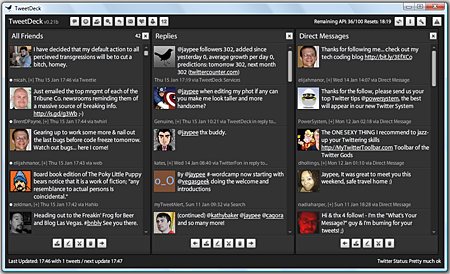
TweetDeck is an Adobe Air desktop application that is currently in public beta. It aims to evolve the existing functionality of Twitter by taking an abundance of information i.e twitter feeds, and breaking it down into more manageable bite sized pieces.
What makes it different from other Twitter desktop clients like Twitteriffic, Twhirl, Snitter, and AlertThingy? TweetDeck can display more than one column of information at a time. As a default, it displays three columns – All Friends, Replies and Direct Messages but you can add more columns Search and Groups (maximum of 10 columns). Aside from that you can move any column left or right, you can also filter any column according to text, username, source or timeframe. If you follow a lot of people on Twitter, TweetDeck’s ability to create Groups and sort/filter the content is a very useful tool. To make changes to any Group or to add/remove members, just click on the Group name.
Notification

TweetDeck notifies you of recently received tweets/updates that shows up on the upper right corner of your screen.
Status Indicator

TweetDeck indicates the last time tweets were received and also displays the Twitter server status.
Tweet Window

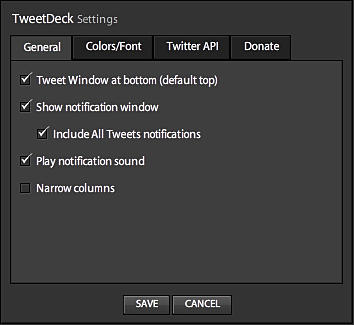
By default, the tweet window is displayed on top of of the program window but can be easily moved to the bottom via the settings page. TweetDeck’s tweet window includes a link shortening tool powered by bit.ly, lets you share pictures using TwitPic and also includes TweetShrink, a service that shortens tweets to help you make the 140 character limit.
Additional Features
- Catch up with overnight global twitterings as TweetDeck stores all updates whilst running
- Continual status updates of TweetDeck and Twitter
- Resize TweetDeck as either an unobtrusive column, full screen or anything in between
- Especially useful running full screen on a separate monitor
- Filter tweets using the tweet text, username, source or timeframe
- Auto updates from the Twitter API
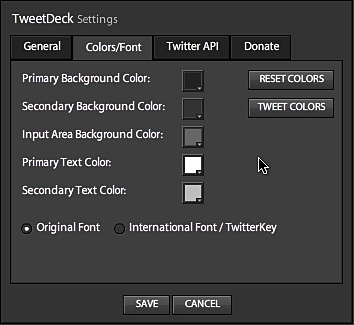
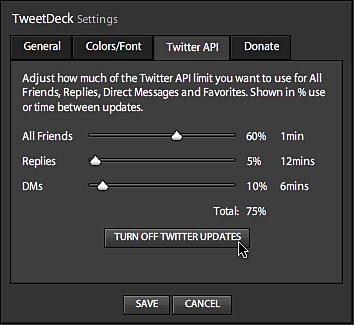
Aside from these features, you can also customize TweetDeck and some of its functionality via the settings.
TweetDeck Settings
As with most applications or software, some people will like it and some won’t. Others won’t like the fact that it occupies too much space because it has more than one column. Another thing to consider about TweetDeck is that it uses up quite a lot of the computer’s resources so this can be a turn-off for some users. But then, with all the functionality and features that it offers, I’m sure many Twitter users like me would like it and use it.
TweetDeck is available for Mac OS X and Windows XP & Vista. It requires Adobe AIR runtime to be installed first. Download the AIR file.
Btw, I just installed Ubuntu on my laptop and I was also able to install TweetDeck on it. If you’re interested to know how I did that, I’ll be writing a post about that later so make sure subscribe to my RSS feed so you won’t miss it.
Do you currently use any Twitter desktop client like Twitteriffic, Twhirl, Snitter? Do you know of any other Twitter desktop clients? What do you think of TweetDeck? What are the features that you like/dislike from it? Would you consider using it as your Twitter desktop client? Please share your thoughts by leaving a comment below.




Hi I just uploaded tweetdeck on my laptop. & in search for ways to use it I came across your article. #question, even tho it saves up lots of tweets down the bar, does it also eat up the memory on your computer? if so, does it clear up once you hit the “clear all” button on the columns? I just don’t want it to eat up the memory on my laptop. other than this question the site seems cool. only thing I can’t find is how to tell if the people you’re following are following you back. that would be nice. I would like to unfollow ppl that are clogging up my timeline without unfollowing the ones that are following me back. if you could answer me these two things it would be great. have a blessed day. – @d_men0408
@doj – I think I remember you now. Yes, we were classmates in several subjects not only Accounting but also Typing class, I got assigned kasi with your block.
Oh okay, I understand. In my case, I don’t have much online privacy coz my name and photos are all over the place. The only stuff I keep private are my home address and other important personal data. Hehe
Thanks! Wish you all the best. Hope to see you more often here on my blog. :D
@Raju – Yep, that’s why I don’t keep TweetDeck open all the time. If I don’t like an application or program I uninstall it but if I like it and its a resource hog, that’s how I deal with it. I don’t keep it open all the time. Only when I need it.
You’re welcome and thanks for dropping by too! :)
@Gem – So you got it installed without any problems? What do you think happened last time? User error? Hehe just kidding.
TweetDeck is a bit of a resource hog, what I do is I don’t keep it open all the time. I only open it up once in a while to check on friend’s tweets and if I wanna post my own tweets.
I guess it depends on user preferences and how we use Twitter. I use TwitterFeed to promote my blog posts and it is effective. :)
Hi Jaypee,
If you took subjects from the Accountancy class, we might have been classmates then. Di ko sure. Either na-clasmeyt ka namon or you knew or were friends with my classmates. Batch 2001 class kami. Don’t blame you if you can’t remember, kasi acquaintance lang tayo. Hehe.
The small pic is intentional. Haha. Would like to hold on to a little bit of online privacy. Hehe.
Goodluck on your job and family. See you ’round the net. =)
I agree with you here. Memory hogging happens if we keep it open for a long time. Thanks for visiting my blog :)
Just gave TweetDeck a try (because I wanted to know the error) but I got that installed today without any problems! I think Twhirl is a system hog too – well, coming from Adobe…
Tweetdeck looks less intrusive and less noisy. I hope it does not consume much of my computer's resources.
Once in a while I use Tweetree to see those threaded conversations.
I tried Twitterfeed long ago but didn't like it. I don't like to announce each post that I make. I also don't want them to start with "New blog post". I wanted to engage an interesting conversation with other Twitters.
@Raju – Yes it is a bit of a memory/resource hog but for me its a keeper. I don’t mind that it is a resource hog because I don’t have it open for long periods of time.
Thanks for the visit! I checked out your blog and saw that we have the same blog theme but you did a better job of customizing it. :)
@doj – Hi there! Yes I did. Were we classmates in USLS? I can’t remember anyone I know with the name doj and I tried visiting your blog but your profile photo was too small. Maybe you can refresh my memory? Thanks for dropping by! :)
I liked tweetdeck the moment I opened it, probably because its based on Adobe Air which by default gives the apps a great look. But believe me, tweetdeck is such a memory hogger. I had no option but to uninstall it within a day. i hope they make use of the recent funding to improve this aspect of it.
@loy – So you’re new to Twitter huh? When did you start using it? If you lazy to post updates, you can use TwitterFeed to post your recent blog post as a tweet or Twitter status. But of course, its also good if you can manually post updates every now and then. :)
Jaypee! You went to La Salle Bacolod, right? Was surprised to see your pic at panjeet’s blog! Seldom do I find bloggers who I’ve somehow personally met. Cool. (Sorry, didn’t know where to post this…off-topic, I know.) =)
I’m still getting the hang of Twitter. I’m too lazy to post updates every once in a while. :-) I might give TweetDeck a try, though. Maybe I’ll become addicted to Twitter if I use it. :lol:
@Gem – Really? I installed mine on both Windows and Ubuntu without any problems. What error message did you get? I haven’t tried Twhirl myself, is it a resource hog?
As far as I know TweetDeck doesn’t do threaded conversations. That would be cool if they can add that option. TweetDeck is still in Beta so expect more new stuff to come. :)
@jhay – I haven’t heard of Twitteroo and like you I’m not really that active on Twitter but I’m starting to use it more often especially after I installed TweetDeck. :D
Tried installing TweetDeck 2x but returned an error message. I'm still sticking out to Twhirl.
Features are pretty much similar with Twhirl, except for the 3 column style and the group feature.
I also wonder TweetDeck can do threaded conversations (like Tweetree). Like Plurk I sometimes run into discussions.
I use Twitteroo but I’m not really active in Twitter. Perhaps I’ll play with this one over the weekend.