
Last week, I received another phishing email pretending to be from PayPal. This time, it was easier to spot that it was a fake email compared to the first PayPal phishing email I got earlier this month. What’s good is that Gmail’s spam filtering system was able to detect it was a phishing email and immediately sent it to the Spam folder.
Here’s a screenshot of the latest PayPal phishing email I got on my Gmail account.
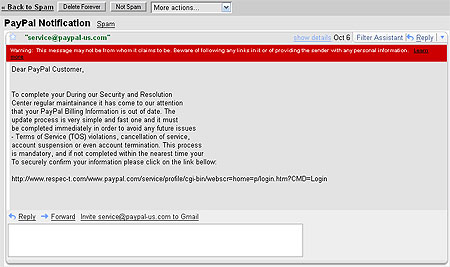



This is the third time that I got a PayPal phishing email but this last one is not as organized or as well composed as the two previous emails. However, it does have some similar characteristics like it asks the user to click on the URL provided and login with their username/password and also how it addresses the user. The other two uses “Dear PayPal Member“, while this one uses “Dear PayPal Customer“. That’s one thing that every PayPal account holder should remember and take note of, PayPal will always address you with the full name used in your account.
Always remember, NEVER click on the URLs embedded on the email and NEVER login with your username or password if you’re not sure with the site or URL. If you want to be safe, login directly from your browser. Another safety measure is to use a secure browser like Mozilla Firefox which can detect if a website or URL is used for phishing. Just recently, Abe Olandres was almost tricked by a new breed of Gmail phishing scam, good thing he was using Firefox which immediately detected it to be a phishing site.
.
Any experiences with phishing emails? Do you know anyone or someone who’s been fooled or tricked by a phishing email? What precautionary measures do you take to keep yourself safe? Share your thoughts!


@Ambo – I’m sure many people even non-bloggers get this type of emails in their inbox. Yeah, we should alwas be careful and as I always say, “better safe than sorry”. :D
OMG, i thought i was alone. Be careful guys.
@Dre – Me too. I received several PayPal phishing emails in my Yahoo! mail even before I had an account in PayPal. Hehe :D
Gmail has very good spam filters and I seldom get spam emails in the inbox. Spam immediately gets flagged and sent to the spam folder.
I have received emails like this even before I signed up for Paypal. It’s really annoying. I immediately delete those emails, and thank heavens for Gmail! My spam folder is always full.
@Exene – You mean you don’t even read it? Anyways, just curious but do you have a PayPal account? Coz if you don’t then ignoring it really makes sense. :D
Everytime I get an e-mail from ‘paypal’ I just ignore it.
@Eli – Yup, we should always be careful. Keep calm and never panic. Practice safe browsing. :)
we really really have to be very careful with those kinds of email..
just like spam mails, they evolve and get smart. ;)