
Yesterday, while I was checking my Gmail spam folder I came across an email that’s supposedly from PayPal. It says in the email that my PayPal account has been temporarily blocked because of several login attempts from different global locations.
This is the second time I received a phishing email that’s pretending to be from PayPal. The first one was also flagged by Gmail and I immediately knew it was fraudulent because in the message, it says that my account was opened in 2001 when in fact I only created my PayPal account early this year.
See the screencap of the actual email after the jump.


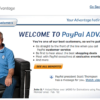

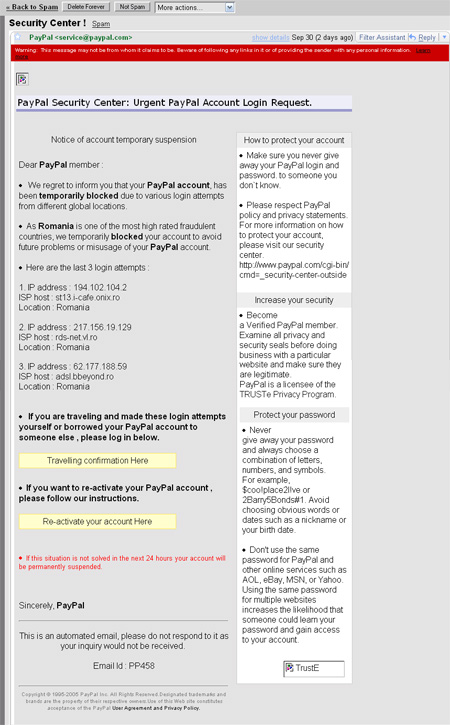
This latest email is more deceiving than the previous one. It provides tips on how to protect your PayPal account, increase security and protect your password. It even tries to use scare tactics with this message at the bottom of the email:
If this situation is not solved in the next 24 hours your account will be permanently suspended.
It’s a good thing that Gmail has a very good spam and phishing filtering system and this email was immediately flagged and sent to the spam folder. I also make it a habit not to click on URLs on emails especially if I’m not sure about the source/sender. If you receive something like this or an email that asks you to click on a link and login to your bank account with your username and password, NEVER do it! If you want to check and make sure, open a new window or tab and type in the address of the site and then login. That way, you can be sure that you opened the right URL and that you logged in to the right website.
Have you received the same email or maybe something similar to it? What did you do? Have you or someone you know been deceived or victimized by a phishing email? Share your thoughts!


@jaycee – You’re welcome! Glad to be of help and provide useful information to my readers. Thanks for dropping by! :)
I never encountered such phishing email before. but thanks for posting this as a warning…
@James – Thanks man! That’s true, users who receive this type of email should never panic, just keep calm and never click on the links embedded on the email. Like what iRonnie mentioned, the real PayPal email would address you with your real name and not “PayPal member” or “PayPal customer”.
Btw, thanks for the link love. :)
Nice find, Jaypee!
The key not to fall victim into these phishers is to not panic. A few people, after reading that their Paypal account has been blocked or limited, would automatically click on the links in the email. That’s a sure way to disaster. Keep calm, and see whether the email is a legitimate Paypal email.
Here are other ways to detect phishing emails.
@jeff – I’m not familiar with how it works in the Philippines but here in the US, a valid bank account would do.
You can check out this post on PinoyMoneyTalk.
dude, is there any way to deposit my money on paypal without using CC?
@Eli – Good, it means that you’re careful and that you’re aware of this type of scam. Unfortunately, there are a lot of people who get victimized by these fake emails.
I had a friend who lost all the money in his bank account because he thought the phishing email he received was really from his bank. Good thing he found out right away and reported it so he got the full amount back. :D
I have several of those kind of email… they have to try harder for them to trick me.. :)
@trench – Same here. I never click on links in my emails especially if they’re for bank accounts, PayPal, etc. Always better and safer to login directly to the site. :)
always go to the source when it comes to financial stuff. I get fake paypal, citibank, etc.. emails all the time. I never click them. I delete then check out my accounts by logging on directly. Much safer this way. :mrgreen:
@iRonnie – That’s right. Thanks for pointing that out as I forgot to mention it in the post. :)
i read from somewhere before that one of the way to determine if it is an authentic paypal notice is to check the addressee as paypal will never address you as “dear paypal member” but instead will use the full name you used to register.