
One of the primary goals for web developers and bloggers like me is to provide users/readers a nice and smooth user experience on our websites or blogs. To achieve this, some of the things we do are using tools like the Google Browser Tool to check how our websites and blogs look like in different screen resolutions, install and use mobile themes/plugins or create mobile versions to make our websites or blogs viewable on mobile devices. Now that the Apple iPad is here, I’m pretty sure that most web developers and bloggers would want to check how their websites look on the Apple iPad.
To do that, you don’t need to buy or have an Apple iPad. iPad Peek is a cool website/tool that will let you see how a website or blog is rendered on the iPad. Just point your browser to http://ipadpeek.com, type in the URL of the website or blog that you’d want to check and hit Enter. Btw, the virtual keyboard that pops up when you click on the address bar is just for show and doesn’t function, the same goes for the back/forward, bookmark buttons. The only part of the browser that works is the reload button. Clicking on the top part/border of the iPad toggles the landscape and portrait mode.
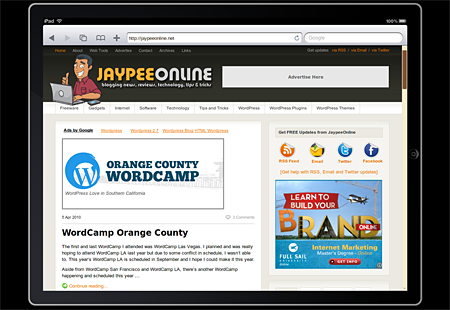
Here’s how JaypeeOnline looks like when viewed on the iPad using iPad Peek:










Landscape Mode
Portrait Mode
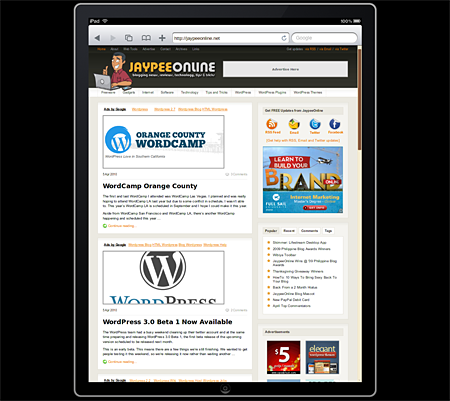
Using iPad Peek can give you an idea on how a website or blog looks like on the iPad but doesn’t provide a 100% accurate user experience because Flash isn’t supposed to work on the iPad but works on iPad Peek. To do that, you’ll have to disable Flash on your web browser. Another thing to take note when using iPad Peek is that pages viewed on portrait mode are scaled 75% using CSS3 transformations which work best on Firefox 3.5+, Chromium 5+ and Opera 10.5+.
iPad Peek was created by software engineer Pavol Rusnak.
Did anyone try using iPad Peek? Does your website or blog render well on the iPad?


Hey Jaypee.
Yeah, iPad Peek is cute. But, seriously, the web version doesn’t render anywhere near what the actual iPad user will see. Like Jayson said, it’s just an inline frame with iPad “graphics” around it that still uses your native computer’s browser to display the webpage in it. It’s no better than say, putting the inline frame inside the screen area of a picture of one of those old RCA tube TVs.
Cute, but not really useful as a development tool.
Developers just have to get/lease the actual device if they really want to check the rendering of their sites on an iPad. Otherwise, they’re just wasting their time with these pseudo-simulators.
Have a good one Jaypee!
Um.. I just tested my site and it works (which is really WRONG) – the ipad does not support flash yet this previewer is showing that it does. Sorry. No good.
Spread the word, because i’m really sick and tired of finding a real ipad browser emulator. Ipadpeek does not show the exact thing that is in the ipad browser. Ipadpeek uses the same browser that you use, or if you use safari which is supposed to be the browser on ipad and iphone then you still use a different browser because yes ipad uses safari but it is the MOBILE version of safari, because of this the site i am developing cannot be corrected because i don’t have a ipad to view it, My boss sees the site different on his ipad and there are some rendering problems while i see it ok in ipadpeek when it supposed to be the same since its an ipad emulator, I see all around the net about ipadpeek but it is just a damn iframe with an image of IPAD. get it. I cannot download the iphone SDK 3.2 which suppose to have the ipad emulator but fails to download. grrrr…
Thank you so much sir Jaypee for this cool post! I’m about to write a post about iPad Peek too :) I’m a big fan of this blog!
@Johnn – You’re welcome! Yes, I’ve mentioned it in the post. Like the iPod Touch and iPhone, the iPad doesn’t support Flash because if Apple allows it, they would lose control. Also, allowing Flash would enable developers to do more stuff with their applications and open new doors for publishers to compete with the App Store.
Hello Jaypee,
Great idea about the iPad Peek, thanks for sharing it, however, I heard that iPad does not run Flash (dunno if this is just a rumour).
Why do you think iPad won’t run flash? I think some (a lot) sites will be affected by this.
@trench – Noticed what? The public service ads that Dexter mentioned?
You’re welcome! Anyways, good to see you again. It’s been a while since you last visited and dropped a comment here. :D
@Dexter – Really? I wasn’t aware of that. It looks okay on my end and I’ve checked it as a regular user, not logged in as admin and I can see regular ads. I even tried it on different browsers. Anyways, will have to check on it and make sure. Thanks for the heads up!
Out of topic..
Jaypee why is it that when I am visiting your site your adsense ads always shows Public Ads, any problem ?
I notice that too. Great resource JP. Thanks for sharing!