
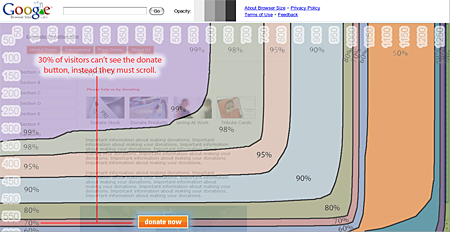
For web designers and bloggers, one of the important things that needs to be considered when designing a webpage or choosing a blog theme is browser size. Another important aspect related to this topic is called the “fold”, which refers to the visible area of a webpage that the reader can see without having to scroll down or sideways. Many users are too lazy to scroll so if you have stuff or content on your webpage or blog that are not above the fold, it most likely that it won’t be seen or get viewed by these users.
Last month, Google Labs released a new tool called Browser Size.










To help you understand how everyone sees your website, we created a tool called Browser Size in our 20% time. Browser Size is based on a sample of data from visitors to google.com. Special code collects data on the height and width of the browser for a sample of users. For a given point in the browser, the tool will tell you what percentage of users can see it. For example, if an important button is in the 80% region it means that 20% of users have to scroll in order to see it. If you’re a web designer, you can use Browser Size to redesign your page to minimize scrolling and make sure that the important parts of the page are always prominent to your audience. We hope people will use this tool to make their websites better, in turn making the web better for everyone.
Anyways, I was curious as to how my blog would fair with this test so I tried to analyze JaypeeOnline using Browser Size and took a screenshot of it.
1280×800 Screen resolution
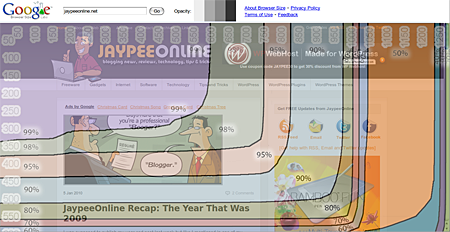
1024×600 Screen resolution
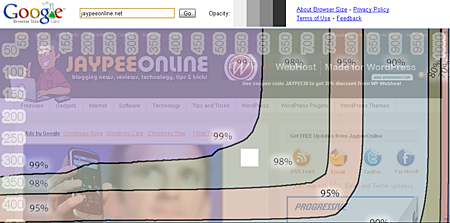
I have a 1280×800 screen resolution on my laptop and because my blog theme’s layout is centered, it shows that only 60% of readers can view the content that are above the fold. When I checked JaypeeOnline with an Asus Eee PC on 1024×600 resolution, it was about 85-90% reader viewable which is not bad. Although, it would’ve been better if it was optimized for 800×600 resolutions because there are still a lot of users out there who use this screen resolution.
If you want to optimize your content and want to maximize your content’s exposure, then you need to check out and give the Google Browser Size tool a try.
What do you think about Google’s Browser Size Tool? Do you consider browser size important or not? Do you think that the “fold” is just a myth or something that is important and something that needs to be considered in web design? Please share your thoughts.


@Archon Digital – Cool! Glad to know that someone else is finding this tool useful. :D
Based on my blog analytics, about 17% of my visitors use a 800×600 resolution and that’s quite a significant amount.
Started using the tool and I find it really helpful on my latest projects.
Also 800×600 screens don’t get to show up much on any of the analytics accounts that I oversee.
@Michael – This tool helps you see/check how a certain webpage or website looks like (what areas are visible) on different screen resolutions.
im confused. will this increase or zoom in the content of the browser making it fit on the screen? or decrease the browser size?
@sylv3rblade – Yes it is and also for bloggers who’d like to check how their blog looks like or works in different screen resolutions. Your old method is a lengthy process and very time consuming. :D
It’s a useful tool for web devs like me. I don’t have to take snapshots, paste it on photoshop then turn out the ruler tool just to see what our clients would see :D
@Jhay – Yes, this tool is primarily for web designers but I think its also useful for us bloggers. I’m guessing that most of these users who use 800×600 resolutions are from third world countries who have old computer models and monitors.
This would a great tool for theme designers. Though I still find it a bit surprising that a lot of folks still use the 800×600 screen resolution. I can’t even remember if I used that resolution in all my computing life.
@Hesham – I know..I’m glad the folks from Google came up with this idea and made it available to the public for free.
It is hard when you’re using a large screen resolution, sometimes you forget about your readers. You really have to take a conscious effort in checking that your sites are accessible to smaller screen resolutions.
What a wonderful tool! I actually suffering some times from not fixing the width of my websites :) I am using my 18″ wide screen laptop and this give me some problems! I will be checking this tool!