
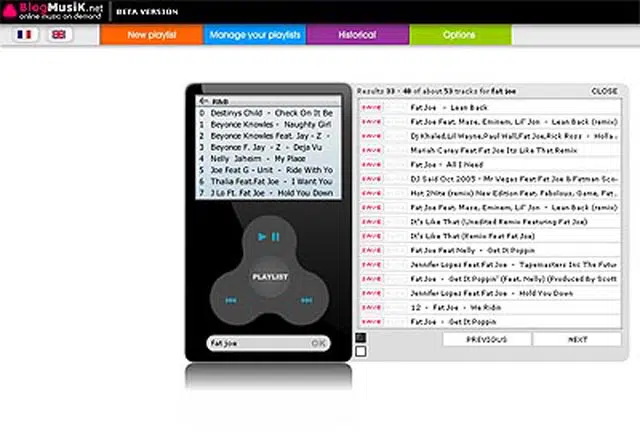
Blogmusik is a new site that allows you to listen to on-demand songs online for FREE!
Blogmusik uses a Flash-based virtual player that looks exactly like an iPod and works exactly like one. It includes a Play/Pause button, Skip button (Previous track and Next track), Volume control, a Playlist button to access your saved playlists and an option to share it to a friend. You can also change the player skin to black or white. Regular users can only listen to songs one at a time. While registered users can create/save playlists and save songs into each playlist.










The site can be accessed in two languages, English and French. To register, just provide an email address and password. Once you’ve done that, you’ll see a menu on top. Click on New Playlist and type a name for that playlist. Now that you have a playlist, you can start adding songs to it. To search for songs, type on the space provided right below the virtual iPod. Type in the name of the artist or title of any song, click OK and it will show you the search results on the right side of the player. Look for the song that you like and click on Save and choose which playlist you want to save it to. Repeat the same steps to add other songs. In your playlist, use your mouse wheel to scroll thru the songs. Registered users can also manager their playlists (delete songs, change song order). I was hoping that they’d let the users, edit the file name of the song because some of the files had very long names and had some extra info that I wanted to edit.
Blogmusik is still in it’s Beta version so expect some bugs and improvements in the near future. Also, be aware that the site opens a pop-up every few minutes or after every song. I have no problem with it because Firefox blocks it right away. If your browser doesnt’ automatically block it, you might have to do it manually because if you don’t you’ll have a lot of pop-ups while you’re listening to the songs.
Note: Earphones not included. Hehe



This is nice article.
@ash – So it works in the office? Good thing it's not blocked by Websense, coz you have another thing to keep you busy. Hehe :D
Wow, this is nice.
Cures my nightshift boredome.
Thanks.
@Blondie – You can’t download all songs for free. If it’s free, most of the time it’s not legit/legal. However, there are sites where you can download songs for “free” and several ways to do it. :)
@anonymous – You’ll have to create a playlist, then search for songs and save them to your playlist. :)
Anyone know how to save music? im registered but it wont save for me… and it has a save option! what gives?
Hi Jaypee.
Love your site.
I'm a bit slow with this internet stuff & looks like you're in the know. So which site is best if you want to download free music to then save to your iTunes?
Thanks,
Blondie.
@Maayan – Hello..Why can't you install another browser in your computer?
All this time I've been using Firefox or Flock to access Blogmusik. After reading your comment, I tried using Internet Explorer and I also experienced the same issues that you mentioned. I believe that the problem is with Internet Explorer.
The only solution I can think of right now is for you to use a different browser like Mozilla Firefox, Flock or Opera. Hope you can find a way to install it in your computer.
Hi again…
I'm using internet explorer,but I can't install on my computer another browser to check it.
The problem occurs both when I edit the playlist, then I see the whole list gathered on the first line one over each other (when the last song I saved is at the top), and also while I'm at the player view and I try to enter the playlist – again, I see all the songs written on one line…
This way, I can access the songs only by clicking the "prev" & "next" buttons of the player. But this is not an easy way to access one specific song from the 200 I saved…
What do you think?
Thanks,
Maayan.
@maayan – I'm not really sure I understand the problem. When you said you entered the playlist, is it in the player or was it when while trying to edit your playlist?
I've never encountered this type of problem with Blogmusik before. Also, what browser are you using? Could you try opening it with a different browser and see if the problem still persists?
Let me know what happens. I'll try to help you as best as I can. :D
Hi jaypee,
I have a terrible problem… :(
Only yesterday I found out about the cool blogmusik site and I've built a great playlist with lots of songs I like, when suddenly, I entered the list and all songs were apparently overlapping each other on the same line so until I choose to delete the current song, I cannot access all the ones placed beneath it…
What should I do? I don't want to build the list again, and there's obviously a bug there… :(
Please help!
Thanks,
Maayan.
@jorge – hehe. sorry bout that. i've been moving, changing address like crazy coz of the problems i had with free webhosts. the Motorola Razr is cool, but for me i like the Slvr better.
maaaaan, i finally found your site :lol:
sweet, i've been looking for a launchcast replacement kasi sobrang buggy… i'll try this :) i've gotten over my ipod hangups ever since i got my Razr V3i.. sweet sweet phone :)
@jong – you really should try it.
@ash – really? man, that sucks! halos lahat na lang blocked ng Websense. i hope meron tayong mahanap na solution para dyan.
The Websense category "MP3 and Audio Download Services" is filtered.
still can't go through it. That Websense really annoys me.
cool. matry nga.. hehe
@paul – sure, why not? thanks! i'll also add you up on my blogroll.
is it ok if ill link your blog sa blog ko?..
@cruise – thanks for the compliment! you better switch to Firefox if you want to have pop-up free web browsing. i'm having so much fun using Blogmusik.
@dre – maybe you can start trading something to get that dream iPod, just like what the red paperclip guy did. hehe
@jhay – yeah, that's true. hehe
This is great. At least now I can use an iPod without fear of breaking it. hehehe
I don't have an iPod… sad… anyone wants to give? LOL.
very informative blog you've got here.
siguro i'll better switch to Firefox so I can avoid or effectively block pop-ups and will then try Blogmusik. Blogmusik sounds really cool as you have described it here in your blog :)
thanks for droppin by paul and thanks for sharing your plans. bout your decision on what business course to take, just try to see what interests you the most and something that you would love doing, something that won't get you bored of.
CSI? i love it! i prefer the original series, CSI Las Vegas. Miami & NY are okay.
God bless you too!
hi! i'm paul… naks! what a coincidence?… wanna know why? it says on your profile na you graduated with a degree in Commerce major in Management Information Systems… and then.. "Masters degree in Business Administration with a double emphasis on Business Management and Management Information Systems." wah!…
here's the scenario… i'm a 3rd year student taking up computer science and information technology major in systems and software engineering in asia pacific college… now i'm planning to take another course after i finish what im taking up right now… im planning to take up a course about business… the prob is i dunno whether to take up business management, entrepreneurial management, or marketing and advertising… ive already asked some people who are taking up the courses ive mentioned and up to now uhm… i still dont know what to take… wala lang… just want to share my plans…
you love csi! dude i love csi! wah!.. csi miami? ny? or vegas?… love miami and ny… *lol
'bout your entry –> sige ma-try nga… i chose a pda rather than having an ipod… very timing din yung entry mo… im goin' to change kasi the facade of my blog… hopefully masama ko yung virtual ipod…
God bless!
@gbert – no you can't save the songs/files into your computer. the songs and the playlists are saved online and you can access them anywhere online when you log-in to your Blogmusik account.
you can save the music to the computer? pirates will have the time of their life then… but this is one player i wanted for my pc… really great.. :)
@trench – same here. don't have either iPod or Mac. hmm, it can count coz iTunes is also a product of Apple. hehe
Dont have an IPOD and dont have a MAC so I am clueless to these posts. LMAO. I do have a motorola SLVR that plays ITUNES. Does that count?