
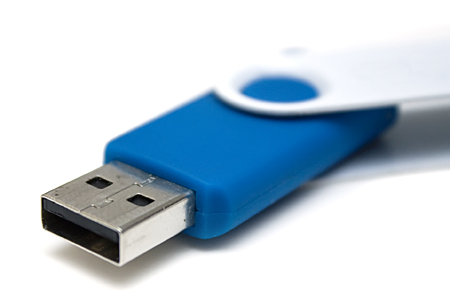
Remember the times when you had to carry a case full of floppy disks to carry your digital documents and files? I do. Portable media storage devices like the zip drive were already available at that time but they were quite expensive and not everyone could afford them. Technology has vastly improved and gone a long way since then. Portable media storage devices like the USB flash drive or thumb drive are becoming smaller, cheaper and have more storage capacity. They are now a common sight and you see a lot of people bring it with them to school, in the office or anywhere they go.
I recently purchased a 4 GB Sandisk Micro Cruzer. I bought this USB flash drive because it was on sale for cheap from Amazon.com and because I needed something that can store important files, portable programs and installers for different programs like office productivity software, data recovery, anti-virus, anti-spyware, firewall, web browser, cd/dvd burning software and other useful utility software. I bring it with me anywhere I go because it can come in handy in certain situations.




Anyways, while I was sorting the stuff in my USB flash drive, I thought of blogging about it, share with you what I have on inside it and at the same time ask you guys what you have on your USB drives? This is quite a long list and it should’ve been more if I had extra space on my USB flash drive. Btw, all of the programs/installers in this list are freeware or open source.
Programs Installed:
- ClamWin Portable
- Firefox Portable
- GIMP Portable
- Notepad++ Portable
- Pidgin Portable
- VLC Portable
Misc Files:
- Select mp3s
- Videos
- Documents
Software Installers:
Data/System Recovery
- Avira UnErase Personal
- FreeUndelete
- PhotoRec
- Recover My Files
- Recuva
- Restoration
File Encryption
- AxCrypt
- dsCrypt
- TrueCrypt
File Manager
- Free Commander
- Xplorer2
CD/DVD Burning Software
- Ashampoo Burning Studio 6
- Avi2DVD
- CDBurnerXP
- DVD Shrink
- HandBrake
- ImgBurn
- InfraRecorder
Instant Messaging
- Digsby
- Miranda IM
- Pidgin
- Trillian Astra Basic
- Windows Live Messenger
- Yahoo Messenger
Image Viewer/Editor
- FastStone Image Viewer
- GIMP
- IrfanView
- LightBox Free
- Paint.NET
- PhotoScape
- Picasa
CD/DVD Emulation
- Daemon Tools Lite
- GizmoDrive
Media File Converters
- AnyVideoConverter
- Format Factory
- MediaCoder
- VioVideoConverter
Media Players
- Applian FLV Player
- DivX
- Foobar2000
- iTunes
- JetAudio Basic
- KM Player
- MediaMonkey
- Media Player Classic
- Miro HD Video Player
- QuickTime
- Songbird
- VLC Media Player
Office Productivity
- Abiword
- OpenOffice
- Mozilla Thunderbird
PDF Tools
- CuteWriter
- Foxit Reader
- PDFill Free Writer
Other Installers
- 7zip
- Adobe AIR
- Adobe Flash Player
- AMP Font Viewer
- Audacity
- Download Accelerator Plus
- EphPod
- FileZilla
- Google Earth
- KLite Code Full
- OperaTor
- PeaZip
- Microsoft Silverlight
- UltraVNC
- uTorrent
Portable Apps
- BPBible Portable
- ClamWin Portable
- Cornice Image Viewer Portable
- Firefox Portable
- GIMP Portable
- Notepad++ Portable
- Pidgin Portable
- Portable Apps Suite
- VLC Portable
- XAMPP Portable
Programming
- Notepad++
- NVU
- Zoundry Raven WYSIWYG Editor
Security/Privacy
- Ad-Aware Anniversary Edition
- a-squared Free
- Avast Home Edition
- AVG Free
- Avira Personal
- CCleaner
- Comodo Internet Security
- Comodo Firewall
- Malwarebytes Anti-Malware
- Outpost Firewall Free
- PC Tools ThreatFire
- Spybot Search & Destroy
- ZoneAlarm Free
System Tools
- Absolute File Shredder
- Comodo BO Cleaner
- CPU-Z
- EASEUS Partition Manager Home Edition
- Eraser File Shredder
- HijackThis
- jDiskReport
- MyUninstaller
- PC Decrapifier
- Revo Uninstaller
- SIW (System Information for Windows)
- WinAudit
Video Editors
- VirtualDub
- Avidemux
Web Browsers
- Flock
- Google Chrome
- Mozilla Firefox
- Opera
- Safari
Another reason why I carry all these installers on my USB drive is because I’m frequently asked by family and friends to check out their computers for problems and fix it. Most of the time, when I check their computers they don’t have an antivirus or the license is already expired. There are also times when they complain that their computers have become sluggish or very slow (common symptom of malware or spyware infection) so I install an antispyware or anti-malware on their computers and run a thorough scan. Anyways, you get the idea.
How about you guys, what’s on your USB drive? Do you know of other useful programs/installers that are not included in the list? Please share it with us.



on my usb:
windows xp / win7 (bootable usb)
avast 5
ms office 2007
piriform defraggler/ccleaner (xp)
diskeeper (win7)
driver genius (to fetch drivers online)
chrome 8 offline
vlc media player (xp)
windows 12 codec from shark007 (win7)
cleanmypc registry cleaner
transformation pack vista/7 (winxp)
transformation pack macOS (win7)
directX sdk
java 6
flash/shockwave
smartRAM (copied from IObit full install)
usb shield
eBoostr (better than windows’ fake readyboost, can use “hidden ram”, ssd, external drives etc.)
— the real swiss army knife lol
@Luc J – Yeah, many users don’t realize that USB drives can be very useful tools aside from just being a storage media. The data recovery tools are really useful and you won’t know just when it’ll come in handy but you’ll be glad you had it with you when it happens. :D
I don’t have it right now but I can do that and upload it on my server for you guys to download. Give me time and I’ll arrange these apps and upload it as one single zip file. Thanks for the suggestion!
Hey, that’s interesting. I just store a bunch of docs on mine, but have’t considered the concept of taking portalble apps with me wherever I go. Also the data recovery tools seems quite useful to have at hand all the time.
Thanks for the inspiration.
Btw, don’t happen to have a huge zip file for download, containing all these applications, do you? :)
@Melissa – You see, I was a desktop support technician before and I’m used to having people – family and friends, asking me to help them fix their computers so a USB drive with all those apps and installers comes in very handy.
Like what you mentioned, many times their browsers are messed up by malware or sometimes, you can’t download the apps because there’s no Internet connection so it helps if you already have the installers, you can install them anytime. Thanks for the compliments and thanks for sharing! :D
Hmmm, I never thought of putting some of those things on mine. I keep mostly work files on mine. I am constantly being asked for extra copies of paper work so I want to keep them always on me. I love your ideas though. I am so sick of people asking for help after they screwed up their computers so badly that they no longer even have a working browser to download fixes with.
@trench – When I first read school work, I thought you were studying. I just remembered you were a teacher. Hehe
Wow, that’s quite a durable thumb drive you got there. What brand is it? Same as with any other gadget, they get cheaper, smaller and have more features or storage capacity as time goes by.
Btw, good to see you here again Chris. Its been a while since you last joined a conversation here. :D
School work. Im still using the 1GB I had when Thumbs first arrived on the scene. I bought mine for a whopping $50.00 back then!!! Who knew you could store 10000 Floppy Disks worth of material on one little thing!
@Michael – Really? Thats quite cheap for a 16GB usb drive. What brand is it and where did you buy it? I’m also planning of upgrading to a 16GB USB soon. Will wait for the prices to drop a bit or wait for a good deal. :D
i bought a 16G flash disk for $20 hehehe. i can store lots of movies, files, and softwares on it.
@Jhay – I did this coz I don’t have or can’t bring my laptop with me all the time so this USB drive with all these portable apps and installers come in very handy.
Ah yes, Readyboost. I’ve had a draft about Readyboost lying around for quite a while. Maybe I should polish it up and publish it. :D
@Industry News – Its the same as yours, 4GB. Most of the apps are just installers and not installed programs so it uses up less space. :)
Files and documents mainly. I tried storing a sort of “essential apps” collection in my USB drive last year but dropped the idea because I had my laptop shortly thereafter.
Nowadays, I mainly use my USB drive in ReadyBoost mode especially when using Photoshop CS.
@elmot – Hehe, you can say that. Actually, I could’ve had more apps if I had more space. :D
@jan – Oh really? Cool! I only have a few mp3s on my USB drive, I have more mp3s on my phone coz it has an 8GB microSD on it. While the documents I have on my USB are personal documents and the videos I have there are for my son.
Yeah you should have some of these portable apps on your USB drive. I’m sure you’ll find them useful one of these days. You’re welcome! Glad you learned new stuff from this post. :D
This USB is a heavyweight jayps.
My USB drive has Justin Timberlake songs, BlackEyed Peas, Chris Brown and yes, Mariah Carey. At least it doesn’t contain Willie’s songs noh. Ahahaha. Did I just offend somebody here? Peace!
It has documents, too – ones I always use. And pictures – family pics and friends pics.
It’s got lots of rooms for more so I’d copy all these freeware apps and make myself useful. Thanks Jaypee – I don’t even know half of these tools and apps before i read this. :)
Hahahahahahah! How big is your USB with all of these programs and applications on it? Mine is 4 GB, and I generally got music and spreadsheets on it that I am always transferring between my notebook and desktop PC.
@K – Yeah, there are a lot of unique and weird looking USB drives out there. I’m not into those, I prefer the regular ones.
I’m telling you, you need to have one and have these portable apps installed on it. You don’t know when, but it will come in handy one of these days. Trust me. ;)
I’ve seen a lot of funky, cool, weird, tiny USB drive down at computer shop, no one picks them siguro “not one of the coolest gadget” anymore, haha but I’m curious to have one. Probably will store all my fotoz. Yay!
@Ade – LMAO :D
Porn. Duh.