
UPDATE: I found out how to fix the issue. What you need to do is manually delete Ping-O-Matic’s cookies from your web browser and then reload the page. The thing about this it is that you’ll have to do it everytime you want to ping your blog. It sucks, but it works.
I use several websites or online services to ping my blog and one of them is Ping-O-matic. For those of you who might not be familiar with what a blog ping is, here’s a little info from Wikipedia:
In blogging, ping is an XML-RPC-based push mechanism by which a weblog notifies a server that its content has been updated.[1] An XML-RPC signal is sent to one or more “ping servers,” which can then generate a list of blogs that have new material. Many blog authoring tools automatically ping one or more servers each time the blogger creates a new post or updates an old one.










By using online ping services like Ping-O-matic, you notify different online services that keep track of weblogs that your blog’s content has been updated. Once notified, these services crawl and index your site and later on publish your blog content which increases your blog’s popularity.
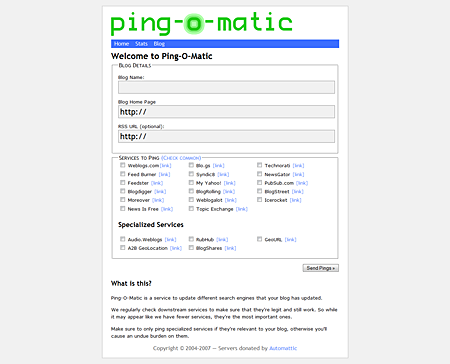
Anyways, talking about Pingomatic, the site recently received a makeover or redesign as you can see from the screenshots below.
Previous Ping-O-Matic design
New Ping-O-Matic design
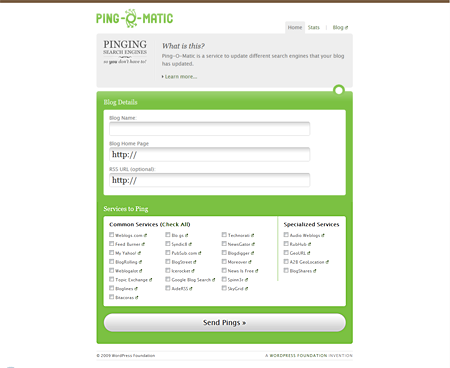
The new look is definitely better than the old one and even the new logo looks really nice.
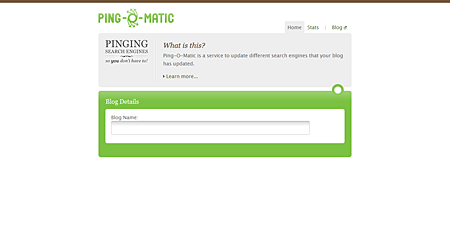
However, since Ping-O-Matic got its new design, I’ve been having problems accessing it with Firefox (both Windows and Ubuntu). Some parts of the page mysteriously don’t show up. (See screenshot below)
Firefox
Firefox + IE Tab
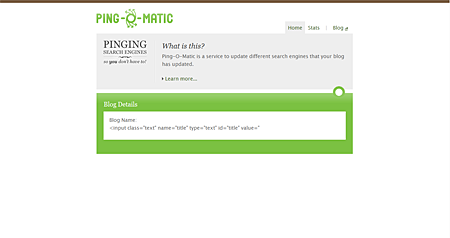
I’ve tried opening Ping-O-Matic using Internet Explorer 7, Google Chrome, Opera and Safari 4 and had no problems whatsoever as they render the page well. I also tried accessing Ping-O-Matic with Internet Explorer on Firefox using the IE Tab plugin and I experience the same issue. So the problem is really with Firefox. I’m running the latest version – Firefox 3.0.6 and I have no clue as to what causes the problem. I don’t know if its a conflict with one of the plugins/extensions I’m using. The thing is, I’m also experiencing the same problem with Firefox on Ubuntu which only has a few extensions installed on it. I still have to figure out what’s causing this and how I could fix it.
Anyone else experiencing this issue when accessing Ping-O-Matic with Firefox? Any ideas what could cause this problem? If you know the solution please share it with us. Thanks!



The problem seems to be intermittent. I just wrote an article about this yesterday, http://www.noone-special.com/2010/04/pinging-pingomatic-com/, and now the problem seems to be fixed.
Clearing the browser cache and cookies is definitely a drawback for something simple to achieve.
I hope pingomatic stays fixed now for good.
done pinging directories..this one is much better. nice post…
@Matt G – You’re welcome! Glad I could help you out. ;)
@jaypee Cheers dude. Will check it out. I’ve got the ping on twitter which is cool.
Thanks for the help.
@Matt – Did you read the update I posted above the article? I’ve found out how to fix the issue and it has something to do with Ping-O-Matic’s cookies which you’ll have to manually delete. After that, just reload the page and you’re good to go.
Hi Jaypee,
I’ve been having the same issue as it seems everyone else is. I use Firefox the most out of all the IP’s. Let me know if you here anything about when it might get fixed. Cheers.
@Axel – You’re welcome! Glad my post was able to help you with your problem. :)
Your update on how to get Ping-O-Matic working with a 2nd blog was a real help, thanks! I am only new to blogging so to find this info with a simple Google search was great.
Thanks again!
Axel
@Raju – Is that so? What blog pinging service are you using now or tried before? Yes, please let me know if you also experience the same issue. You’re welcome! :)
I am yet to try this service. Will surely give it a try and let you know. Thanks!
@Gem – Oh I see. That happened to me too before. That’s the problem about upgrading Firefox to the latest version, sometimes one or two of your plugins aren’t compatible.
About the issue with Ping-O-Matic, the only thing that works is to delete the cookies and reload the page everytime you need to ping your blog. Unless the guys from Ping-O-Matic has fixed this issue already.
I just reinstalled my Firefox and all my favorite add-ons today because have an important add-on that stopped working a while back. I decided to wipe out all my personal settings and spent an hour downloading all the plugins… I hope all is well when I try to use that pinging service.
Or I’ll have to resort to using the method that you have suggested here (delete browser cookies and reload the page).
@Adam – I also experience that once in a while and that happens when you use Ping-O-Matic to ping your blog after you just recently published an article. Try to use Ping-0-Matic before or a few hours after you publish a post and see if it works.
Thanks for sharing and stopping by. :)
I am also having problems with Ping-O-Matic in Firefox. I have the latest version and every time I submit a ping, I get the standard message: “Slow down cowboy! Your last ping was less than a few minutes ago”. This is despite not pinging in over a week!
I’ll give Internet Explorer a go, but since I generally only use Firefox these days, what a nuisance. Perhaps the HTML needs a tweak? I hope the Ping-O-Matic people get it sorted soon.
@jong – Updating and reinstalling Firefox works but only the first time. When you’ve successfully pinged your blog using Ping-O-Matic and want to do it next time, then the issue comes back again.
Yes, I remember that. Do you still have that problem?
Btw, as I told Gem earlier I found out how to fix the issue. Just delete all cookies from Ping-O-Matic and reload the page. :)
try updating youre firefox? or reinstall? i’ll try to look into this. pero weird. kasi it’s working fine both in my laptop and workstation…
Do you still remember when I had this same problem with twitter both in firefox and IE? I even asked you to help me sign up :D
@Gem – That’s exactly what I’m having issues with lately after the new design has been implemented. I had to open a new browser just to use Ping-O-Matic.
But guess what? I found out how to solve it. All you need to do is manually delete Ping-O-Matic’s cookies from your web browser and reload the page. The thing is, you’ll have to do it everytime you want to ping your blog. It sucks, but it works. :P
I had experienced the same issues. I saw this design few weeks ago. I like the design but I do not like the same issues that you had also pointed out.
I have other blogs where I need to ping this service manually and I am able to do the ping only once. I had to open another browser and do the ping for another blog. :-(
The pingomatic runs fine when I visit the site initially (all three fields are shown) but when I tried to visit the site again, I am left with a single field that asks for the blog name (same as your 3rd and 4th screenshots).
Even if the design looks great, I still prefer the old one.
@elmot – There’s always a first time, right? I’m not sure, but I believe you can also use Ping-O-Matic for blogspot blogs. Why don’t you try it, then let me know.
Regarding having your pic appear on your comments, you’ll have to sign up with Gravatar and create an account, then upload your photo. Once you’ve done that, everytime you leave a comment on a blog that has Gravatar support, your photo will automatically appear on your comments. :)
@jong – Oh okay. I’m still running Firefox 3.0.6 on both Windows and Ubuntu and I’m still having problems accessing Pingomatic. I’ve tried clearing the browser’s cache and deleting cookies, etc but it still doesn’t work. This is really weird.
i have not used this tool… could this tool be also used to a blogger platform, and if not, does it have an equivalent tool suitable to a blogger platform?
ei, jayps, how can i make my handsome pic (hahhaa) appear whenever i put my comments? tried some stuffs to do so, all in vain.
when i checked it yesterday, im running on 3.0.6. My version now is 3.0.7 but still ping-o-matic is working fine.
@jong – Oh I forgot to mention that I also tried that, disabling all the plugins/extensions but that too, didn’t fix the issue. What version of Firefox are you using? This is really weird I tell you. :(
The redesign looks great and its web 2.0ish.
Anyhow, the page is working fine in my firefox. Try to disable your plugins and see if it works.